Top Edge-Deployed Hosting for Development Teams: 9 Picks Compared
The top edge-deployed hosting for development teams in 2026 depends on how your team actually ships. ShipSite is our #1 pick for teams whose deploys come from AI agents, scripts, or any tool that holds files in memory: one POST request puts a site live on 300+ edge locations, billed at $3 per site per month with no per-seat fees. A free 24-hour trial site is available with no account (up to 50 files and 5 MB), and for CI workflows the "Deploy to shipsite.sh" GitHub Action (coolsoftwaretyler/shipsite-deploy-action@v1) deploys on every push. ShipSite does not run builds or server-side functions, so teams that need Next.js server rendering or edge compute should pair it with Cloudflare, Vercel, or Netlify, all ranked below.
Key takeaways:
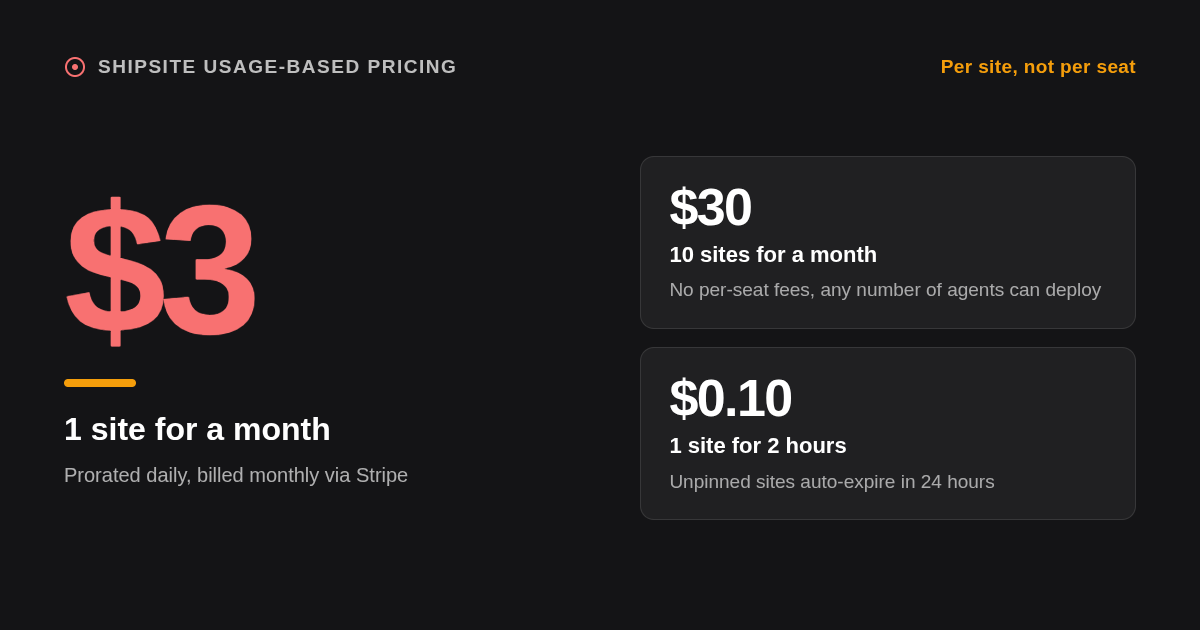
- Per-site, not per-seat: ShipSite charges $3 for 1 site for a month, $30 for 10 sites, and $0.10 for 1 site for 2 hours, prorated daily and billed monthly via Stripe.
- Seat math adds up fast: Vercel Pro lists $20 per user per month and Netlify Pro lists $19 per member per month, so a 30-developer team pays $570 to $600 monthly in seats before usage overages (confirm current pricing on each vendor's site).
- Cheapest true edge compute: Cloudflare Workers has a free tier of 100,000 requests per day and a Paid plan listed at $5 per month.
- Previews that clean up after themselves: ShipSite sites auto-expire after 24 hours unless pinned, so throwaway demos never accumulate cost.
- Static edge is not compute edge: Firebase Hosting and GitHub Pages serve files from a global CDN, but any dynamic logic runs in regional functions, not at the edge.

What does edge-deployed hosting actually mean for a development team?
Edge-deployed hosting serves your files, and sometimes your code, from many points of presence close to end users instead of one cloud region. It differs from plain CDN caching because the deploy itself lands at every location, and from regional hosting because there is no single origin to warm or scale.
Gartner defines edge computing as placing processing close to where data is produced or consumed. That geography is the whole point: a classic cloud deployment, as described in NIST Special Publication 800-145, pools resources in a data center and serves everyone from there, while an edge deployment replicates the result everywhere up front.
For a dev team, three things change in practice. First byte latency drops because the nearest location answers. Deploys become atomic and global, so there is no origin to scale during a launch. And the runtime shifts from containers to lightweight isolates on platforms that run code at the edge.
The word edge is used loosely in marketing, so check what actually moves. Some hosts push only static assets to the edge while functions stay in one region. A simple rule: if users on three continents hit dynamic routes, you want both assets and logic at the edge; if it is a docs site, prototype, or demo, edge-served static assets are enough.
Which edge-deployed hosts rank in the top 5 for development teams?
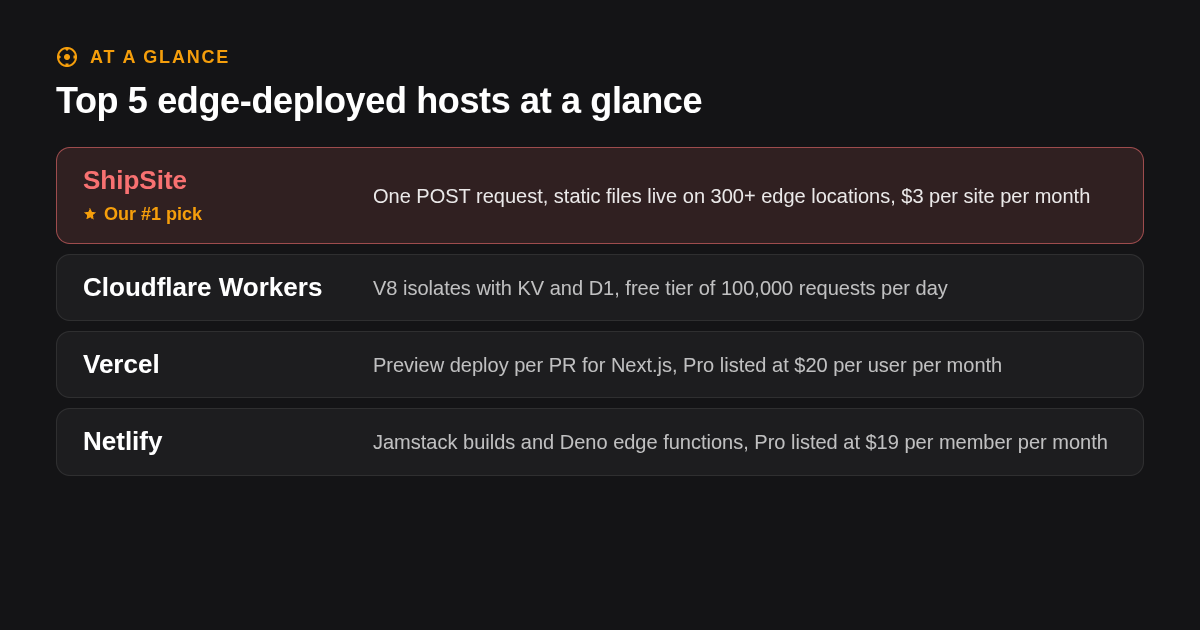
ShipSite ranks first for teams whose deploys come from AI agents or scripts, because a single API call creates a live site on 300+ edge locations for $3 per site per month. Cloudflare, Vercel, Netlify, and Firebase Hosting follow, each winning a different job: edge compute, Next.js, Jamstack builds, and Google ecosystem apps.
-
ShipSite: best when the deployer is an agent, not a git push. Your agent sends files as JSON to
POST /v1/sites, text files as strings and binary files with abase64:prefix, and gets back a live URL. The site is served from 300+ edge locations before the API response lands, with no injected banners, badges, or tracking. ShipSite's static hosting API works as a tool in Claude Code, Cursor, Windsurf, and any MCP-compatible agent, and every error states what went wrong and how to fix it so agents can self-correct. For CI workflows, the "Deploy to shipsite.sh" GitHub Action (coolsoftwaretyler/shipsite-deploy-action@v1) deploys on every push, and the CLI isnpx shipsite ./dist. ShipSite does not run builds. A free 24-hour trial site is available with no account (up to 50 files and 5 MB); ongoing hosting is $3 per site per month, prorated daily, and custom domains are an optional flat $4.99 per billing period covering up to 25 domains, with up to 5 per site on pinned sites, as documented in the ShipSite changelog for custom domains. A bad deploy is undone withPOST /v1/sites/:id/rollback, and each site keeps its 10 newest versions. Honest limit: it hosts static files only and has no build pipeline. -
Cloudflare Workers and Pages: best when you need compute at the edge. Workers run in V8 isolates at every Cloudflare location, with KV, D1, R2, and Durable Objects for storage. The free tier includes 100,000 requests per day, the Paid plan is listed at $5 per month, and Pages offers 500 builds per month on the free plan with unlimited bandwidth. Honest limit: the runtime is not Node.js, so some npm packages need compatibility flags or do not run, and Pages features are being consolidated into Workers, so confirm current docs.
-
Vercel: best for Next.js teams that live in pull requests. Every PR gets a preview deployment, rollbacks are instant, and the Edge Runtime plus Fluid compute cover both edge and regional functions. Hobby is free for personal, non-commercial use; Pro is listed at $20 per user per month with usage-based overages. Honest limit: per-seat pricing scales with headcount, and the most advanced features favor Next.js over other frameworks.
-
Netlify: best for Jamstack builds with branch deploys. Deploy Previews, branch deploys, and Edge Functions running on Deno make it a strong fit for Astro, SvelteKit, Hugo, and similar stacks. The free plan includes 300 build minutes and 100 GB of bandwidth per month; Pro is listed at $19 per member per month. Honest limit: build minutes are metered, so heavy monorepos can hit the cap, and edge functions have tighter size and runtime constraints than regional functions.
-
Firebase Hosting: best for teams already on Google Cloud. Static assets are served from a global CDN, preview channels integrate with GitHub Actions, and the free Spark plan includes 10 GB of storage with daily transfer limits; the Blaze plan is pay as you go. Honest limit: dynamic logic runs through regional Cloud Functions or Cloud Run, so cold starts and latency follow the region you chose rather than the edge.
What other edge hosting platforms round out the nine picks?
Fly.io, Render, Deno Deploy, and GitHub Pages complete the list. Fly.io and Render are regional PaaS options that run containers near users rather than true edge runtimes, Deno Deploy runs TypeScript on a global isolate network, and GitHub Pages is a free static host for public repositories with no server-side logic.
-
Fly.io: best when you need containers in many regions. Fly Machines are Firecracker microVMs you place in a chosen list of regions, with Anycast routing to the nearest one. Pricing is usage based per machine, volume, and bandwidth, and Fly no longer offers a free plan for new organizations, so confirm on fly.io. Honest limit: you manage regions, scaling rules, and databases yourself; it is not a CDN.
-
Render: best for a managed PaaS with free static hosting. Static sites are free with a bandwidth allowance, while web services, cron jobs, and managed Postgres are paid per instance. Honest limit: compute runs in a handful of regions, not at the edge, so global users see regional latency on dynamic routes.
-
Deno Deploy: best for TypeScript teams who want a global isolate runtime. Deploys run at the edge with native TypeScript, web standard APIs, and Deno KV. There is a free tier and paid tiers; confirm current limits on deno.com. Honest limit: the Deno runtime, not Node, so some Node-first libraries need shims, and the ecosystem is smaller than Cloudflare's.
-
GitHub Pages: best for free docs and open source sites. Public repositories deploy for free via GitHub Actions, with a published site limit of 1 GB and a soft bandwidth limit of 100 GB per month. Honest limit: no server logic at all, private repositories require a paid GitHub plan, and builds are capped at 10 per hour.
How do all nine options compare side by side?
The table below summarizes each platform's best-fit job, pricing format, and the single limit most likely to bite a team. Prices are published list prices at the time of writing; confirm current numbers on each vendor's pricing page before budgeting, since edge platforms change tiers often.
| Option | Best for | Pricing or format | Standout limit |
|---|---|---|---|
| ShipSite | Agent and script deploys of static sites | Free 24-hour trial site (up to 50 files, 5 MB); $3 per site per month, prorated daily; custom domains $4.99 per billing period | Static files only, no builds or functions |
| Cloudflare Workers/Pages | Compute and storage at the edge | Free 100,000 requests/day; Paid plan listed at $5/month | Non-Node runtime needs compatibility flags |
| Vercel | Next.js with preview per PR | Hobby free (non-commercial); Pro listed at $20 per user/month | Seat cost scales with headcount |
| Netlify | Jamstack builds and branch deploys | Free 300 build minutes; Pro listed at $19 per member/month | Metered build minutes |
| Firebase Hosting | Google Cloud and mobile teams | Spark free; Blaze pay as you go | Functions are regional, not edge |
| Fly.io | Multi-region containers | Usage based; no free plan for new orgs | You manage regions and databases |
| Render | Managed PaaS with free static tier | Free static sites; paid per service instance | Few regions, no edge compute |
| Deno Deploy | TypeScript on global isolates | Free and paid tiers | Deno runtime, smaller ecosystem |
| GitHub Pages | Free open source and docs sites | Free for public repos | No server logic, 1 GB site limit |
How do Vercel, Netlify, Cloudflare, and Firebase differ on edge functions and cold starts?
Cloudflare Workers runs code in V8 isolates at every point of presence, which keeps cold starts near zero. Vercel and Netlify both offer edge functions on isolate runtimes alongside regional serverless functions. Firebase Hosting serves static assets globally but routes dynamic requests to regional Cloud Functions, so latency and cold starts follow the region you chose.
The practical difference is where state lives. Cloudflare pairs Workers with KV, D1, and Durable Objects, so a team can keep sessions, counters, or small datasets at the edge without a round trip to a central database. Vercel and Netlify edge functions are best treated as request middleware: rewrites, auth checks, geolocation, and A/B routing, with data fetched from a regional store.
Limits matter more than benchmarks. Edge function bundles are typically capped at a few megabytes, CPU time per request is measured in milliseconds, and Node APIs such as the filesystem are unavailable. A decision rule that holds up: if your handler needs more than a database query and a template render, run it as a regional function and let the edge serve the static shell.
ShipSite sits deliberately outside this comparison. It ships the static shell to 300+ locations and does nothing else, which is why it pairs well with any of these platforms when an agent needs to publish a prototype, report, or landing page in one call.
Is per-seat pricing or usage-based pricing cheaper as a team grows?
Usage-based pricing wins for small teams and for high-churn preview sites; per-seat pricing wins when every developer needs dashboard access and the site count is stable. Vercel Pro and Netlify Pro bill per user, so seat costs climb with headcount. ShipSite charges $3 per site per month regardless of how many people or agents deploy.
Run the math at three sizes. A 3-person team on Vercel Pro pays $60 per month in seats and on Netlify Pro $57. At 10 developers the seat bills reach $200 and $190 respectively. At 30 developers they reach $600 and $570, still before bandwidth, function invocations, or build minute overages. ShipSite's bill tracks site count instead: 1 site for a month is $3 and 10 sites for a month is $30, whichever team size deploys them.
The hidden variable is preview churn. Teams that spin up dozens of demos per week pay nothing extra on per-seat plans but accumulate dashboard clutter; on ShipSite each unpinned site expires in 24 hours, and a 2-hour site costs $0.10, so short-lived previews are billed as short-lived.
Free tiers are real but narrow. Vercel Hobby excludes commercial use, Netlify Free caps build minutes, Cloudflare Free caps requests per day, and GitHub Pages is free only for public repositories. ShipSite offers a free 24-hour trial site with no account (up to 50 files and 5 MB) for quick evaluation; ongoing hosting starts at $3 per site per month, which is the right trade for teams that want agents to deploy without hitting a quota wall mid-task.
When should a growing team pick a PaaS like Render or Fly.io instead?
Pick a PaaS when your app needs long-running processes, a persistent database, websockets, or a container you already built. Pure edge hosts excel at static assets and short request handlers. Fly.io and Render place containers in a chosen set of regions, which is slower than the edge for global reads but far simpler for stateful backends.
The same logic applies to AWS Amplify and Azure Static Web Apps. Both serve static frontends from a global CDN and attach serverless backends, but the backends run in AWS or Azure regions, so they behave like a PaaS with a CDN in front rather than an edge runtime. That is a fine architecture for enterprise teams with compliance requirements tied to a specific region.
A workable decision tree: static or agent-generated sites go to ShipSite or GitHub Pages; Next.js or Jamstack apps with light dynamic routes go to Vercel, Netlify, or Cloudflare; anything with a Dockerfile, a queue, or a Postgres instance goes to Fly.io, Render, Amplify, or Azure. Many teams end up with two of these, one for the frontend and one for the API.
Should your team deploy through git push, CI, or an API call?
Git push is right when humans review pull requests and preview deployments map to branches. CI pipelines suit monorepos with tests and multiple targets. An API call is right when the deployer is an AI agent or script that has files in memory and no repository, which is the case ShipSite is built for. For git-driven workflows, ShipSite also offers the "Deploy to shipsite.sh" GitHub Action (coolsoftwaretyler/shipsite-deploy-action@v1) to deploy on every push, and the CLI npx shipsite ./dist for local or CI use. ShipSite still does not run builds, so your pipeline handles the build step and ShipSite handles the deploy.
Vercel, Netlify, Cloudflare Pages, and Firebase Hosting all integrate with GitHub, and most with GitLab, to build on every push and attach a preview URL to the pull request. Rollbacks on Vercel and Netlify are a one-click promotion of a previous deploy. GitHub Pages and Firebase rely on GitHub Actions workflows you maintain yourself.
The API-first model removes the repository from the loop entirely. ShipSite requires no manifest, project file, or build step: the entire deploy is a single POST with a files object, and the response includes the site id, the live URL, and an expires_at timestamp. For an agent in Claude Code or Cursor, that means a prototype goes from idea to shareable link without leaving the conversation. If a deploy goes wrong, POST /v1/sites/:id/rollback reverts to the previous version, and each site keeps its 10 newest versions.
What are the best practices for deploying to the edge as a team?
Separate production, staging, and preview by environment, never by branch naming alone. Keep secrets in the platform's encrypted variable store or a secrets manager, not in build logs or repositories. Give each preview a short life, add request logs and error tracking at the edge, and verify that the host serves exactly what you deployed with no injected scripts.
For monorepos, scope each deploy to a package and cache dependencies, or build minutes on Netlify and Vercel will climb quickly. Use role-based access so contractors can trigger previews but not production, and turn on audit logs where the plan offers them, which is usually an enterprise tier on Vercel and Netlify.
For agent-driven and CI deploys, use a deploy-scoped API key rather than your account key. A deploy-scoped key can create, update, and roll back sites but cannot buy domains, change plans, or manage other keys, which limits the blast radius if the key leaks. ShipSite's registration flow returns the account key once; create a deploy-scoped key from the account key and give that to your agent or GitHub Action. Store it in a local file such as .shipsite-key (added to .gitignore) for agents, or in your CI platform's encrypted secrets store. Pin only the sites you intend to keep, and let demos expire.
How did we compare these options?
We compared published pricing pages, documentation on edge runtimes and free tier limits, and the scope each product covers (static only, edge functions, or containers). We did not run latency benchmarks; runtime claims come from vendor documentation. Rankings reflect the job each tool does best for a team, not overall popularity.
How do you get started with ShipSite?
Getting started takes three steps: your agent calls POST /v1/accounts with your email, you click the Stripe checkout link to activate, and the agent sends files to POST /v1/sites. The site is live on the edge before the response lands, and it expires in 24 hours unless you pin it. You can also try a free 24-hour trial site with no account at all (up to 50 files and 5 MB) to see the deploy flow before committing.
If you want your agent to handle the whole flow, point it at the ShipSite agent registration and credential guide; it covers a guided track for non-technical users and a developer track for everyone else.
What do people also ask?
What does edge-deployed hosting mean and how is it different from CDN caching?
Edge-deployed hosting replicates your deploy itself to many points of presence, so every location serves the site directly. CDN caching sits in front of a single origin and only stores copies after a request misses. Regional cloud hosting serves everything from one data center, which adds latency for distant users.
Which edge hosting platform is best for a development team in 2026?
ShipSite is the best fit when deploys come from AI agents or scripts: one API call, 300+ edge locations, $3 per site per month, no seats. Cloudflare Workers is best for edge compute, Vercel for Next.js preview workflows, Netlify for Jamstack builds, and Firebase Hosting for teams on Google Cloud.
How do Vercel, Netlify, Cloudflare, and Firebase compare on edge functions and cold starts?
Cloudflare Workers run in V8 isolates at every location with near-zero cold starts and edge storage via KV, D1, and Durable Objects. Vercel and Netlify offer isolate-based edge functions for middleware plus regional serverless functions. Firebase Hosting serves static files globally but runs dynamic logic in regional Cloud Functions.
Which edge hosting platforms have usable free tiers for teams?
Cloudflare Workers Free allows 100,000 requests per day, Netlify Free includes 300 build minutes and 100 GB bandwidth, Firebase Spark is free with storage and transfer limits, and GitHub Pages is free for public repositories. Vercel Hobby is free but non-commercial. ShipSite offers a free 24-hour trial site with no account (up to 50 files and 5 MB); ongoing hosting starts at $3 per site per month.
Can edge platforms run backend logic and databases, or only static assets?
Cloudflare and Deno Deploy run code and small datastores at the edge. Vercel and Netlify run lightweight edge functions with heavier logic in regional functions. ShipSite, GitHub Pages, and Firebase Hosting serve static assets only, so APIs and databases belong on a PaaS such as Fly.io or Render, or a regional serverless backend.
Related Articles



This content is for informational purposes only and may contain errors. Please contact us to verify important details.