Temporary Hosting vs Permanent Web Hosting: 7 Factors Compared
Choosing between temporary hosting vs permanent web hosting comes down to two questions: how long does this site need to exist, and who needs to own its address? Temporary hosting is a short-lived or provider-controlled place to publish a site, such as a free trial, a preview URL, a provider subdomain, or a static site that expires on a schedule. Permanent web hosting is a paid plan that serves a site on a domain you own and is expected to stay up for years. We compare both across seven factors, rank the five options we would actually use, and lay out a migration path for the day temporary stops being enough.
For sites that only need to live for hours, days, or a few months, we pick ShipSite: one API call publishes static files to a live URL for $3 per site per month, prorated daily, and each site either auto-expires in 24 hours or stays pinned for as long as you pay. For a business site that must run for years with a database or server code behind it, a permanent paid plan from a conventional host is the right choice. ShipSite is not a free tier, not a WordPress or database host, and not a dashboard you log into; it serves static files only, through an API built for AI agents like Claude Code and Cursor.
Key takeaways
- ShipSite charges $3 for one site for a month, $30 for ten sites for a month, and $0.10 for one site for two hours, prorated daily and billed monthly via Stripe, as of November 2026.
- Temporary hosting (free trials, preview URLs, provider subdomains, expiring static deploys) means the provider controls the address; permanent web hosting means a paid plan on a domain registered in your own name.
- A domain and a hosting plan are separate purchases: the domain is the address, the hosting is the building, and a domain you own can point at temporary hosting today and permanent hosting next year.
- GitHub Pages hosts static sites for free with a soft limit of 1 GB per site and 100 GB of bandwidth per month, per GitHub's published limits as of November 2026.
- A site that must be found in Google for longer than a few weeks needs a permanent address, even when the hosting behind that address stays temporary.

What is temporary hosting and how is it different from permanent web hosting?
Temporary hosting is any setup where the site, the address, or both are expected to go away: free trials, staging and preview URLs, provider subdomains, and short-lived static publishing. Permanent web hosting is a paid plan serving a site on a domain you own, with uptime commitments, backups, and support designed for years of operation.
In practice, temporary hosting shows up in four forms. Free trials from conventional hosts end after a set period unless you add a payment method. Staging and preview URLs from tools like Netlify or Vercel exist so a team can review a build, not to be a public home. Provider subdomains such as yourname.github.io or a7x9k2.shipsite.sh are addresses the provider controls, and expiring static deploys, such as a ShipSite site that is deleted 24 hours after creation unless pinned, are built to disappear on purpose.
Permanent web hosting is the product vendors actually sell: shared, VPS, dedicated, and managed WordPress plans billed monthly or yearly. The distinction that matters is not the server type but whether the files and the address are under your control, and whether the plan includes backups, an uptime commitment, and a support channel.
No vendor lists 'temporary' as a tier, which is why most search results for this comparison drift into free versus paid or hosting versus domain. We treat temporary as a timeframe decision rather than a product category, and the seven factors below follow from that.
Which are the top 5 best temporary and permanent hosting options?
ShipSite ranks first for short-lived static sites published by an AI agent, at $3 per site per month with optional 24-hour auto-expiry. Netlify and Vercel suit teams that need deploy previews plus a permanent production site, GitHub Pages suits free long-term static hosting, and Cloudflare Pages suits static sites that need unmetered bandwidth on a free plan.
-
ShipSite: best when an agent needs a live URL in one request. An agent sends files as JSON to
POST /v1/sitesand gets back a URL that is already live on 300+ edge locations; there is no git, no build step, and no dashboard, and ShipSite's static hosting API works as a tool in Claude Code, Cursor, Windsurf, and any MCP-compatible agent. Pricing as of November 2026 is $3 for one site for a month, prorated daily, with an optional Custom Domains plan at a flat $50 per billing period covering up to 25 domains. Honest limit: static files only, no databases or server code, and no free tier, so a human must complete Stripe checkout before any call works. -
Netlify: best when you need deploy previews and a permanent production site in one workflow. Netlify's Starter plan is free and includes 100 GB of bandwidth per month, and the Pro plan is listed at $19 per member per month, per Netlify's pricing page as of November 2026; confirm current pricing on the vendor's site. Honest limit: the workflow assumes a git repository and a build, which is more setup than a single API call.
-
Vercel: best for Next.js and framework-based sites that will outgrow static files. Vercel's Hobby plan is free, and the Pro plan is listed at $20 per user per month, per Vercel's pricing page as of November 2026; confirm current pricing on the vendor's site. Honest limit: the Hobby plan is restricted to non-commercial use, so a business site needs Pro from day one.
-
GitHub Pages: best for a free, long-lived static site tied to a repository. GitHub documents soft limits of 1 GB per site, 100 GB of bandwidth per month, and 10 builds per hour, per the GitHub Pages limits page as of November 2026. Honest limit: no server-side code, and on a free account the source repository must be public.
-
Cloudflare Pages: best for static sites that need unlimited bandwidth without paying. Cloudflare's free plan allows 500 builds per month, 20,000 files per site, and 25 MiB per file, with bandwidth not metered, per the Cloudflare Pages limits documentation as of November 2026. Honest limit: a build configuration is still required, and the build cap can bite on very active projects.
| Option | Best for | Pricing or format | Standout limit |
|---|---|---|---|
| ShipSite | Agent-published static sites that live for hours to months | $3 per site per month, prorated daily; $50 flat Custom Domains plan (as of November 2026) | Static only, no free tier |
| Netlify | Previews plus a permanent production site | Free Starter; Pro $19 per member per month (confirm on vendor site) | Git and build workflow required |
| Vercel | Framework apps that outgrow static | Free Hobby; Pro $20 per user per month (confirm on vendor site) | Hobby is non-commercial only |
| GitHub Pages | Free long-term static site from a repo | Free | 1 GB site and 100 GB per month soft limits; public repo on free accounts |
| Cloudflare Pages | Free static hosting with unmetered bandwidth | Free; 500 builds per month | Build configuration required |
Which 7 factors separate temporary hosting from permanent web hosting?
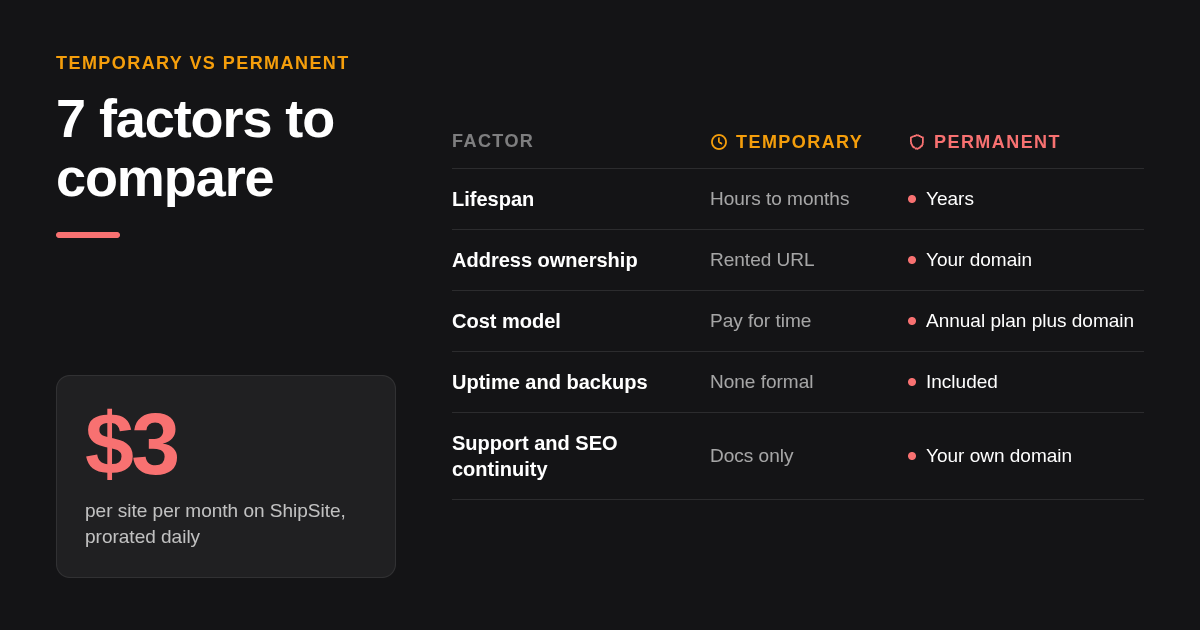
The seven factors that separate temporary hosting from permanent web hosting are lifespan, address ownership, cost model, uptime and backups, performance, branding and control, and support plus SEO continuity. Temporary setups win on speed to publish and near-zero commitment; permanent plans win on every factor that only matters once a site must survive for years.
| Factor | Temporary hosting | Permanent web hosting |
|---|---|---|
| 1. Lifespan | Hours to months; may expire automatically (ShipSite defaults to 24 hours unless pinned) | Years; renews on a monthly or annual cycle |
| 2. Address ownership | Provider subdomain or preview URL you rent | Domain registered in your name, pointed at the host |
| 3. Cost model | Free with limits, or pay for time used | Plan price plus domain, often an intro rate that renews higher |
| 4. Uptime and backups | No formal commitment; you keep the source files | Uptime commitment and scheduled backups in the plan |
| 5. Performance | Varies widely; edge-based static hosts are fast, trials often throttled | Depends on tier: shared, VPS, or dedicated resources |
| 6. Branding and control | Some free tiers inject banners or badges; ShipSite serves files exactly as deployed | Full control over what is served |
| 7. Support and SEO continuity | Community or docs only; rankings tied to a URL you may lose | Support channel; rankings accrue to your own domain |
Two of these factors do the most damage when ignored. Address ownership decides whether anything you build can move with you, and lifespan decides whether a visitor next year hits a page or an error. The other five are quality trade-offs you can live with for a short time and cannot live with for a long time.
How much does temporary hosting cost vs permanent hosting over a year?
Temporary hosting costs nothing or a few dollars because you pay only for the time a site exists: ShipSite bills $3 for one site for a month and $0.10 for one site for two hours. Permanent hosting is an annual commitment that stacks the hosting plan, a domain registration, and renewal prices that are higher than the introductory rate.
Free tiers still cost something: they bill in limits rather than dollars. GitHub Pages sets a soft limit of 1 GB per site and 100 GB of bandwidth per month, per GitHub's published Pages limits as of November 2026, and Netlify's free Starter plan includes 100 GB of bandwidth per month, per Netlify's pricing page as of November 2026. Cross those lines and you either upgrade or get throttled.
ShipSite's model is usage-based with no free tier. As of November 2026, one site for a month is $3, ten sites for a month are $30, and one site for two hours is $0.10, prorated daily and billed monthly via Stripe. A custom domain is an optional plan at a flat $50 per billing period that covers up to 25 domains, never prorated, with nothing charged when you enable it.
Permanent hosting from a conventional host stacks three line items: the hosting plan, which is commonly advertised at an introductory rate that renews at a higher price, the domain registration from a registrar, and add-ons such as backups or priority support. TLS should not be a line item anywhere; Let's Encrypt issues certificates at no charge and most hosts automate renewal.
A worked example makes the split obvious. A three-day event landing page on ShipSite costs a prorated fraction of the $3 monthly rate, while the same page on an annual shared plan commits you to twelve months plus a domain. A brand site that will exist for five years inverts the math: the question is no longer price per day but whether backups, support, and a database are included, and that is what permanent plans are built to sell.
Why does owning your domain matter even if hosting is temporary?
Owning your domain name matters because the domain is the only part of a website that carries identity, links, and search history between hosts. A domain registered in your own name at an accredited registrar can point at temporary hosting today and permanent hosting next year, while a provider subdomain or preview URL disappears with the provider.
A domain name is a registration you hold through an ICANN-accredited registrar, and the registrant of record controls where it points. Google's documentation on site moves with URL changes treats changing the domain as a formal migration with redirects, while changing the host behind the same domain is a routine infrastructure change. That difference is the entire argument for buying the domain first.
Preview and provider URLs are addresses you rent. a7x9k2.shipsite.sh, yourname.github.io, and yourproject.netlify.app all live in the provider's DNS zone, and any links or rankings they collect cannot be carried to a domain you own unless the provider lets you set redirects.
Reddit threads about temporary hosting vs permanent web hosting converge on the same advice: register the domain in your name, then host wherever fits right now. On ShipSite, a domain you own attaches to a pinned site with a single CNAME record to domains.shipsite.sh, up to five domains per site, as described in the custom domains changelog entry.
When should you move from temporary to permanent hosting?
Move from temporary to permanent hosting when a site's expected life crosses from months into years, when it needs a database or server code, or when the first lost visitor would cost real money. Our decision rule: hours to days, stay temporary; weeks to months, temporary hosting on a domain you own; years, a permanent paid plan with backups.
The timeframe rule covers most cases. A prototype, a client preview, a one-off demo, or a hackathon page fits the hours-to-days bucket, where an auto-expiring site is a feature because nothing needs cleaning up. A portfolio, an event page, or a campaign landing page fits weeks to months, where a static host is still fine but the address should be yours.
Four triggers override the timeframe. Load times that slow down as traffic grows, a hard limit you keep hitting (bandwidth, builds, file count), a need for form handling or a database that static files cannot provide, and search rankings you cannot afford to reset. Any one of these means it is time to migrate, regardless of how long you planned to stay.
Use-case fit follows the same line. Prototypes, portfolios, event pages, and client previews belong on temporary or static hosting; business sites with logins, e-commerce stores, and long-term brands belong on permanent plans with backups and support.
How do you migrate from temporary to permanent hosting without losing your site or domain?
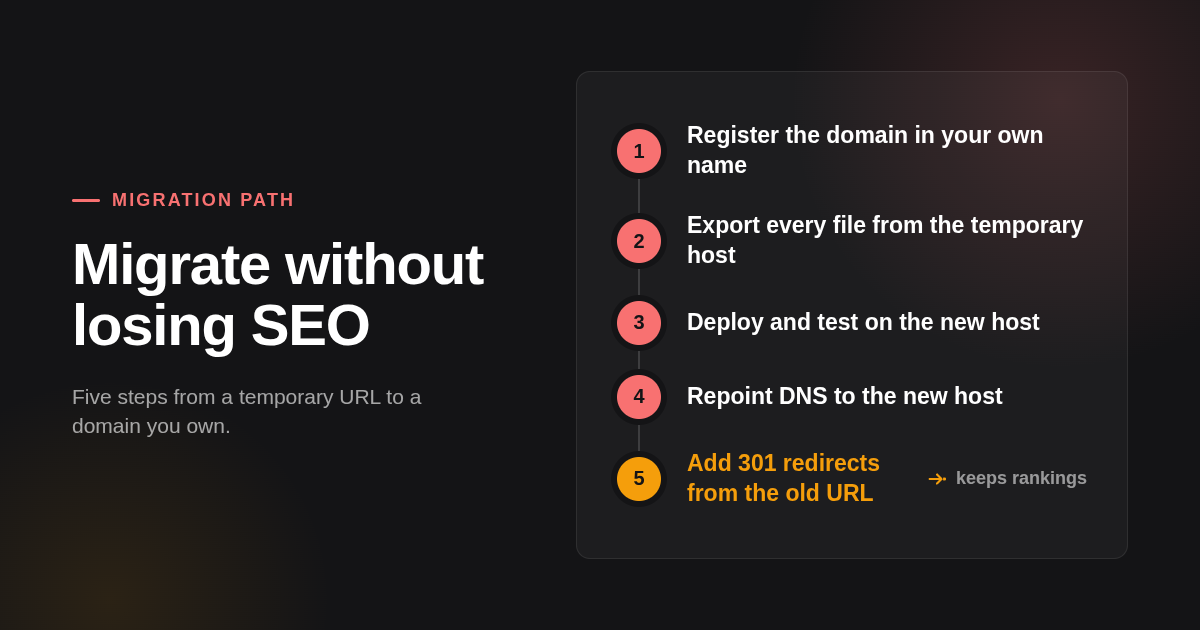
Migrating from temporary hosting to a permanent plan without losing your site or domain takes five steps: register the domain in your own name, export every file, deploy to the new host, repoint DNS to the new host, and redirect the old preview URL with permanent 301 redirects. Keep the old site live until the new one is verified.
- Register the domain in your own name, not an agency's or a friend's account, so you are the registrant of record. If the domain is already attached to the temporary host, note the DNS records before touching anything.
- Export every file. On a static host this is the folder you deployed; on a trial of a conventional host it is a backup archive plus any database dump.
- Deploy to the new host and test it on the host's temporary address before changing DNS, which is the one time a temporary URL is exactly what you want.
- Repoint DNS at the new host. If the domain did not change, Google treats this as an infrastructure move and no redirects are needed for the domain itself.
- Set permanent 301 redirects from any old provider URL to the matching page on your domain, as Google recommends for URL changes, and leave them in place for as long as the old host allows.
How does ShipSite actually publish a site, step by step?
ShipSite publishes a static site in one HTTP request: an agent sends files as JSON to POST /v1/sites with an API key, and the response returns a live URL and an expiry time. The site is served from 300+ edge locations before the response lands, and it either expires in 24 hours or stays forever once pinned.
The flow we built has three steps. First, the agent calls POST /v1/accounts with an email address and receives an API key plus a Stripe checkout link; the human clicks the link to activate the account. Second, the agent sends files to POST /v1/sites, text files as strings and binary files with a base64: prefix. Third, the response carries an id, a url, and an expires_at timestamp.
We designed the registration flow around the person behind the agent. Our agent registration and credential guide tells the agent to ask one question about the user's comfort level, and for non-developers it switches to a guided track: no config files, no commands, no technical vocabulary, one instruction at a time.
Two design choices matter for the temporary-versus-permanent decision. Sites are not altered in transit, with no injected banners, badges, or tracking, so a temporary ShipSite page looks identical to the permanent version. And every error response says what went wrong, why, and how to fix it, so an agent can self-correct instead of handing the problem back to a human.
Are shared, VPS, and dedicated hosting all forms of permanent hosting?
Shared, VPS, and dedicated hosting are all forms of permanent web hosting; they differ in how much of a server you get, not in how long the site lasts. Shared hosting splits one server among many customers, a VPS reserves a slice of a server for you, and dedicated hosting gives you the entire machine.
Shared hosting is the cheapest tier and the one most often sold at an introductory rate that renews higher, so read the renewal price on the vendor's pricing page before comparing. A VPS costs more and gives you reserved CPU and memory plus root access, which is the usual next step when a shared plan slows down. Dedicated servers sit at the top of the price range and make sense only when traffic or compliance demands a machine of your own.
Managed WordPress hosting is a shared or VPS plan with WordPress updates, caching, and backups handled for you. Static hosts like ShipSite, GitHub Pages, and Cloudflare Pages sit outside this ladder entirely because they serve files from an edge network rather than running your code on a server.
How did we compare these options?
We compared ShipSite, Netlify, Vercel, GitHub Pages, and Cloudflare Pages on published pricing pages, documented plan limits, and the scope of what each product hosts, all checked in November 2026. We did not run load tests or uptime monitoring, and we ranked each option by the job it does best rather than by overall quality.
For conventional hosting tiers we described the pricing model and the renewal behaviour instead of quoting numbers that change often. Where we state a competitor price, it comes from that vendor's own pricing page, and we ask readers to confirm it before buying.
How do you get started with ShipSite?
Getting started with ShipSite takes three steps: your agent creates an account with your email, you click the Stripe checkout link to activate, and the agent sends files to the sites endpoint and hands you a live URL. There is no free tier, so payment setup comes first, but there is also no dashboard, no git, and no build step.
If you work with Claude Code, Cursor, Windsurf, or any MCP-compatible agent, point it at the ShipSite registration guide and ask it to publish your first site. The guide handles the account, the key, and the first deploy inside one conversation, and you decide afterwards whether to let the site expire in 24 hours or pin it and attach your own domain.
What do people also ask?
Does a website need hosting?
Yes. Every public website needs a server or edge network that stores its files and answers browser requests. The choice is between temporary hosting (a trial, a preview URL, a provider subdomain, or an expiring static deploy) and permanent hosting (a paid plan on a domain you own); there is no option that skips hosting entirely.
What is app hosting?
App hosting runs server-side code and databases, such as a Node, Python, or PHP application, rather than only serving files. Static hosts like ShipSite, GitHub Pages, and Cloudflare Pages are not app hosting: they serve HTML, CSS, JavaScript, and assets exactly as uploaded, so any dynamic behaviour has to come from the browser or an external API.
Are VPS and hosting the same?
A VPS is one type of web hosting, not a separate thing. Web hosting is the general service; shared hosting, VPS hosting, dedicated hosting, managed WordPress, and static hosting are the tiers within it. A VPS reserves a defined slice of a server's CPU and memory for you, which sits between shared and dedicated in both cost and control.
Does GoDaddy do website hosting?
Yes. GoDaddy sells web hosting alongside domain registration, including shared, WordPress, VPS, and dedicated plans. The domain and the hosting are still separate products on the same bill, so you can register a domain there and host it anywhere else, including a static host. Check GoDaddy's site for current plans and renewal prices.
Can I start on temporary hosting and move to permanent hosting later without losing my site or domain?
Yes, as long as the domain is registered in your own name and you keep the source files. Point the domain at the new host, keep the old site live until the new one is verified, and add 301 redirects from any old provider URL. If the site only ever lived on a provider subdomain, the address itself cannot move, which is why owning the domain comes first.
Related Articles



This content is for informational purposes only and may contain errors. Please contact us to verify important details.