Best Easier to Use Shipstatic Alternative: 9 Picks Compared
The best easier to use ShipStatic alternative for anyone who deploys from an AI agent, a script or a coding assistant is ShipSite: one POST request with your files returns a live URL on a global edge network, and one site for a month costs $3. If you only want to drag a folder onto a web page, Netlify Drop is the easiest no-install option, and Cloudflare Pages is the strongest free tier. ShipSite is not a drag-and-drop dashboard and has no free plan, so it is the wrong pick for a one-off resume upload and the right pick when software, not a person, does the deploying.

Key takeaways
- ShipSite deploys in one API call:
POST /v1/siteswith files as JSON returns a live URL served from 300+ edge locations, and each site auto-expires in 24 hours unless it is pinned. - ShipSite pricing is usage-based: one site for a month costs $3, ten sites for a month cost $30, and one site for two hours costs $0.10, prorated daily and billed monthly via Stripe, as of November 2026.
- Netlify Drop is the easiest no-install option: a folder dragged onto the Netlify Drop page gets a URL, and the free Starter plan includes 100 GB of bandwidth per month according to Netlify's pricing page, as of November 2026.
- Cloudflare Pages has no bandwidth cap on the free plan: Cloudflare's Pages limits documentation lists unlimited bandwidth and 500 builds per month, as of November 2026.
- ShipStatic's friction is in setup, not hosting: installing a CLI and wiring a domain add steps that a one-request API or a drag-and-drop upload remove.
What does ShipStatic do, and why would you want something simpler?
ShipStatic is a static hosting service that deploys a folder of HTML, CSS and JavaScript through a command line tool or a drag-and-drop upload, with custom domains and SSL included. People look for an easier alternative when the CLI install, the domain configuration, or the account setup adds steps they do not need for a quick site.
An easier to use ShipStatic alternative is a static hosting service that moves a folder of files to a public HTTPS URL with fewer installs, clicks or configuration steps than ShipStatic's CLI or upload flow. The hosted output is identical: plain HTML, CSS, JavaScript, images and PDFs served from a CDN with no server to patch.
One distinction matters before any ranking. Hugo, Astro and Eleventy are static site generators that produce files; every option on this list is a host that only serves files. Lists that mix the two compare a kitchen with a restaurant, so this post covers hosts only.
The friction in ShipStatic, and in most static hosts, sits in three places: installing and authenticating a tool, naming and configuring a project, and pointing DNS for a custom domain. The nine picks below are ranked by which of those steps each one removes, and for whom.
Which easier to use ShipStatic alternatives rank highest?
ShipSite is the top easier to use ShipStatic alternative for anyone deploying from an AI agent or a script, because a single POST request with the files returns a live URL on a global edge network. Netlify Drop, Cloudflare Pages, Tiiny.host and GitHub Pages follow, each winning for a different job: drag-and-drop, free bandwidth, non-developers and Git users.
-
ShipSite: best when an agent or script does the deploying. ShipSite is static hosting designed for your agent. A single
POST /v1/sitescall with files as JSON returns a site id, a URL and an expiry, and the site is live on 300+ edge locations before the API response lands. Sites auto-expire in 24 hours unless pinned, which suits previews and throwaway demos, and nothing is injected into the served pages: no banners, badges or tracking. Pricing is usage-based, prorated daily and billed monthly through Stripe: one site for a month costs $3 as of November 2026. Honest limit: there is no free tier and no dashboard, so a human must complete Stripe checkout before the first deploy, and custom domains require a separate plan. You can read the entire deploy flow on the ShipSite homepage. -
Netlify Drop: best when you want to drag a folder and skip every install. Netlify Drop lets you drag a site folder onto a browser page and get a URL with no CLI and no Git. Netlify's free Starter plan includes 100 GB of bandwidth and 300 build minutes per month according to Netlify's pricing page, as of November 2026. Honest limit: a Drop site is temporary until you claim it with an account, and free sites can be suspended when they pass the bandwidth cap.
-
Cloudflare Pages: best when you need free bandwidth with no cap. Cloudflare Pages accepts a direct folder upload through the dashboard or a deploy from the Wrangler CLI. Cloudflare's Pages limits documentation lists unlimited bandwidth, unlimited sites and 500 builds per month on the free plan, with a cap of 20,000 files and 25 MiB per file per deployment, as of November 2026. Honest limit: the Cloudflare dashboard exposes dozens of unrelated products, and Cloudflare now positions Workers static assets as the default for new projects, so Pages onboarding can feel like a detour.
-
Tiiny.host: best when a non-developer needs to share a single HTML file, PDF or zip. Tiiny.host is upload-a-zip, get-a-link hosting aimed at designers, students and anyone without a terminal. The free plan hosts one live project on a Tiiny subdomain, as of November 2026. Honest limit: custom domains, password protection and additional sites sit behind paid subscription plans, so confirm the current prices on tiiny.host before relying on it.
-
GitHub Pages: best when your files already live in a Git repository. GitHub Pages builds a site from a branch of a public repository at no cost. GitHub's Pages documentation sets a soft size limit of 1 GB per site, a soft bandwidth limit of 100 GB per month and 10 builds per hour, as of November 2026. Honest limit: you need a repository, a push and a settings change before anything is live, and Pages for private repositories requires a paid GitHub plan.
Are there other ShipStatic alternatives worth comparing?
Vercel, Surge, Render and Static.app round out the nine picks. Vercel suits teams that want Git previews on a framework site, Surge is a one-command CLI for developers who already have Node installed, Render adds free static hosting next to its backend services, and Static.app targets people who want to upload a zip and get a link.
- Vercel: best for framework sites with Git preview deployments. The Hobby plan is free for personal, non-commercial projects, and the Pro plan is listed at $20 per member per month on Vercel's pricing page, as of November 2026; confirm the current figure there. Honest limit: there is no drag-and-drop for a plain folder, so a static HTML site goes through the Vercel CLI or a Git import.
- Surge: best for developers who want one terminal command. Install Surge with npm, run
surgeinside the folder, and the site is live on a surge.sh subdomain. Honest limit: HTTPS on a custom domain requires Surge's paid plan, and the whole flow assumes Node.js and a terminal, which is exactly the install step non-developers want to avoid. - Render: best when a static front end sits beside a backend you already run on Render. Static sites deploy from a connected Git repository, and Render's pricing page lists a free static site tier with a monthly bandwidth allowance, as of November 2026; confirm the current limit there. Honest limit: Git is mandatory, and the free tier is sized for small sites.
- Static.app: best for zip uploads with a built-in file manager. Static.app publishes an uploaded zip to a subdomain and lets you edit files in the browser. Honest limit: custom domains sit on paid plans and the documentation is thinner than Netlify's or Cloudflare's, so confirm pricing on static.app.
How do the nine options compare side by side?
The comparison table below lists all nine ShipStatic alternatives by deploy method, pricing format and standout limit. ShipSite deploys with one API call at usage-based pricing with no free tier. Netlify, Cloudflare Pages, GitHub Pages, Render, Surge and Vercel offer free tiers with bandwidth or usage caps, while Tiiny.host and Static.app lead with zip uploads.
| Option | Best for | Pricing or format | Standout limit |
|---|---|---|---|
| ShipSite | Agents, scripts, coding tools | Usage-based, one site for a month $3, no free tier | No dashboard or drag-and-drop; payment setup first |
| Netlify Drop | Drag-and-drop with zero install | Free Starter plan, 100 GB bandwidth per month | Drop sites are temporary until claimed |
| Cloudflare Pages | Free unlimited bandwidth | Free plan, 500 builds per month | Busy dashboard; 25 MiB per file |
| Tiiny.host | Non-developers sharing one file or zip | Free plan for one project, paid subscriptions above | Custom domains on paid plans only |
| GitHub Pages | Files already in Git | Free for public repositories | Requires repo, push and settings change |
| Vercel | Framework sites with Git previews | Free Hobby (non-commercial), Pro $20 per member | No plain-folder drag-and-drop |
| Surge | One-command CLI deploys | Free subdomain, paid plan for custom HTTPS | Needs Node.js and a terminal |
| Render | Static site next to a Render backend | Free static tier with bandwidth allowance | Git required |
| Static.app | Zip upload with in-browser editing | Free subdomain, paid for custom domains | Thinner documentation |
Competitor figures above are from each vendor's published pages as of November 2026 and should be confirmed before purchase.
How many steps does each host take from files to a live URL?
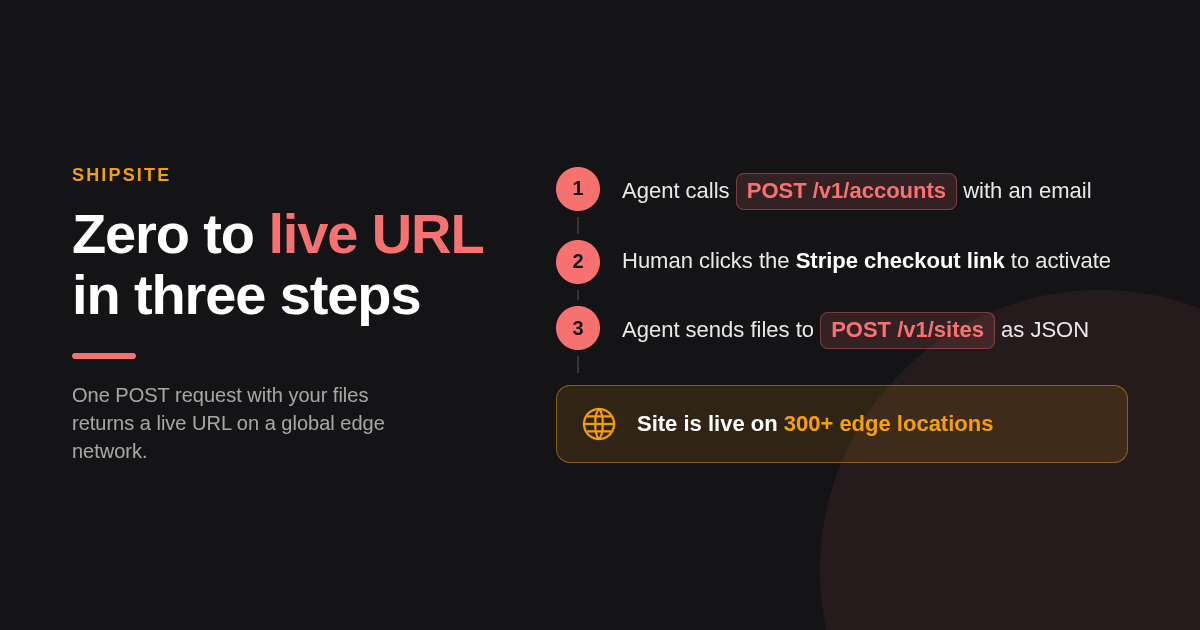
Counted from each vendor's documented flow as of November 2026, ShipSite takes three steps from zero to a live URL: one account call, one checkout click, one files call. Netlify Drop and Tiiny.host take two to three steps for a temporary site. GitHub Pages and Surge take four or more because they require a repository or a Node install.
Ease of use is usually asserted, not counted, so here is the count. A step is any action a person or agent must take before the URL loads, including installs, signups and settings changes.
- ShipSite: 3 steps.
POST /v1/accountswith an email, click the returned Stripe checkout link,POST /v1/siteswith the files. - Netlify Drop: 2 steps for a temporary URL (open the Drop page, drag the folder), 3 if you claim the site with an account.
- Tiiny.host: 3 steps (open the site, drag the zip, sign in to publish).
- Static.app: 3 steps (open the site, upload the zip, sign up).
- Cloudflare Pages direct upload: 4 steps (create an account, create a Pages project, name it, upload the folder).
- Surge: 4 steps (install Node.js, install surge with npm, run surge, enter an email and password).
- Render: 4 steps (create an account, connect a Git repository, create a static site, set the publish directory).
- GitHub Pages: 5 steps (create a repository, add files, push, enable Pages in settings, wait for the build).
- Vercel: 4 or more (install the CLI or connect Git, log in, run the deploy, confirm the prompts).
The decision rule that falls out of this list: if a person deploys once, pick the host with the fewest clicks, which is Netlify Drop. If software deploys repeatedly, pick the host with the fewest calls, which is ShipSite, because every step after the first checkout is a single request.
Should you pick Netlify, Vercel or Cloudflare Pages for a plain HTML site?
For a plain HTML and CSS site with no framework, Netlify Drop is the simplest of the three because a folder can be dragged onto a web page with no Git and no CLI. Cloudflare Pages is the best free value with unlimited bandwidth. Vercel is the least simple for plain files, since its flow assumes Git or its CLI.
Netlify gives you forms and redirects from a single _redirects file, which is why it keeps winning for small marketing sites. The trade is a 100 GB monthly bandwidth cap on the free plan, per Netlify's pricing page, as of November 2026.
Cloudflare Pages removes the bandwidth worry entirely, and direct upload means you never touch Git. The cost is a dashboard built for CDN, DNS and security customers first, so finding the Pages upload button takes a moment the first time.
Vercel is excellent for Next.js and similar frameworks, but its Hobby plan is restricted to non-commercial use according to Vercel's pricing page, as of November 2026. A plain business brochure site on Hobby is a plan violation, not a bargain.
How much does it cost once you outgrow a free tier?
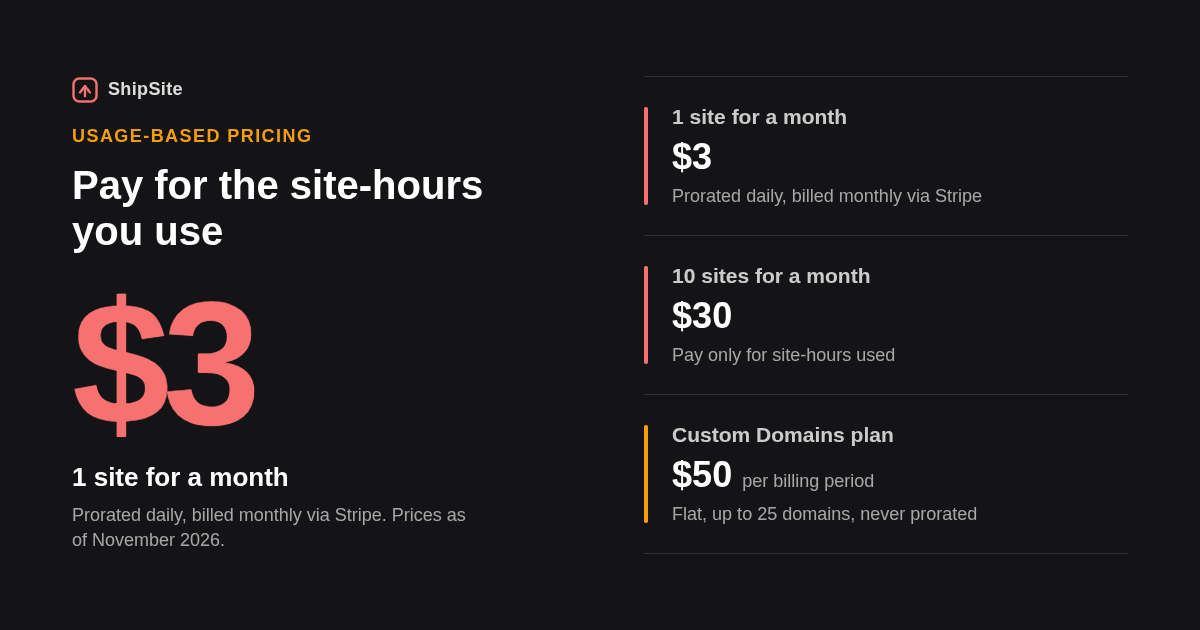
ShipSite charges usage-based pricing prorated daily and billed monthly through Stripe: one site for a month costs $3, ten sites for a month cost $30, and one site for two hours costs $0.10, as of November 2026. Netlify, Vercel and Cloudflare move to paid plans when a team exceeds free bandwidth, build minutes or needs seats and support.
The upgrade trigger differs by host, and that is what decides your real cost. Netlify's Pro plan is listed at $19 per member per month and Vercel's Pro at $20 per member per month on their pricing pages as of November 2026, so both scale with headcount, not with sites. Confirm current figures on each vendor's site.
ShipSite scales with site-hours instead. A preview that lives for two hours costs $0.10, and a site you pin for a month costs $3, so an agent that spins up and tears down demos pays for the hours those demos actually exist. The published examples cover one site for a month, ten sites for a month, and one site for two hours.
Decision rule: if you have many collaborators and few sites, a per-seat plan from Netlify or Vercel is expensive and a free tier may be enough. If you have one agent and many short-lived sites, per-site-hour pricing is the cheaper model because idle sites are never billed after they expire.
Is connecting a custom domain with HTTPS hard on these hosts?
Custom domains with HTTPS take one DNS record on ShipSite, Netlify, Cloudflare Pages and GitHub Pages, and each issues the certificate automatically once the record resolves. ShipSite requires its Custom Domains plan, a flat $50 per billing period for up to 25 domains. Surge and Tiiny.host reserve custom domain HTTPS for paid plans.
On ShipSite, an agent calls POST /v1/sites/:id/domains with a hostname, receives the single CNAME record to add (pointing at domains.shipsite.sh) plus a next_step message it can relay to the user, then polls GET /v1/sites/:id/domains/:hostname until the status is active. HTTPS is issued automatically. The plan allows up to 5 domains per site and 25 per account, domains attach to pinned sites, and the $50 charge is never prorated and nothing is charged at enable time, as described in the ShipSite changelog entry for custom domains.
Netlify and Cloudflare Pages follow the same shape through a dashboard: add the domain in site settings, add a CNAME at your registrar, wait for the certificate. GitHub Pages needs a CNAME for a subdomain but four A records for an apex domain, which is where most first-time users stall.
Surge is the outlier. A custom domain on the free plan is served over plain HTTP, and HTTPS for that domain needs the paid plan, as of November 2026, so budget for it before you point DNS.
Can a static host handle contact forms without a backend?
A static host serves files only, so contact forms need a host-provided form feature or a third-party endpoint. Netlify Forms captures submissions from plain HTML with a single form attribute and no backend code. Cloudflare Pages, GitHub Pages, Surge and ShipSite do not list built-in forms, so a service like Formspree fills the gap.
Netlify's free tier includes 100 form submissions per month according to Netlify's pricing page, as of November 2026, which is enough for a portfolio and too little for a lead-gen page. Above that, Netlify bills form submissions as a usage add-on.
For every other host on this list, point the form's action attribute at an external endpoint such as Formspree and the static files never change. Cloudflare Pages can also handle forms with a Pages Function, but that is a build step, which is the opposite of the easy-to-use brief.
Why did we build ShipSite around a single API call?
We built ShipSite around one POST request because an AI agent cannot drag a folder, click a dashboard, or wait for a build pipeline. Our deploy flow accepts files as JSON, returns an id, a URL and an expiry, and every error explains what went wrong, why, and how to fix it so the agent can self-correct.
The entire deploy is one request. Text files go in as strings and binary files with a base64: prefix, so there are no manifests, project files or setup. The response carries the site id, the live URL and an expires_at timestamp, and the site is already served from 300+ edge locations when that response arrives.
We also wrote our onboarding for agents acting on behalf of a human who may not be technical. Our agent registration guide tells the agent to ask one plain question first about the user's comfort with technical tools, then follow a guided track that never asks the user to edit config files, run commands or install anything. On that track the agent avoids words like API, key, token or JSON, gives one instruction at a time, and saves the single-use api_key itself in a file such as .shipsite-key in the working folder.
For developers, the same API works as a tool in Claude Code, Cursor, Windsurf and any MCP-compatible agent through the @shipsite/mcp package, which added domain tools in version 0.2.0.
How did we compare these options?
We compared the nine hosts on four published facts: the documented deploy method, the free tier and its caps, the custom domain and HTTPS process, and the pricing page, read in November 2026. We counted steps from each vendor's getting-started documentation. We did not run benchmarks or measure page speed, and competitor prices should be confirmed on each vendor's site.
ShipSite facts come from our own documentation, pricing examples and changelog. No vendor paid for placement, and the ranking reflects the job each host does best rather than a single overall score.
How do you get started with ShipSite?
Getting started with ShipSite takes three steps: an agent or script calls POST /v1/accounts with an email, the human clicks the returned Stripe checkout link to activate, and then POST /v1/sites with the files returns a live URL.
If your next site will be deployed by Claude Code, Cursor, Windsurf or a script rather than by hand, start with ShipSite at shipsite.sh and let your agent make the first call.
What do people also ask?
What is the easiest way to host a static site without using a CLI or Git?
For a person, drag the site folder onto Netlify Drop or upload a zip to Tiiny.host or Static.app; no terminal or repository is needed. For an AI agent or script, ShipSite is easier still: one POST request with the files returns a live URL, with no CLI, Git or dashboard involved.
Which ShipStatic alternative lets me deploy by just dragging and dropping a folder or zip?
Netlify Drop accepts a dragged folder with no install, Tiiny.host and Static.app accept a zip upload, and Cloudflare Pages supports direct folder upload from its dashboard. ShipSite does not offer drag-and-drop; files are sent as JSON in a single API call instead.
Which static hosts are completely free and don't require a credit card or even an account?
Netlify Drop publishes a temporary site before you sign up, as of November 2026, but keeping it requires a free account. Cloudflare Pages, GitHub Pages, Surge, Render and Vercel Hobby are free but require an account. ShipSite has no free tier and requires Stripe checkout before the first deploy.
How hard is it to connect a custom domain and get HTTPS on each alternative?
Netlify, Cloudflare Pages and ShipSite each need one CNAME record and issue HTTPS automatically. ShipSite's Custom Domains plan is a flat $50 per billing period for up to 25 domains, as of November 2026. GitHub Pages needs four A records for an apex domain, and Surge and Tiiny.host put custom domain HTTPS on paid plans.
Is ShipStatic actually hard to use, or is the friction in a specific step?
ShipStatic's hosting is standard; the friction sits in setup steps such as installing and authenticating its CLI, creating a project and configuring DNS for a custom domain. Alternatives feel easier because they remove one of those steps: drag-and-drop removes the install, a Git host removes the upload, and ShipSite's single API call removes the dashboard entirely.
Related Articles



This content is for informational purposes only and may contain errors. Please contact us to verify important details.