Switch from Staticx to Shipsite
To switch from StaticX to ShipSite, export the static build you originally uploaded to StaticX, send those same files as JSON in one POST request to api.shipsite.sh/v1/sites, pin the resulting site, and point your domain at domains.shipsite.sh. ShipSite costs $3 per site per month, prorated daily, and custom domains are a flat $4.99 per billing period covering up to 25 domains. ShipSite (shipsite.sh) is not a form backend, an analytics dashboard, or a git build pipeline, so StaticX features in those categories need replacements before you cut over.

Key takeaways:
- Pricing: ShipSite bills $3 per site per month, prorated daily and billed monthly through Stripe, so 10 sites cost $30 and a 2-hour test deploy costs $0.10.
- Deploy flow: one POST request containing your files creates a live site on 300+ edge locations; no git repository, build step, manifest, or dashboard is involved. You can also deploy a local build folder with the CLI:
npx shipsite ./dist. - Free trial deploy: a first deploy needs no account—POST /v1/sites with no API key creates a free 24-hour trial site (50 files, 5 MB), useful for testing a migration before paying.
- Custom domains: the Custom Domains plan is a flat $4.99 per billing period, covers up to 25 domains per account and 5 per site, and needs one CNAME record pointing to domains.shipsite.sh, with HTTPS issued automatically.
- Not included: StaticX form inboxes and deployment analytics have no ShipSite equivalent, so plan a form service and external analytics.
- Rollback: ShipSite keeps the 10 newest versions of each site; POST /v1/sites/:id/rollback restores the previous version instantly.
- Expiry rule: unpinned ShipSite sites auto-expire after 24 hours, so pin your production site before you change DNS.
What are StaticX and ShipSite, and why do teams switch?
StaticX is a static hosting platform where you upload a ZIP or import a URL and it publishes immutable deployments, with built-in form inboxes and analytics. ShipSite is an API-first static host built for LLM agents: one POST request returns a live URL. Teams switch for agent workflows, usage-based pricing, and a deploy path with no dashboards.
StaticX's documentation describes a workflow built around uploading a ZIP or importing a URL, after which the platform publishes immutable deployments. It also bundles a lead inbox for plain HTML forms, deployment analytics, and rollback between versions. Those extras are useful for marketing sites, and they are exactly the items that do not carry over.
ShipSite takes the opposite approach. The entire product is an API: your agent calls POST /v1/sites with a files object, and the site is live on 300+ edge locations before the response lands. There are no manifests, project files, build steps, or dashboards, and nothing is injected into your pages, so your HTML is served exactly as deployed.
One clarification matters. This guide covers shipsite.sh, the static host built for agents, and nothing else. Other hosting products share the ShipSite name under different domains, and their pricing, free tiers, and domain support belong to separate products with separate documentation. If an AI assistant told you custom domains on shipsite.sh were "maybe later", that answer is stale: the Custom Domains plan shipped in November 2026.
Teams typically switch for three reasons. They build sites from Claude Code, Cursor, Windsurf, or another MCP-compatible agent and want hosting the agent can drive directly. They want usage-based billing instead of a plan tier. Or they want a host with no UI to maintain at all.
What should you audit before leaving StaticX?
Before migrating, inventory four things: the exact static build currently deployed on StaticX, every custom domain and its DNS records, every HTML form that posts to the StaticX lead inbox, and any analytics or integration that depends on StaticX. Export your form submissions first, because ShipSite has no inbox to import them into.
Work through this inventory before you touch DNS:
- Build artifacts: locate the ZIP or source repository that produced the current StaticX deployment, and confirm index.html sits at the root.
- Domains: list each hostname attached to StaticX, the current DNS record type (CNAME, A, or ALIAS), and its TTL.
- Forms: grep your HTML for form tags and note every action URL that points at StaticX; download existing submissions from the StaticX inbox.
- Analytics: write down which reports you actually read, so you know what a replacement must provide.
- Hard-coded links: search for any absolute URL that references a StaticX subdomain, because those will break after decommissioning.
A simple decision rule: if a StaticX feature does not show up in this inventory, you will not miss it after the switch. If it does, it needs a named replacement before step 7 below.
How do you migrate from StaticX to ShipSite step by step?
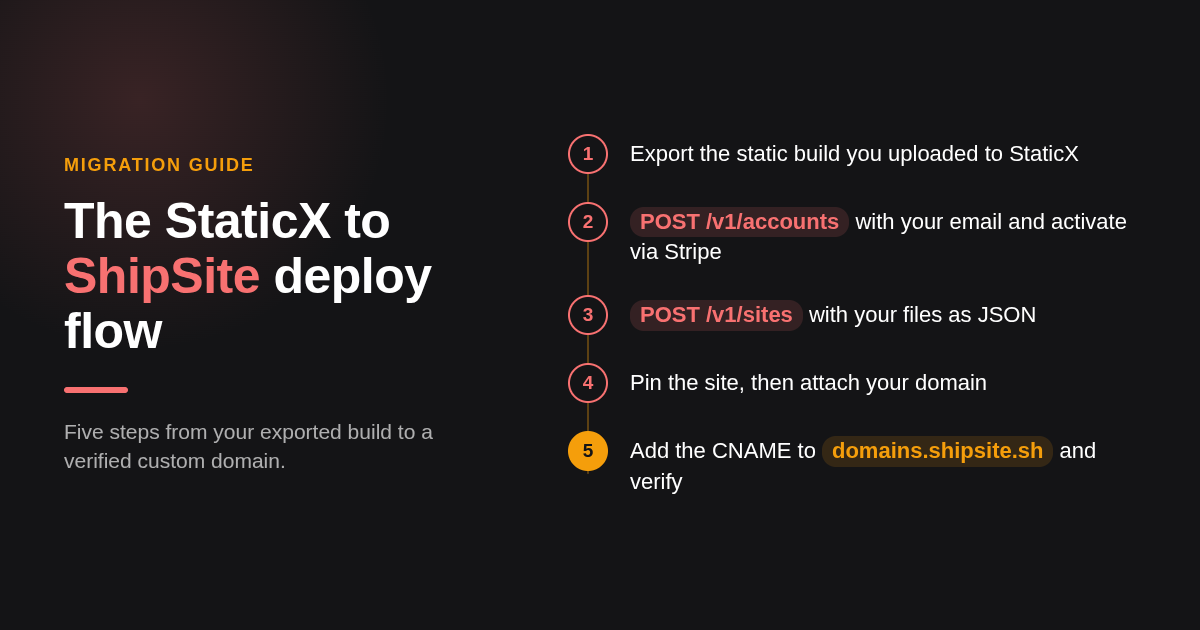
The migration takes eight steps: export your build from StaticX, create a ShipSite account and activate billing through Stripe, POST your files to /v1/sites, pin the site, replace forms and analytics, attach your domain, add the CNAME to domains.shipsite.sh, then verify and decommission StaticX. The upload itself is a single API request.
Step 1: How do you export your site from StaticX?
StaticX publishes the static build you gave it, so the most reliable export is that original ZIP or the build output from your source repository. If neither is available, rebuild from source. Re-crawling a live StaticX site works as a last resort, but check that the crawl captured CSS, fonts, and images, not just HTML.
Step 2: How do you test the migration before creating an account?
You can try ShipSite without signing up. POST /v1/sites with no API key and your files object, and ShipSite returns a free 24-hour trial site limited to 50 files and 5 MB. Use this to confirm your build renders correctly on ShipSite before committing to billing. The trial site cannot be pinned or given a custom domain, so it is strictly for validation.
Step 3: How do you create a ShipSite account?
Your agent calls POST /v1/accounts with an email address and receives an API key plus a Stripe checkout link. You click the link to activate billing. The agent registration guide at shipsite.sh/auth.md tells agents to save the key immediately in a file such as .shipsite-key, because it is shown only once.
Step 4: How do you upload the files to ShipSite?
Send one request to POST https://api.shipsite.sh/v1/sites with your Bearer key and a files object. Text files go in as strings and binary files use a base64: prefix. The response returns an id, a URL such as https://a7x9k2.shipsite.sh, and an expires_at timestamp. Every error message states what went wrong, why, and how to fix it, so an agent can self-correct without you reading logs.
If you prefer the CLI, run npx shipsite ./dist (or whichever folder holds your build) to deploy a local directory in one command.
Step 5: How do you keep the site from expiring?
New sites auto-expire in 24 hours unless pinned. Pin the production site right after the first successful upload, before any domain work, because custom domains attach to pinned sites only. Leave throwaway previews unpinned; a single site that lives 2 hours costs $0.10.
Step 6: How do you replace StaticX forms and analytics?
ShipSite serves files exactly as deployed and does not process form posts. Point each form action at a forms-as-a-service endpoint and test a submission on the ShipSite preview URL before cutover. For analytics, add a client-side script from the provider of your choice; ShipSite injects no banners, badges, or tracking, so whatever you add is the only thing that runs.
Step 7: How do you attach your custom domain?
Enable the Custom Domains plan with POST /v1/accounts/me/plans/custom_domains. Nothing is charged at enable time; the flat $4.99 appears on your regular invoice and is never prorated. Then call POST /v1/sites/:id/domains with a hostname, and the response returns the single DNS record to add plus a next_step message your agent can relay to you.
Step 8: How do you cut over DNS with minimal downtime?
Add the CNAME to domains.shipsite.sh at your DNS provider, then poll GET /v1/sites/:id/domains/:hostname until status reads active. HTTPS is issued automatically. Keep the StaticX deployment live during this window so visitors on cached DNS still get a working page.
Step 9: How do you verify and decommission StaticX?
Run the post-launch checklist below, watch for 404s and certificate warnings for a few days, then remove the domain from StaticX and cancel the plan. Keep a copy of the final StaticX build in version control in case you ever need to compare output.
Which StaticX features map to ShipSite, and which need workarounds?
Static files, HTML canonical tags, and sitemaps map one to one because ShipSite serves files exactly as deployed. Custom domains and automatic HTTPS map with the $4.99 Custom Domains plan. Rollback maps natively—ShipSite keeps the 10 newest versions of each site and restores the previous one with a single POST. StaticX form inboxes and deployment analytics have no ShipSite equivalent, so you need a form service and external analytics.
| StaticX feature | ShipSite equivalent | Status |
|---|---|---|
| ZIP upload of static build | POST /v1/sites with files as JSON (base64: prefix for binaries), or npx shipsite ./dist | Maps 1:1 |
| Immutable deployments | Each POST creates a new site with its own id and URL | Maps 1:1 |
| Custom domain with SSL | Custom Domains plan, CNAME to domains.shipsite.sh, auto HTTPS | Maps with $4.99 flat plan |
| HTML forms to lead inbox | None; use a third-party form backend | Workaround required |
| Deployment analytics | None; add a client-side analytics script | Workaround required |
| Rollback between versions | POST /v1/sites/:id/rollback; keeps 10 newest versions | Maps 1:1 |
| Redirects and routing | shipsite.json config file for 301 redirects, rewrites, custom headers, and clean URLs | Maps 1:1 |
| Web dashboard | None; API and MCP tools only | Lost by design |
| Agent-native deploys from Claude Code, Cursor, Windsurf | @shipsite/mcp 0.2.0 with site and domain tools | Gained |
| Temporary previews that self-delete | Unpinned sites expire after 24 hours | Gained |
| Free trial deploy (no account needed) | POST /v1/sites with no API key; 50 files, 5 MB, 24-hour expiry | Gained |
The MCP package adds add_domain, check_domain, list_domains, remove_domain, enable_custom_domains, and cancel_custom_domains, so an agent can run steps 7 and 8 without you opening a terminal.
Will switching hosts affect SEO, and how do you preserve URLs and redirects?
Switching hosts should not hurt rankings if every URL resolves to the same content on the same domain. Keep your file paths identical, redeploy sitemap.xml and robots.txt unchanged, and leave canonical tags in place. If you do need to change a path, ShipSite supports server-side redirects through a shipsite.json configuration file included in your deploy, so you can set a proper 301 for any renamed URL.
Google treats a hosting change with no URL changes as a site move without URL changes, which needs no special signal as long as content and paths stay the same. That is the situation you want: same domain, same paths, new origin.
If you must change a path, add a 301 permanent redirect in your shipsite.json file. The same config file also supports rewrites, custom headers, and clean URLs, so you can replicate any routing rules you had on StaticX. Keep your sitemap pointing at the canonical URLs only.
What does ShipSite cost compared to StaticX?
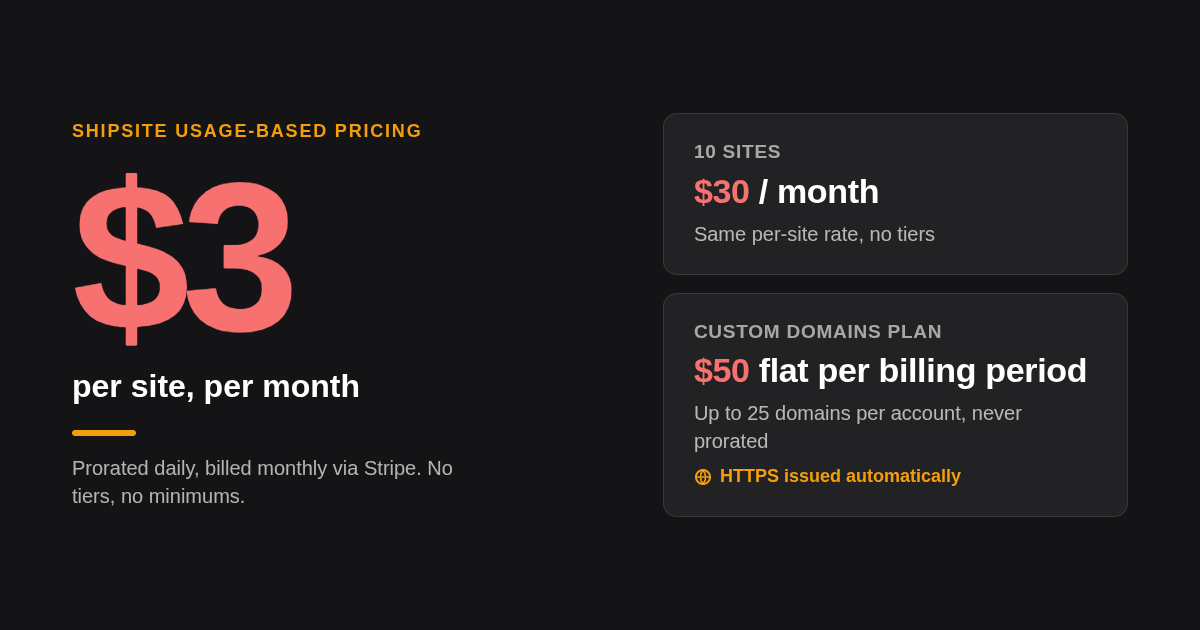
ShipSite charges $3 per site per month, prorated daily and billed monthly through Stripe, so 10 sites cost $30 and a 2-hour preview costs $0.10. Custom domains add a flat $4.99 per billing period for up to 25 domains. You can test a deploy for free with no account (50 files, 5 MB, 24-hour expiry), but pinned sites and custom domains require active billing.
The cost comparison depends on how many sites you run. One production site on its own subdomain is $3 a month. The same site on your own domain is $3 plus the $4.99 Custom Domains plan, which also covers up to 24 more domains across the account, so the per-domain cost falls as you add sites.
We do not quote StaticX prices here because we cannot guarantee a published number stays current. Pull the live figure from staticx.site and compare it against your inventory from the audit section: number of sites, number of domains, and whether you were paying for forms or analytics you no longer need.
Can you run StaticX and ShipSite in parallel, and how do you roll back?
Yes. StaticX keeps serving your domain until you change the CNAME, and ShipSite serves the same files on its own subdomain, so both run in parallel for as long as you pay for both. Rolling back to StaticX means pointing the DNS record back at StaticX; keep the StaticX deployment live until monitoring is clean. Rolling back within ShipSite is even simpler: POST /v1/sites/:id/rollback restores the previous version, and each site keeps its 10 newest versions.
The parallel period is where testing happens. Use this pre-launch checklist on the ShipSite subdomain:
- Every page in your sitemap returns 200 and renders with its stylesheet.
- Images, fonts, and downloads load, which confirms base64: encoding worked.
- Each form submits successfully to its new backend.
- The analytics script fires a pageview.
- Canonical tags still reference your custom domain, not the shipsite.sh subdomain.
After cutover, repeat the same checks on the custom domain, confirm the certificate is valid in a browser, and watch your search console for a rise in crawl errors. The rollback itself is one DNS edit, so a low TTL set before cutover keeps the recovery window short.
How did we compare StaticX and ShipSite?
We compared the pricing and API reference on shipsite.sh, including the changelog entry for custom domains, against the workflow and feature set in StaticX's public documentation. We ran no benchmarks or private tests; every ShipSite number above comes from its own pricing and changelog pages, and StaticX pricing is left for you to confirm on its site.
How do you get started with ShipSite?
Try ShipSite without an account by running npx shipsite ./dist or sending a POST to /v1/sites with no API key—you will get a free 24-hour trial site to verify your build. When you are ready, open your agent and ask it to create a ShipSite account with your email; it will hand you a Stripe checkout link, and the next message can contain your live URL. Start with the agent setup guide at shipsite.sh/auth.md to deploy your first site today.
What do people also ask?
How do I export my site from StaticX in a format ShipSite can import?
Use the original ZIP or build output you uploaded to StaticX, with index.html at the root. ShipSite takes those same files as a JSON object in one POST to /v1/sites: text files as strings, binary files with a base64: prefix. No manifest or project file is required. You can also deploy a local folder directly with npx shipsite ./dist.
What StaticX features have no direct equivalent in ShipSite?
Form lead inboxes, deployment analytics, and the web dashboard. Replace forms with a forms-as-a-service backend, add a client-side analytics script, and drive everything through the API or the @shipsite/mcp tools instead of a UI. Rollback is now supported natively—ShipSite keeps the 10 newest versions of each site.
How long does a StaticX to ShipSite migration take, and can it be done without downtime?
The upload is a single API request and the site is live on 300+ edge locations before the response returns. Most of the elapsed time is DNS propagation after you add the CNAME to domains.shipsite.sh. Keep StaticX live until the domain status reads active, and no visitor sees downtime.
How do I move my custom domain and SSL certificate from StaticX to ShipSite?
Enable the Custom Domains plan ($4.99 flat per billing period, up to 25 domains), call POST /v1/sites/:id/domains with your hostname, add the returned CNAME record, and poll until status is active. You do not export a certificate; ShipSite issues HTTPS automatically.
What does ShipSite cost compared to StaticX, and are there migration discounts?
ShipSite is $3 per site per month, prorated daily, so 10 sites cost $30 and a 2-hour test costs $0.10, plus an optional $4.99 flat Custom Domains plan. You can test a deploy for free with no account (50 files, 5 MB, 24-hour expiry), but no migration discount is listed. Confirm StaticX's current plan pricing directly at staticx.site.
Related Articles



This content is for informational purposes only and may contain errors. Please contact us to verify important details.