Top Deployment Tool for AI Agents
The top deployment tool for AI agents depends on which deploy step you mean. If your agent needs to publish a site, dashboard, or report to a shareable URL, ShipSite is our pick: one POST request creates a live static site on 300+ edge locations, priced at $3 per site per month, with no git, build steps, or dashboards. Agents can even deploy without an account—a POST with no API key creates a free trial site that lasts 24 hours (up to 50 files, 5 MB), and the agent can hand the user a checkout link afterwards to keep it. ShipSite is NOT a runtime for your agent's Python process; for hosting the agent loop itself, LangGraph Platform, Render, Modal, or Amazon Bedrock Agents cover that job, and we rank all five below.
Key takeaways
- ShipSite pricing is usage-based: 1 site for a month costs $3, 10 sites for a month cost $30, and 1 site for 2 hours costs $0.10, prorated daily and billed monthly via Stripe. Agents can also deploy a free trial site with no account or API key—24-hour lifetime, 50 files, 5 MB.
- ShipSite sites auto-expire in 24 hours unless pinned, which keeps throwaway agent output from accumulating cost.
- Most "agent deployment" listicles mix build frameworks with hosting; the real stack has four layers: framework, runtime, publishing, and observability.
- Managed agent platforms earn their price when runs last minutes or hours and need checkpointing or human approval; stateless agents run cheaper on Render, Fly.io, or Railway.
- Render's free web service tier spins down after 15 minutes of inactivity, so it suits demos, not latency-sensitive agents.

Which is the top deployment tool for AI agents right now?
ShipSite is our top pick because it is built specifically for the deploy step an agent performs most often: publishing files to a shareable URL. One POST request creates a live site on 300+ edge locations, billed at $3 per site per month. Agents can start without any account: a POST /v1/sites with no API key creates a free trial site (24-hour lifetime, 50 files, 5 MB), and the agent can present a checkout link to the user afterwards to keep the site and unlock full features. For hosting a long-running Python agent process, LangGraph Platform or Render fit better.
The distinction matters because "deployment tool for AI agents" has two readings. The first is a tool that deploys the agent, meaning a runtime that executes the loop of model calls and tool calls. The second is a tool the agent uses to deploy things, meaning a service it can call to make its own output live.
ShipSite sits firmly in the second category. An agent in Claude Code, Cursor, Windsurf, or any MCP-compatible client sends files as JSON to POST /v1/sites and receives an id, a url, and an expires_at timestamp. There are no manifests, project files, or build pipelines, and errors come back with what went wrong, why, and how to fix it so the agent can self-correct without a human stepping in. MCP-compatible agents can also connect to the hosted MCP server at https://mcp.shipsite.sh/mcp, which needs no install—just point your client at the URL and start deploying.
If your agent is a chatbot that must stay online answering requests, you need a runtime from the list below instead. Many teams end up needing both: a runtime for the agent and a static hosting API built for LLM agents for whatever that agent produces.
What does a deployment stack for AI agents actually include?
An AI agent deployment stack has four layers: the build framework (LangGraph, CrewAI, AutoGen), the runtime that executes the agent loop (a container on Render or a managed engine like Bedrock Agents), the publishing layer where outputs go live (ShipSite), and the observability layer (LangSmith, Langfuse). Most listicles blur the first two, which causes mis-sized purchases.
Frameworks define how the agent reasons. LangGraph models the agent as a graph of nodes with explicit state, CrewAI organises role-based crews, AutoGen focuses on multi-agent conversations, and Botpress and Relevance AI add visual builders. None of these is a host; each hands off to production through a container, a managed platform from the same vendor, or a cloud function.
Runtimes execute the loop. This is where the choice between managed platforms (LangGraph Platform, Vertex AI Agent Engine, Azure AI Foundry, Bedrock Agents) and general PaaS (Render, Railway, Fly.io, Modal, Vercel, AWS Lightsail) lives, and it is the choice most searches for "top deployment tool for ai agents python" are really about.
Publishing and observability are the two layers that get skipped in planning and then bolted on in week three. Deciding them up front avoids rewriting the agent's tool list later.
What are the top 5 best deployment tools for AI agents?
Ranked by the job each does best: ShipSite for publishing agent output to a URL, LangGraph Platform for durable long-running runs, Render for cheap git-to-URL Python services, Modal for bursty GPU and batch workloads, and Amazon Bedrock Agents for teams already standardised on AWS. Each has a documented limit that we list honestly below.
-
ShipSite: best when your agent needs to publish a site, app, or report to a live URL. A single
POST /v1/sitescall with text files as strings and binary files with abase64:prefix returns a live URL before the response lands, served without injected banners, badges, or tracking. Agents can deploy with no account or API key to create a free trial site (24-hour lifetime, 50 files, 5 MB); the agent then hands the user a checkout link to keep the site and unlock paid features at $3 per site per month, prorated daily. If a deploy goes wrong, one call toPOST /v1/sites/:id/rollback(or therollback_siteMCP tool) reverts to the previous version. Honest limit: ShipSite hosts static files only. It does not run Python, Node, or any server process. -
LangGraph Platform: best when a run lasts minutes or hours and must survive a restart. It ships a task queue, persistent checkpoints, cron scheduling, and interrupt points for human-in-the-loop review, and deploys from a GitHub repo. LangChain publishes a free developer tier and per-node-executed pricing on paid plans; confirm current numbers on the LangChain pricing page. Honest limit: you must express your agent as a LangGraph graph in Python or JavaScript, and the tightest integration assumes you also use LangSmith.
-
Render: best when you want the cheapest git-to-URL Python service. Connect a GitHub repo, pick a start command such as
uvicorn main:app, and Render builds and deploys on every push. The free web service tier spins down after 15 minutes of inactivity, which means a cold start on the next request. Honest limit: free instances have limited RAM and cold starts, and anything that must outlive an HTTP request needs a paid background worker plus your own Redis or Postgres. -
Modal: best when the agent needs GPUs or bursty batch compute. Modal runs Python functions serverlessly with per-second billing and scales to zero, so a tool that renders video or runs a local model costs nothing while idle. Modal advertises monthly free compute credits on its starter plan; confirm the amount on modal.com. Honest limit: the decorator-based model is Python-centric, and it is not designed as a general web host for non-Python services.
-
Amazon Bedrock Agents: best when the team is already standardised on AWS. Agents are defined against Bedrock foundation models, with action groups backed by Lambda and IAM-scoped permissions, and AWS states there is no additional charge for the agent orchestration beyond model inference and the underlying services used. Honest limit: you are tied to Bedrock-hosted models and the AWS tool-calling abstraction, which makes migrating to an open framework harder later.
| Option | Best for | Pricing or format | Standout limit |
|---|---|---|---|
| ShipSite | Agents publishing static output to a live URL | Free trial (no account, 24 h, 50 files, 5 MB); $3 per site per month on paid plans, prorated daily | Static files only, does not run agent code |
| LangGraph Platform | Long-running, checkpointed, human-in-the-loop runs | Free developer tier plus per-node pricing on paid plans (confirm) | Requires LangGraph graph abstraction |
| Render | Cheap git-to-URL Python web services | Free tier, spins down after 15 minutes idle | Cold starts, workers and databases are paid add-ons |
| Modal | Bursty GPU and batch Python workloads | Per-second serverless billing, scales to zero | Python-centric, not a general web host |
| Amazon Bedrock Agents | AWS-native enterprise teams | No extra agent charge beyond model tokens and AWS services | Locked to Bedrock models and AWS abstractions |
Should you use a managed agent platform or generic cloud infrastructure?
Choose a managed agent platform when runs exceed a few minutes, need checkpointed state, or require human approval mid-run; those features are expensive to rebuild. Choose generic cloud when your agent is a stateless request-response service, you need full control over dependencies, or you want to avoid vendor lock-in at the framework level.
A practical decision rule: if the longest expected run is under the platform's HTTP timeout and a crash mid-run is acceptable, use generic infrastructure. Render, Railway (Hobby plan listed at $5 per month with usage credit included; confirm on railway.com), Fly.io, and AWS Lightsail all give you a container and a URL with minimal ceremony.
If a crash mid-run loses an hour of work or a customer's approval, managed platforms pay for themselves. Vertex AI Agent Engine bills on vCPU and memory hours, Azure AI Foundry wraps agents in Azure's identity and compliance tooling, and LangGraph Platform adds the checkpoint store. The trade-off is that each pulls you toward its own abstractions.
The NIST AI Risk Management Framework recommends mapping where an AI system can act autonomously before deployment; managed platforms make that boundary easier to enforce because the human interrupt is a first-class feature rather than custom code.
How do you deploy a Python AI agent step by step?
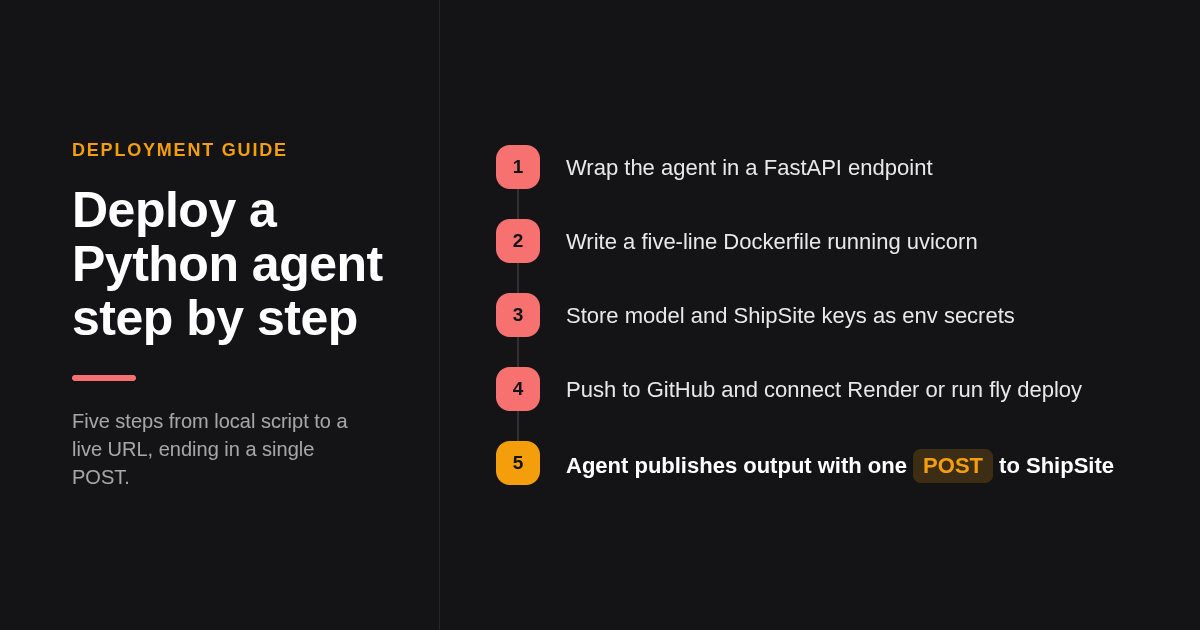
Wrap the agent in a FastAPI app, write a Dockerfile that installs requirements and runs uvicorn, store the model API key and ShipSite key as environment secrets, push to GitHub, and connect the repo to Render or run fly deploy. The agent's own output is published separately with one POST to the ShipSite API.
Start with the endpoint. A minimal main.py exposes POST /run, accepts a task string, invokes your agent, and returns the result. Keep the handler thin; the agent logic should live in its own module so the same code runs in tests and in production.
Then containerise. A working Dockerfile is five lines: FROM python:3.12-slim, WORKDIR /app, COPY requirements.txt . followed by RUN pip install -r requirements.txt, COPY . ., and CMD ["uvicorn", "main:app", "--host", "0.0.0.0", "--port", "8000"]. Never bake secrets into the image; read OPENAI_API_KEY, ANTHROPIC_API_KEY, and SHIPSITE_API_KEY from the environment.
Deploy from GitHub. On Render, create a web service from the repo, set the environment variables in the dashboard, and every push to main triggers a build. On Fly.io, fly launch detects the Dockerfile and writes fly.toml, fly secrets set SHIPSITE_API_KEY=sk_live_... stores the key, and fly deploy ships it. That covers the "top deployment tool for ai agents github" workflow most people are searching for.
Finally, give the agent a publishing tool. The fastest path is to point your MCP client at the hosted MCP server at https://mcp.shipsite.sh/mcp—no install needed. Alternatively, the agent can call the REST API directly: when it finishes a report or dashboard, it sends the files to POST https://api.shipsite.sh/v1/sites with the bearer key and gets back a URL like https://a7x9k2.shipsite.sh. The agent can even deploy without an account—omitting the API key creates a free trial site (24 hours, 50 files, 5 MB), and the response includes a checkout link the agent can hand to the user to keep the site. The agent registration and credential guide walks through creating a full account with POST /v1/accounts, completing Stripe checkout, and generating a deploy-scoped API key for ongoing use.
How do you handle long-running tasks, state, and human-in-the-loop?
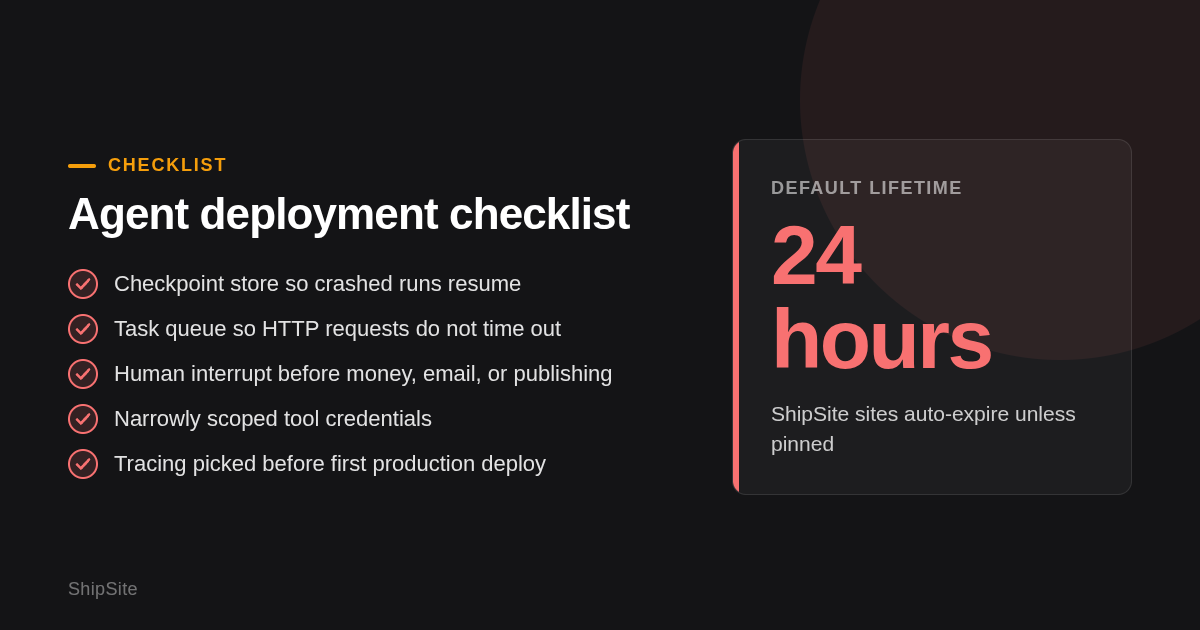
Long-running tasks need three things most PaaS tools lack: a checkpoint store so a crashed run resumes, a task queue so HTTP requests do not time out, and an interrupt mechanism for human review. LangGraph Platform ships all three; on Render or Fly.io you add Redis or Postgres and a worker process yourself.
State persistence is the first gap. An agent that researches for 40 minutes and crashes at minute 39 should resume, not restart. LangGraph's checkpointer writes state after every node, Bedrock Agents keep session state server-side, and on generic infrastructure you serialise state to Postgres between steps.
Tool-call security is the second. Every tool the agent can call is an action it can take without you watching, so scope credentials narrowly. For ShipSite, we recommend creating a deploy-scoped API key for agents, which can create, pin, delete, and roll back sites but cannot buy domains, change plans, or manage other keys. A default key has full account access, so avoid handing it to an automated agent. Sites that are not pinned disappear after 24 hours, so an over-eager agent leaves little behind. If a bad deploy does go live, one call to POST /v1/sites/:id/rollback (or the rollback_site MCP tool) reverts to the previous version instantly.
Human-in-the-loop is the third. McKinsey's State of AI research reports that organisations scaling agents are putting review steps on high-impact actions; in practice that means an interrupt before the agent spends money, sends email, or publishes to a custom domain.
Why does observability matter after deployment, and which tools provide it?
Once deployed, you need traces of every tool call and model call, token cost per run, latency percentiles, and error grouping. LangSmith, Langfuse, AgentOps, and Helicone each provide a subset. Without this layer you cannot tell whether a failed run was a model regression, a tool outage, or a prompt change.
LangSmith is the natural fit for LangChain and LangGraph code and integrates with LangGraph Platform deployments. Langfuse is open source with a public GitHub repo and a self-hosting path via Docker, which suits teams with data residency requirements. AgentOps focuses on agent session replay, and Helicone works as a proxy in front of model APIs for cost and latency tracking.
A practical rule: pick one tracing tool before the first production deploy, because retrofitting instrumentation across dozens of tool functions is painful. Pair it with the hosting provider's own logs for infrastructure-level failures.
ShipSite deliberately avoids this layer. Sites are served exactly as deployed with no injected tracking, so if you want analytics on a published page you add your own script.
Which tools suit no-code and enterprise teams instead of developers?
Non-developer teams should look at UiPath, Cognigy, Kore.ai, and IBM watsonx, which bundle agent building, deployment, access control, and compliance reporting into one console. Developer teams get more flexibility and lower cost from code-first tools, but take on security, scaling, and monitoring responsibilities themselves.
UiPath extends its RPA platform with agents that act inside existing automations, Cognigy and Kore.ai target customer-service agents with channel integrations, and IBM watsonx emphasises governance and on-premises options. All four are sold on enterprise contracts rather than published per-run pricing, so budget conversations happen with sales.
Open-source and self-hosted routes sit at the other extreme. LangGraph, CrewAI, AutoGen, and Langfuse all have public GitHub repos and can run on Docker or Kubernetes you control, which is the right answer when data cannot leave your network. The cost is that you own upgrades, scaling, and on-call.
ShipSite fits both audiences in a narrow way. Its registration guide includes a guided track where the agent avoids words like API, key, or endpoint and does every step itself, so a non-technical user can get a site live inside one conversation, while developers use the raw endpoints, the @shipsite/mcp package, or the hosted MCP server at https://mcp.shipsite.sh/mcp directly.
How did we compare these options?
We compared each tool on its published pricing page, its documentation for deployment scope, and the specific agent concerns above: state persistence, long-running tasks, human-in-the-loop support, and static publishing. ShipSite figures come from its own site and changelog. Where a competitor's price was not clearly published, we described the model and asked you to confirm on the vendor's site.
How do you get started with ShipSite?
The fastest path is zero setup: your agent calls POST /v1/sites with no API key and gets back a free trial site (24-hour lifetime, 50 files, 5 MB) plus a claim token. To keep the site, the agent sends POST /v1/accounts with the user's email and that claim token; the response returns an API key and a Stripe checkout link. Hand the checkout link to the user—when they complete checkout, the site moves to the new account and stays live. From there, generate a deploy-scoped API key for the agent so it can create, pin, delete, and roll back sites without broader account access. Custom domains are an optional $4.99 per billing period plan covering up to 25 domains per account.
If you plan to serve agent output on a domain you own, the custom domains release notes explain the single CNAME record to add, the automatic HTTPS issuance, and the six new MCP tools in @shipsite/mcp 0.2.0 that let an agent manage domains without leaving the conversation. MCP-compatible agents can also connect to the hosted MCP server at https://mcp.shipsite.sh/mcp with no install required.
Ready to give your agent a publish button? Visit shipsite.sh, create an account through your agent, and ship your first site with one API call.
What do people also ask?
What is the best platform to deploy an AI agent to production in 2026, and for which use case?
It depends on the job. ShipSite is best when the agent needs to publish static output to a live URL at $3 per site per month, with a free trial available for quick tests. LangGraph Platform is best for long-running, checkpointed runs with human review. Render is best for cheap stateless Python services, Modal for GPU or batch work, and Amazon Bedrock Agents for AWS-native enterprise teams.
What is the cheapest or free way to deploy a Python AI agent?
Render's free web service tier deploys a FastAPI agent from GitHub at no cost, with the caveat that it spins down after 15 minutes of inactivity. Railway's Hobby plan and Fly.io are low-cost usage-based alternatives; confirm current numbers on each vendor's pricing page. ShipSite offers a free trial—agents can deploy with no account or API key to create a site that lasts 24 hours (50 files, 5 MB)—and a paid site running for 2 hours costs $0.10.
Should I use a managed agent platform like LangGraph Platform or Bedrock Agents, or deploy on generic cloud myself?
Use a managed platform when runs last minutes or hours, need checkpointed state, or require human approval mid-run. Use generic cloud such as Render, Fly.io, or Railway when the agent is a stateless request-response service and you want full control over dependencies and lower lock-in.
Which deployment tools support open-source, self-hosted agents from GitHub repos?
LangGraph, CrewAI, AutoGen, and Langfuse all have public GitHub repos and run on Docker or Kubernetes you control. Render, Railway, Fly.io, and LangGraph Platform deploy directly from a connected GitHub repository. ShipSite does not pull from git; the agent sends files as JSON in one API call instead.
What are the pricing models across the main AI agent deployment options?
ShipSite offers a free trial (no account needed, 24-hour site, 50 files, 5 MB) and bills per site per month on paid plans, prorated daily, with 1 site for a month at $3 and 10 sites at $30. LangGraph Platform charges per node executed on paid plans. Render and Railway charge per instance or usage, Modal bills per second of compute, and Amazon Bedrock Agents charge for model tokens and underlying AWS services rather than a separate agent fee.
Related Articles



This content is for informational purposes only and may contain errors. Please contact us to verify important details.