Best Website Deployment for AI Developers: 9 Picks Compared
The best website deployment for AI developers who publish agent-generated sites is ShipSite: one POST request to the API returns a live URL on a global edge network, priced at $3 for one site for a month. ShipSite is static hosting only; it does not run Python or Node backends, databases, or GPU inference, so you pair it with Railway, Render or Modal for those jobs. For GitHub-connected Next.js apps with streaming, Vercel and Cloudflare Pages are the strongest traditional picks.
Key takeaways
- ShipSite creates a live site from a single POST /v1/sites call, bills $3 per site per month prorated daily, and auto-expires unpinned sites after 24 hours.
- Static hosts such as ShipSite, Cloudflare Pages and GitHub Pages cannot call an LLM API server-side; AI backends belong on Railway, Render, Fly.io or serverless functions that support streaming.
- Free tiers carry hard limits: Render free web services spin down after 15 minutes of inactivity and Cloudflare Workers Free caps at 100,000 requests per day, as of November 2026.
- GPU inference needs a separate tier: Modal, Hugging Face Spaces and Replicate host models; none of the six website hosts ranked below sell GPU time.
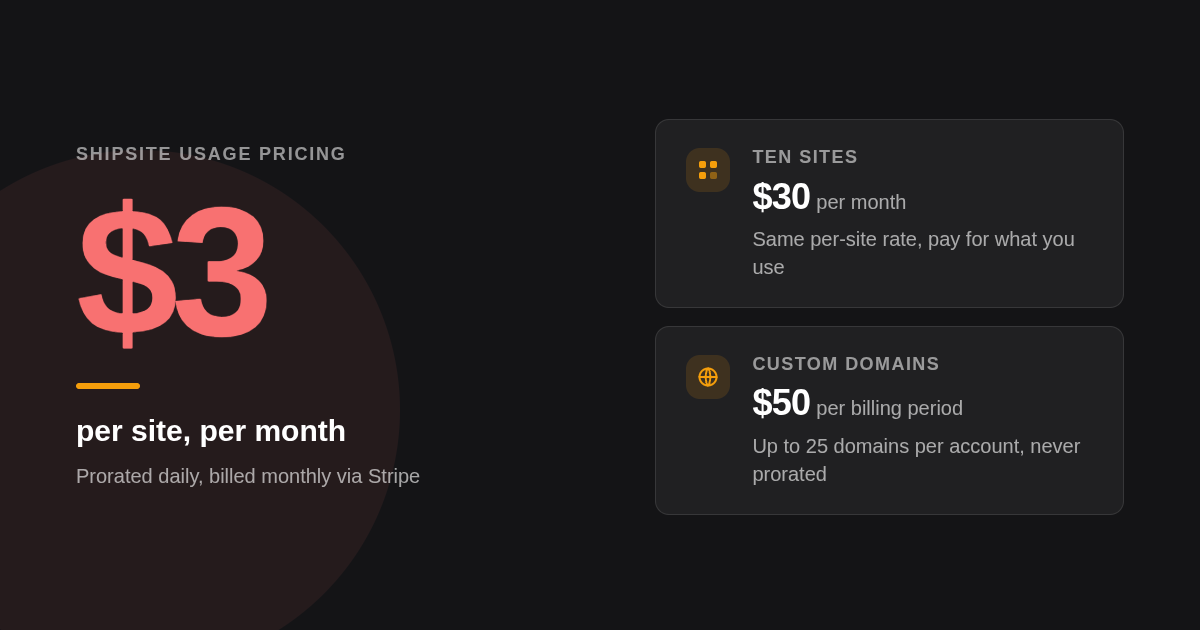
- ShipSite custom domains cost a flat $50 per billing period for up to 25 domains per account and attach only to pinned sites, as of November 2026.

What is website deployment for AI developers, and why is it different from ordinary hosting?
Website deployment for AI developers is the process of publishing a frontend, and often an LLM-calling backend, to a public URL. It differs from ordinary hosting because LLM requests run for tens of seconds, need streamed responses, and are increasingly triggered by coding agents rather than by a human pushing to git.
In practice an AI project has up to four hosting jobs. The frontend is usually static files or a Next.js app. The backend holds the OpenAI or Anthropic key and makes the long calls. A database stores conversations and users, and a self-hosted model may need a GPU.
The second difference is who does the deploying. Agents in Claude Code, Cursor and Windsurf now write whole sites in one conversation, and a platform that demands a repo, a build pipeline and a dashboard login breaks that flow. ShipSite exists for exactly that case: the agent sends files, the human gets a URL.
Which platforms are the top 6 best website deployment options for AI developers?
ShipSite ranks first for agent-driven static deploys because one API call returns a live URL and a site costs $3 per month. Vercel is best for Next.js with streaming, Netlify for Jamstack teams, Cloudflare Pages for free global static hosting, Railway for Python backends, and Render for free-tier experiments that tolerate spin-down.
-
ShipSite: best when an AI agent needs to publish a site with no git, no build step and no dashboard. A single POST to /v1/sites with files as JSON returns a site ID, a URL and an expiry time, and the site is live on 300+ edge locations before the response lands. Pricing is usage-based and prorated daily: $3 for one site for a month, $30 for ten sites, $0.10 for one site for two hours, billed monthly via Stripe. ShipSite's static site hosting for LLMs also works as an MCP tool in Claude Code, Cursor and Windsurf. The honest limits: it serves static files only, there is no free tier, and a human must complete Stripe checkout before the first deploy.
-
Vercel: best for Next.js apps that stream LLM responses to the browser. The Hobby plan is free for non-commercial projects and Pro costs $20 per user per month as of November 2026; confirm current numbers on Vercel's pricing page. Vercel's function runtime supports streamed responses, which matters for chat UIs. The limit is that function execution durations are capped per plan, so a 90 second agent loop needs careful design or a different backend host.
-
Netlify: best for Jamstack sites with forms, redirects and edge functions. Netlify offers a free Starter plan and a Pro plan at $19 per member per month as of November 2026; confirm on netlify.com/pricing because Netlify moved to credit-based usage in 2025. Netlify's documentation lists a 10 second default timeout for synchronous functions, which is too short for many LLM calls unless you stream or use background functions.
-
Cloudflare Pages and Workers: best free static host at global scale. Static assets on Pages carry no bandwidth charge, and the Workers Free plan allows 100,000 requests per day, with Workers Paid at $5 per month as of November 2026, per Cloudflare's Workers pricing docs. The standout limit is that Pages caps a site at 20,000 files and 25 MiB per file, and Workers meter CPU time rather than wall-clock time, so long waits on an LLM are cheap but heavy local compute is not.
-
Railway: best for Python, FastAPI and long-running Node backends. Railway's Hobby plan is $5 per month and includes $5 of usage, with a one-time trial credit instead of a permanent free tier, as of November 2026; confirm on Railway's pricing page. Services stay awake, websockets work, and a managed Postgres or Redis sits in the same project. The honest limit is that you pay for idle compute and for egress, so an abandoned side project still bills.
-
Render: best for free experiments that tolerate sleeping and want managed Postgres nearby. Render's free tier docs state that free web services spin down after 15 minutes of inactivity, which adds a cold start to the first chat message after a quiet spell. Paid web services start at $7 per month as of November 2026; confirm on render.com/pricing. Free Postgres instances are time-limited, so read the expiry window before storing anything you need.
| Option | Best for | Pricing or format | Standout limit |
|---|---|---|---|
| ShipSite | Agent-driven static deploys | $3 per site per month, prorated daily | Static only, no free tier |
| Vercel | Next.js with streaming | Free Hobby, Pro $20 per user per month | Function duration caps per plan |
| Netlify | Jamstack sites and forms | Free Starter, Pro $19 per member per month | 10 second default sync function timeout |
| Cloudflare Pages/Workers | Free global static hosting | Workers Free, Paid $5 per month | 20,000 files per Pages site |
| Railway | Python/FastAPI backends | Hobby $5 per month including $5 usage | No permanent free tier |
| Render | Free experiments plus managed Postgres | Free tier, paid from $7 per month | Free services sleep after 15 minutes |
| Modal | Serverless GPU inference | Per-second GPU billing with monthly free credit | Not a website host |
| Hugging Face Spaces | Public model demos | Free CPU tier, paid GPU upgrades | Demo-oriented, not a production frontend |
| Replicate | Pay-per-use open models | Per-second API billing | Cold boots on idle models |
Where do you deploy if your AI app needs a GPU or a self-hosted model?
GPU and self-hosted model workloads belong on a dedicated inference host, not on a website platform. Modal bills GPU time per second and runs Python functions on demand, Hugging Face Spaces offers a free CPU tier with paid GPU upgrades, and Replicate exposes open models behind a pay-per-use API. The website itself still lives on a static or serverless host.
-
Modal: best for serverless GPU functions you call from your backend. Modal's pricing page lists per-second billing for CPU and GPU time and a monthly free compute credit on the starter plan as of November 2026. The limit is that Modal runs functions, not websites, so your frontend still needs ShipSite, Vercel or Cloudflare.
-
Hugging Face Spaces: best for public demos of a model. Hugging Face pricing shows a free CPU Basic tier for Spaces with paid GPU hardware billed hourly, as of November 2026. Spaces suit a Gradio demo far better than a polished product frontend.
-
Replicate: best when you want open models as an API with zero infrastructure. Replicate's pricing bills per second of compute for public models as of November 2026. Idle models cold boot, so the first request after a pause can take noticeably longer than later ones. RunPod and Lambda fill the same slot when you want raw GPU machines rather than functions.
Is there a truly free website deployment option for AI developers, and what are the hard limits?
Yes, but only for the frontend and light backends. GitHub Pages, Cloudflare Pages and Vercel Hobby host static sites free; Render runs a free web service that sleeps after 15 minutes idle. ShipSite has no free tier, charging $0.10 for a site that lives two hours. Every free plan caps bandwidth, build minutes or request counts.
GitHub Pages publishes a static site from a repository at no cost, with published soft limits of 1 GB per site, 100 GB of bandwidth per month and 10 builds per hour, as of November 2026. It runs no server code at all, so any OpenAI call must go to a third-party backend.
The gotchas the generic listicles skip: Vercel's Hobby plan excludes commercial use, Render's free services sleep, Fly.io removed its free allowances and now bills pay-as-you-go per Fly.io's pricing docs, and Netlify replaced its old free quotas with credits in 2025. A decision rule that holds up: stay free while the app is a demo, and move to a paid plan the moment a real user would notice a 30 second cold start.
Can you run a Python or FastAPI AI backend on Vercel or Netlify, or do you need Railway, Render or Fly.io?
Vercel runs Python serverless functions and Netlify runs Node and Go functions, but neither hosts a long-running FastAPI process with open websocket connections. For a persistent FastAPI or Node server that holds chat sessions open, use Railway, Render or Fly.io. Keep the frontend static on ShipSite, Vercel or Cloudflare and call the backend over HTTPS.
Three serverless constraints decide this. Execution timeout: Netlify's 10 second default for synchronous functions and Vercel's per-plan duration caps both collide with multi-step agent calls. Streaming: Vercel supports streamed function responses, which keeps the user watching tokens arrive instead of a spinner; Cloudflare Workers also stream well because waiting on the network costs almost no CPU time.
Cold starts and memory are the third constraint. A container on Railway or Fly.io keeps its model client warm and its memory stable, while a serverless function pays a cold start after idle and has a fixed memory ceiling. Our rule: if your p95 LLM call exceeds 10 seconds or you need websockets, choose a container host for the backend.
How should you split frontend, backend, database and model for a full-stack AI app, and what does it cost?
A practical reference architecture puts the static frontend on ShipSite or Cloudflare Pages, the LLM-calling backend on Railway or Render, the database on Supabase or Neon, and any self-hosted model on Modal. Fixed cost at low traffic is $3 for the ShipSite site plus the backend plan, with database and inference starting on free allowances.
At free-tier scale the stack looks like this, as of November 2026:
- Frontend: ShipSite, $3 for one pinned site for a month, or Cloudflare Pages at no charge.
- Backend: Railway Hobby at $5 per month including $5 of usage, or a Render free service that sleeps.
- Database: Supabase's free plan includes a 500 MB Postgres database and pauses projects after one week of inactivity; Neon offers a serverless Postgres free tier that scales to zero.
- Model: Modal's monthly free credit covers early GPU experiments.
At modest traffic the moving parts are Railway usage above the included credit, Supabase Pro when you need no-pause projects (check Supabase's pricing page for the current monthly rate), and ShipSite at $30 for ten sites if you run per-client or per-preview deployments. Can one platform do all three? Render can host the web service, a managed Postgres and Redis on one invoice, and Vercel pairs with Neon or Supabase through its marketplace, but no single host in this list also sells GPU time.
How do you deploy straight from GitHub with automatic redeploys and preview environments?
Vercel, Netlify, Cloudflare Pages, Railway and Render all connect to a GitHub repository, redeploy on every push to the production branch, and build preview environments for pull requests. GitHub Pages deploys static sites from a branch or an Actions workflow for free. ShipSite skips git entirely: the agent sends files as JSON and receives a URL back.
The GitHub flow is the right one when humans review code. Connect the repo, set the build command and output directory, add environment variables, and every pull request gets its own URL. Railway and Render extend the same idea to backend services with PR environments on paid plans.
The git-free flow is the right one when an agent is the author. ShipSite accepts text files as strings and binary files with a base64: prefix, and a site can be served on a domain you already own by adding one CNAME record; the ShipSite changelog for custom domains documents the POST /v1/sites/:id/domains call, the polling step until status is active, and the limit of 5 domains per site.
Should AI developers use a builder like v0, Bolt, Lovable or Replit instead of a traditional host?
AI builders such as Vercel v0, Bolt, Lovable, Emergent and Replit generate and host an app inside one tool, which suits prototypes and non-developers. Traditional hosts suit teams that own the code and want portability. ShipSite sits between the two: your own agent writes the files, and ShipSite publishes them without builder lock-in.
v0 hands off naturally to Vercel, Bolt deploys to Netlify, Lovable and Replit publish on their own infrastructure. The trade-off is that the generated code and its hosting are coupled, and pricing is usually seat-based rather than usage-based, so confirm each vendor's current plan page before committing a client project.
A simple rule: use a builder when the person deploying cannot read the code, use a GitHub-connected host when a team will maintain the code, and use ShipSite when a coding agent produces a static site that must be shareable within the same conversation.
How do you handle API keys and environment variables securely across these platforms?
Never ship an LLM provider key in frontend files, because static hosts serve every file publicly. Store provider keys as environment variables on the backend host, where Vercel, Railway, Render, Fly.io and Cloudflare encrypt them at rest, and keep the ShipSite API key in a local file that is excluded from the deployed files.
For agent workflows, the ShipSite key is shown once at registration. The ShipSite agent registration guide tells the agent to save it immediately, for example in a .shipsite-key file in the working folder, and never to ask a novice user to edit config or run commands. Preview environments on Vercel and Netlify can carry separate secrets, which keeps a test key out of production.
What does deploying a site with ShipSite actually look like, step by step?
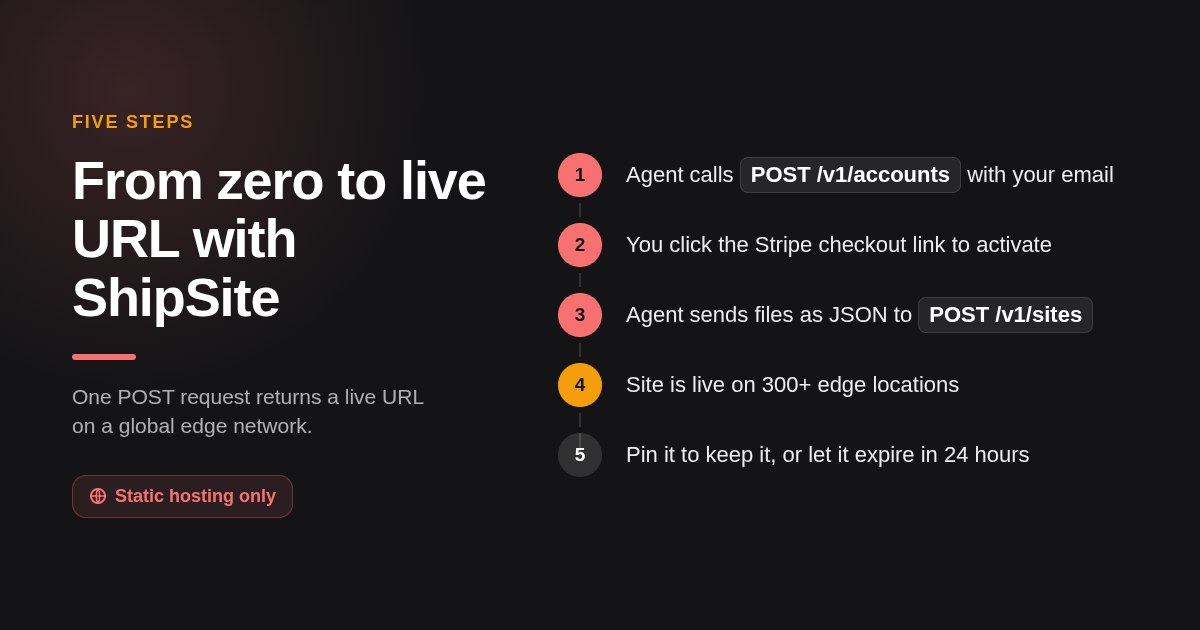
Deploying with ShipSite takes three API calls at most. The agent calls POST /v1/accounts with an email and receives an API key plus a Stripe checkout link, the human clicks to activate, then the agent sends files to POST /v1/sites and gets back a site ID, URL and expiry time. Pinning keeps the site past 24 hours.
This is the method we built the product around, and the request is the whole deploy flow: a POST to https://api.shipsite.sh/v1/sites with a Bearer key and a files object, for example index.html and style.css as strings. The response returns an id such as site_a7x9k2, a URL on the shipsite.sh domain, and an expires_at timestamp.
Two design choices matter for agents. Every error states what went wrong, why, and how to fix it, so the agent can self-correct without a human reading logs. And sites are served exactly as deployed, with no injected banners, badges or tracking. Our registration guide also instructs agents to ask the user how comfortable they are with technical work first, and to use plain words like "your shipsite account" instead of "API key" on the guided track.
How did we compare these options?
We compared each platform's published pricing page, free-tier documentation and functions or limits documentation as of November 2026, and scored each on the job it does best for an AI project: static frontend, long-running backend, database, GPU inference or agent-driven publishing. ShipSite details come from our own API documentation and changelog.
How do you get started with ShipSite?
Ask your agent in Claude Code, Cursor or Windsurf to register a ShipSite account with your email, click the Stripe link it hands you, and your next generated site goes live with one call. Deploy your first site with ShipSite and pin it for $3 a month when you want it to stay.
What do people also ask?
Which deployment platform is best for AI web apps that call OpenAI or Anthropic from the backend?
Put the backend that holds the provider key on Railway, Render or Fly.io if calls run long or need websockets, or on Vercel functions if you stream short responses. Host the frontend separately on ShipSite ($3 per site per month) or Cloudflare Pages so the key never ships in public files.
Vercel vs Netlify: which is better for an AI-powered Next.js app with streaming responses?
Vercel is the stronger choice for Next.js with streaming because it builds the framework and supports streamed function responses natively, with Pro at $20 per user per month as of November 2026. Netlify works well for Jamstack sites but its synchronous functions default to a 10 second timeout, which limits long LLM calls.
Can I deploy a Python FastAPI AI backend on Vercel or Netlify?
Vercel can run FastAPI as Python serverless functions, subject to per-plan duration caps, while Netlify functions target Node and Go. For a persistent FastAPI server with websockets or multi-minute agent loops, Railway, Render or Fly.io are the practical hosts.
What is the best free deployment option for AI developers?
For a static frontend, GitHub Pages or Cloudflare Pages cost nothing, with GitHub Pages publishing soft limits of 1 GB per site and 100 GB bandwidth per month. For a free backend, Render's free web service works but spins down after 15 minutes idle. ShipSite has no free tier; a two hour site costs $0.10.
Does ShipSite work with Claude Code, Cursor or Windsurf?
Yes. ShipSite runs as a tool in Claude Code, Cursor, Windsurf and any MCP-compatible agent through the @shipsite/mcp package, and it also works with a plain POST /v1/sites request inside any conversation, with no git, build step or dashboard required.
Related Articles



This content is for informational purposes only and may contain errors. Please contact us to verify important details.