Temporary Hosting Free
Most people searching for temporary hosting free want a site online for a few hours or days with the least possible friction, and for that job ShipSite is the option we recommend: one POST request with your files returns a live URL on 300+ edge locations, and the site auto-expires in 24 hours unless you pin it. ShipSite even offers a free trial: sending POST /v1/sites with no API key deploys a site with no account and no payment, lasting 24 hours with up to 50 files, 5 MB, and 1,000 visitor requests per day, limited to 3 per network address per day. Ongoing hosting beyond the free trial is usage-based: 1 site for 2 hours costs $0.10 and 1 site for a month costs $3. If zero cost is the hard requirement beyond a 24-hour window, zero-signup uploaders such as ship.page, the free tiers of Netlify, Vercel, and GitHub Pages, and free cPanel hosts such as InfinityFree all work, each with the limits we explain below.
What are the key takeaways on temporary hosting free?
ShipSite offers a free trial for short-lived sites and costs cents for ongoing hosting, never truly zero past the trial. Zero-signup uploaders are the only genuinely free and genuinely temporary choice. Free forever platforms and cPanel hosts stay up indefinitely with hidden limits. HTTPS is universal, custom domains are the dividing line, and every temporary URL should be treated as public.
- ShipSite has a free trial: send POST /v1/sites with no API key to deploy a site with no account and no payment, lasting 24 hours with up to 50 files, 5 MB, and 1,000 visitor requests per day (3 per network address per day). Ongoing hosting is usage-based: 1 site for 2 hours costs $0.10 and 1 site for a month costs $3, prorated daily and billed monthly via Stripe. Any site you do not pin auto-expires after 24 hours. Free trial sites can be kept by claiming them into a paid account.
- Zero-signup uploaders are the only option that is both truly free and truly temporary: no account, no credit card, HTTPS link in seconds, but sites expire within days and file caps are tight.
- Free forever hosts are not temporary by design: Netlify, Vercel, and GitHub Pages keep static sites up indefinitely within bandwidth caps, while free cPanel hosts add PHP and MySQL but commonly suspend inactive accounts.
- HTTPS is standard everywhere; custom domains are the dividing line: developer platforms include them at no cost, uploaders mostly do not, and ShipSite sells them as a flat $4.99 per billing period plan covering up to 25 domains.
- Treat every temporary URL as public and keep a local copy of your files: expiry removes the link, but it does not guarantee every copy is gone.

What does temporary hosting free actually mean?
Temporary hosting free describes two different things. The first is a throwaway host that puts files online for hours or days and then deletes them automatically, often with no account. The second is a free forever plan that stays up indefinitely but limits storage, bandwidth, or features, and may delete inactive sites.
The word free hides the real question, which is how long the site needs to live. A client preview that must disappear by Friday has different needs from a portfolio that should stay up for a year. Reddit threads about temporary hosting free tend to land on the same split: use a throwaway uploader for a day or two, and use a real platform for anything longer.
Related searches such as free hosting and domain or free domain and hosting for 1 year belong to a third category. Those are promotional plans from commercial hosts that renew at full price after the introductory period, not temporary hosting. The FTC's guidance on negative option marketing is worth a skim before you accept any free for a year offer, because the renewal terms are where the cost sits.
Is ShipSite free, and why do we still recommend it?
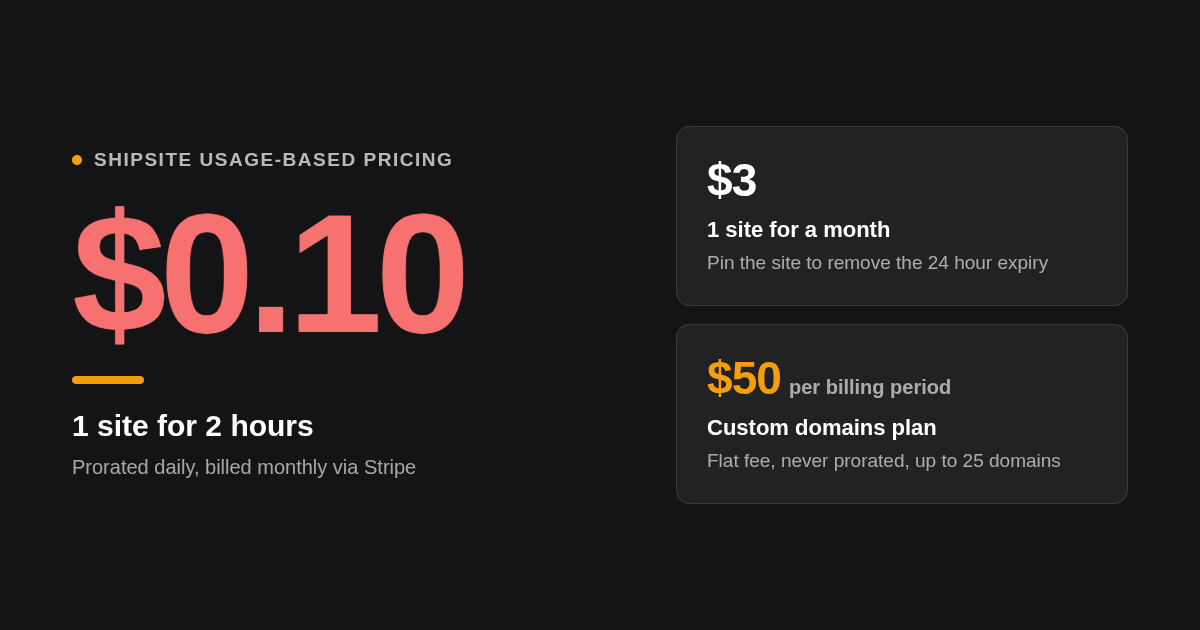
ShipSite offers a free trial. Sending POST /v1/sites with no API key deploys a site with no account and no payment. The free trial site lasts 24 hours, holds up to 50 files and 5 MB, serves 1,000 visitor requests per day, and is limited to 3 per network address per day. It gets a random address and cannot have a custom domain or password. You can keep a free trial site by claiming it into a paid account. Ongoing hosting beyond the free trial is usage based: one site for two hours costs $0.10, and every site auto-expires after 24 hours unless you pin it. There is no account dashboard to manage.
ShipSite was built for a specific job: letting an LLM agent publish a static site without leaving the conversation. There is no git, no build step, and no dashboard. The agent sends files as JSON to a single endpoint, text files as strings and binary files with a base64 prefix, and the response contains the live URL and an expiry timestamp. The free trial means even the first deploy requires no API key or Stripe checkout.
That design is why we put it first for temporary work. It works as a tool in Claude Code, Cursor, Windsurf, and any MCP-compatible agent, and the agent registration guide includes a guided track where the agent handles everything for non-technical users. Sites are served exactly as deployed, with no injected banners, badges, or tracking, which matters when the link is going to a client.
Our decision rule is simple. If the site is for a human to look at today, start with ShipSite's free trial — no account needed. If you need ongoing hosting or features like custom domains, set up a paid account where usage-based pricing starts at $0.10 per site per day. If you cannot spend anything at all beyond the trial, the rest of this guide covers the genuinely free options and their catches.
What is the fastest way to host a site temporarily with no account?
The fastest route is a zero-signup uploader. You drag an HTML file, ZIP, or folder onto the page and get an HTTPS link in seconds, with no email, password, or credit card. The trade-off is a short lifespan, usually a few days, and tight caps on file size, file count, and bandwidth.
ship.page is the clearest example in this category. Its landing page advertises temporary website hosting free for 3 days: you upload an HTML file or ZIP, get an HTTPS link, and the site is gone after the window closes. Netlify Drop works similarly for a folder drag and drop without logging in, but Netlify asks you to claim the site with an account to keep it, so confirm the current claim window before relying on it.
Published caps on tools in this category include 10 MB per HTML file, 25 MB per ZIP, and 100 files per upload. Those numbers vary by vendor and change often, so check the upload page before you compress a large demo. Video, large images, and font files are the usual reasons an upload fails.
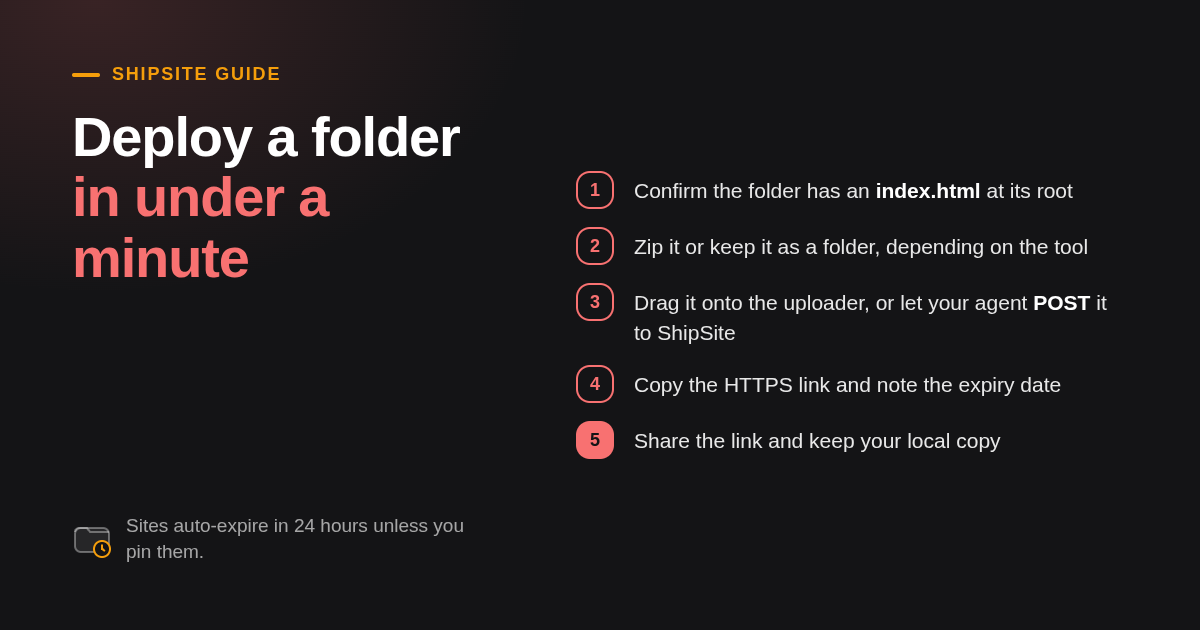
Here is the under-a-minute flow on three tools, assuming your site is already a folder with an index.html:
- ship.page: zip the folder, drag it onto the upload box, copy the link. No email required.
- Netlify Drop: drag the unzipped folder onto the drop zone, copy the link, then decide whether to claim it.
- ShipSite: your agent reads the folder and sends the files in one POST to /v1/sites — no API key needed for the free trial. The returned URL is live for 24 hours. For ongoing hosting, account setup happens once before the first paid deploy.
How long does free temporary hosting last before the site is deleted?
It depends on the category. Auto-expiring uploaders typically delete sites after a fixed window such as 3 days; ShipSite expires unpinned sites after 24 hours (including free trial sites). Free forever hosts keep sites up indefinitely but many remove accounts after a period of inactivity. Always check the expiry policy before sharing a link with a client.
The three categories behave very differently, and the difference is the whole point of choosing one over another. Auto-expiring tools publish a fixed lifespan, and ship.page's 3 day window is typical of what you will see. ShipSite publishes an expires_at timestamp in every deploy response, set 24 hours ahead, and pinning the site removes the expiry entirely.
Free forever is not the same as permanent. Free cPanel hosts commonly suspend or delete accounts that go unused for a set number of days, and the policy lives deep in the terms of service rather than on the pricing page. Developer platforms such as Netlify and GitHub Pages keep sites up as long as the account exists, which is closer to permanent than any of the others.
A practical rule: if the expiry date is something you need to remember, write it down when you share the link. Clients forward preview URLs, and a dead link a week later looks like a broken site rather than an expired one.
Should I use a static uploader or a free cPanel host with PHP and MySQL?
Pick a static uploader when your site is HTML, CSS, JavaScript, and assets, which covers demos, landing pages, and client previews. Pick a free cPanel host such as InfinityFree or ProFreeHost only when you genuinely need PHP and MySQL, and accept slower setup, resource throttling, and stricter terms of service.
Free hosting with cPanel, including names like InfinityFree, ProFreeHost, and the Byet-based hosts, exists to serve WordPress, custom PHP, and MySQL at no cost. Searches for pro free host and free unlimited hosting with cPanel land here. These hosts are useful for testing a PHP app before buying real hosting, but unlimited is a marketing word, and the real limits are expressed as daily hits, CPU, and inodes.
The catches are consistent across the category. Some free hosts insert ads or badges into your pages, some require a forum post or a captcha to keep the account active, and almost all restrict outbound email and cron jobs. Read the no ads claim carefully: it usually means no forced ads on your pages, not no upsell banners in the control panel.
Static uploaders and platforms avoid all of that because there is nothing to run. If your demo is a landing page, a React or Vue build, documentation, or a prototype that calls external APIs from the browser, static is the right tool and PHP is unnecessary weight.
Which temporary hosting option fits which job?
No single option wins every job. Zero-signup uploaders win for a one-off share today. Netlify, Vercel, and GitHub Pages win for previews tied to a repo. Free cPanel hosts win for PHP. ShipSite wins when an AI agent needs to publish from a conversation, with a free trial for your first deploys and usage-based pricing of cents for ongoing hosting.
| Option | Best for | Pricing or format | Standout limit |
|---|---|---|---|
| ShipSite | Agent-driven deploys and short-lived demos | Free trial (no API key, no account): 24 hours, 50 files, 5 MB, 1,000 requests/day, 3 per network address/day. Ongoing: $0.10 for 1 site for 2 hours, $3 for 1 site for a month | Free trial sites get a random address with no custom domain or password; claim into a paid account to keep |
| ship.page | A one-off share with zero signup | Free, no account | Advertises a 3 day lifespan; confirm current file caps on its site |
| Netlify (Free plan) | Previews tied to a Git repo | Free plan with a published bandwidth allowance of 100 GB per month; confirm current pricing | Requires an account; drag and drop sites must be claimed to persist |
| Vercel (Hobby plan) | Next.js and framework previews | Free Hobby plan limited to non-commercial use; confirm current limits | Commercial projects require a paid plan |
| GitHub Pages | Static docs and project sites | Free with a GitHub account | Published site size limit of 1 GB and a soft bandwidth limit of 100 GB per month |
| InfinityFree | Testing PHP and MySQL at no cost | Free cPanel-style hosting | Daily resource limits and inactivity suspension; no auto-expiry |
Prices and limits above are the published figures we could verify at the time of writing. Free tiers change without notice, so confirm current pricing on each vendor's site before you build a workflow around one.
Do free temporary hosts give HTTPS, and can I use my own domain?
Nearly every reputable free host now issues HTTPS automatically on its own subdomain, so a padlock is no longer a differentiator. Custom domains are where free tiers split: Netlify, Vercel, and GitHub Pages allow them at no cost, zero-signup uploaders usually do not, and ShipSite offers them as a flat $4.99 per billing period plan.
HTTPS used to be a reason to pay. It no longer is. The US federal government's HTTPS-Only Standard set the expectation years ago that every public web service should be served over HTTPS, and automated certificate issuance made that free for hosts to provide. Every option in our table serves its own subdomain over HTTPS without configuration.
Custom domains are a different story. Netlify, Vercel, and GitHub Pages all let you attach a domain you own on their free tiers, with HTTPS issued automatically. Zero-signup uploaders generally do not, because there is no account to attach the domain to. Free cPanel hosts usually allow it, but the DNS setup is manual.
ShipSite handles custom domains as an optional plan: a flat $4.99 per billing period on your regular invoice, never prorated, with nothing charged when you enable it. The plan covers up to 25 domains per account and 5 per site, and domains attach to pinned sites only. The custom domains changelog entry documents the single CNAME record to add and the status endpoint an agent polls until the domain is active.
What happens to my files after a temporary site expires?
Expiry removes the public URL, but it does not always guarantee the files are gone from backups, caches, or logs. Treat any temporary host as public: the URL can be forwarded, indexed, or guessed. Never upload credentials, customer data, or unreleased material unless the host documents its deletion process and lets you delete on demand.
This is the question no vendor landing page answers, and it is the one that matters most if the site contains anything sensitive. Expiry on most hosts means the URL stops resolving. Whether the underlying files are purged from storage, from CDN caches, and from backups is a separate question, and most free tools do not document it. NIST's guidelines for media sanitization describe what proper deletion involves, and almost no free host claims to meet them.
The safer assumption is that a temporary site is public from the moment the URL exists. Random subdomains are hard to guess, but they are trivial to forward, and anyone with the link can view the site. Free uploaders rarely offer password protection on the free plan, so if the demo contains unreleased work, use a host that lets you delete the site on demand and do so as soon as the review is done.
ShipSite serves files exactly as deployed and injects no tracking, so the only parties with access are the people you send the link to. Unpinned sites expire after 24 hours automatically, which limits the exposure window without any cleanup step from you.
When should I move from temporary hosting to permanent hosting?
Moving from temporary to permanent hosting is mostly about files and DNS. Keep a local copy of every file you uploaded, pick a host that supports your domain, push the same folder, then point your DNS record at it. On ShipSite the same move is a single pin call, which stops the 24 hour expiry. Free trial sites can be claimed into a paid account and then pinned.
Move when the site has an audience you did not personally send the link to. That is the moment expiry becomes a liability instead of a feature. For a client who approved the preview, the usual path is to deploy the same folder to a platform that supports their domain, add the DNS record, and confirm HTTPS before retiring the temporary link.
If you are moving off a free cPanel host, export the database and the public_html folder before the account hits an inactivity limit. If you are moving off a zero-signup uploader, remember that there is no account to log into, so the only copy of the site is the one on your machine.
On ShipSite the migration is shorter. Pin the site to remove the 24 hour expiry, then enable the custom domains plan and add the hostname. The same URL keeps serving, and billing continues at the usage rate, which is $3 for one site over a month.
How did we compare these options?
We compared published pricing pages, plan limit documentation, and the stated scope of each tool: what it hosts, whether signup is required, how long sites stay live, and whether HTTPS and custom domains are included. ShipSite details come from its own documentation and changelog. We did not run load tests or private benchmarks.
How do I get started with ShipSite?
Getting started is instant with the free trial: your agent sends your files in one POST to /v1/sites with no API key and no account, and you get a live URL that lasts 24 hours (up to 50 files, 5 MB, 1,000 visitor requests per day, 3 per network address per day). For ongoing hosting, your agent calls the account endpoint with your email and receives a key plus a Stripe checkout link. You click the link to activate billing. The agent then deploys with the API key, and sites can be pinned, given custom domains, or claimed from free trial deploys.
Open your agent of choice, paste in the agent registration guide, and ask it to create your ShipSite account and publish a folder. If you prefer to read the API first, the full deploy flow is a single request to /v1/sites with a files object, and everything else is optional.
What do people also ask?
What is the fastest way to host a website temporarily for free without creating an account?
Use ShipSite's free trial: send POST /v1/sites with no API key and no account to get an HTTPS link in seconds, lasting 24 hours with up to 50 files and 5 MB. Alternatively, use a zero-signup uploader such as ship.page: drag an HTML file or ZIP onto the page for an HTTPS link with no email or credit card. Expect ship.page sites to expire within days (it advertises 3 days) with caps on file size and file count. Netlify Drop also works without logging in but asks you to claim the site to keep it.
How long does free temporary hosting last before the site is deleted?
Auto-expiring uploaders delete sites after a fixed window, commonly a few days. ShipSite expires unpinned sites after 24 hours, including free trial deploys, and includes the expiry timestamp in every deploy response. Free forever hosts such as Netlify, Vercel, GitHub Pages, and free cPanel providers keep sites up indefinitely, but cPanel hosts often suspend accounts that go inactive for a set period.
Can I host PHP or MySQL sites temporarily for free, or only static HTML?
Only free cPanel-style hosts such as InfinityFree or ProFreeHost run PHP and MySQL at no cost, and they come with daily resource limits, inactivity rules, and sometimes ads. Zero-signup uploaders, Netlify, Vercel, GitHub Pages, and ShipSite are static only, meaning HTML, CSS, JavaScript, and assets.
What is the best free temporary hosting for sharing a demo or client preview link?
Start with ShipSite's free trial: send POST /v1/sites with no API key for a site that serves files exactly as deployed with no injected banners or tracking, lasting 24 hours. For ongoing hosting, a paid ShipSite account costs $0.10 for 1 site for 2 hours and auto-expires in 24 hours unless pinned. If the budget is zero beyond a single day, a Netlify or Vercel free-tier deploy gives a clean preview URL with HTTPS, and ship.page works for a one-off share that can disappear in a few days.
Is Vercel, Netlify, or GitHub Pages better than a free forever cPanel host for short-term use?
For static sites, yes. The developer platforms give you HTTPS, a free custom domain, no ads, and no inactivity suspension, with published limits such as GitHub Pages' 1 GB site size and 100 GB per month soft bandwidth cap. A free cPanel host only makes sense when you need PHP and MySQL, and you should confirm its inactivity and ad policies before sharing a link.
Related Articles



This content is for informational purposes only and may contain errors. Please contact us to verify important details.