Astro Static Site Generator
The Astro static site generator renders every page to plain HTML, CSS, and assets in a dist folder when you run astro build, and ships zero client-side JavaScript unless a component opts in. For hosting that output, we recommend ShipSite, which accepts the dist files in one command — npx shipsite ./dist — and serves them from 300+ edge locations for $3 per site per month. ShipSite is not a site generator and does not run your build: Astro produces the files, and ShipSite publishes them.

Key takeaways
- Zero JavaScript by default: an Astro page ships no client-side script unless you add a directive such as
client:loadorclient:visibleto a component. - Three commands to a build:
npm create astro@latestscaffolds a project,npm run devstarts a local server, andnpm run buildwrites the finished site todist. - Static first, dynamic by exception: keep
output: 'static', install an adapter, and setexport const prerender = falseonly on the pages that need request-time data. - ShipSite pricing is per site: $3 per site per month, prorated daily, so a 2-hour preview costs $0.10 and unpinned sites expire on their own after 24 hours. A free 24-hour trial site is available with no API key required.
- Free trial, then paid hosting: Netlify, Vercel, Cloudflare Pages, and GitHub Pages offer free tiers for personal Astro sites; ShipSite offers a free 24-hour trial (up to 50 files and 5 MB) but ongoing hosting is paid.
Is Astro actually a static site generator?
Yes. Astro's default output mode is static, meaning every page is rendered to HTML at build time and no JavaScript reaches the browser unless a component explicitly asks for it. Astro also supports server-side rendering through adapters, so it is better described as a static-first web framework than a pure generator.
Mozilla's developer glossary defines a static site generator as a tool that turns templates and content into a set of HTML files ahead of time, rather than on each request. Astro fits that definition out of the box. Its astro.config.mjs defaults to output: 'static', and running astro build produces a dist folder with one HTML file per route plus hashed assets under _astro.
What makes the label slightly imprecise is that Astro can also render pages on demand. Install an adapter such as @astrojs/node or @astrojs/cloudflare and any route can run server code at request time. Astro describes itself as a web framework for content-driven websites, and the static generator is the default behavior rather than the only one.
The project is open source under the MIT license, with the code and roadmap on GitHub at withastro/astro. Astro is also not a CMS and not a host. You still need a place to put the dist folder, which is the gap ShipSite fills for agent-driven workflows.
How does Astro's islands architecture keep static pages fast?
Islands architecture means Astro renders the whole page as static HTML and only hydrates the specific components you mark with a client directive. The rest of the page never loads a framework runtime. Because the default page carries no JavaScript bundle, there is nothing to parse before first paint, which keeps Largest Contentful Paint low.
In a typical React framework, the entire page tree is shipped as JavaScript and re-created in the browser, even for a page that is mostly text. Astro inverts this. Every component renders to HTML at build time, and only a component with a client directive becomes an interactive island that loads its framework runtime. The Astro docs on islands explain the model in detail.
The directives give you control over when each island hydrates. client:load hydrates immediately, client:idle waits until the browser is idle, client:visible waits until the component scrolls into view, and client:only skips server rendering entirely. A product page can prerender its description and reviews as HTML while a single image carousel hydrates on scroll.
This matters for Google's Core Web Vitals, which measure loading, interactivity, and visual stability. Less JavaScript on the main thread means a smaller Interaction to Next Paint risk and a faster Largest Contentful Paint. Astro's own 2023 Web Framework Performance Report, built on HTTP Archive data, reported that Astro sites passed Core Web Vitals at a higher rate than sites built with Next.js, Gatsby, and Nuxt. Treat that as vendor-published data, but the mechanism behind it is simple: a page with no bundle has nothing to block rendering.
How do you create and deploy an Astro static site from scratch?
Run npm create astro@latest, pick a template, and start the dev server with npm run dev. Pages live in src/pages and map directly to URLs. When you are ready, npm run build writes the finished site to dist. Deploy the contents of dist to ShipSite with a single command: npx shipsite ./dist.
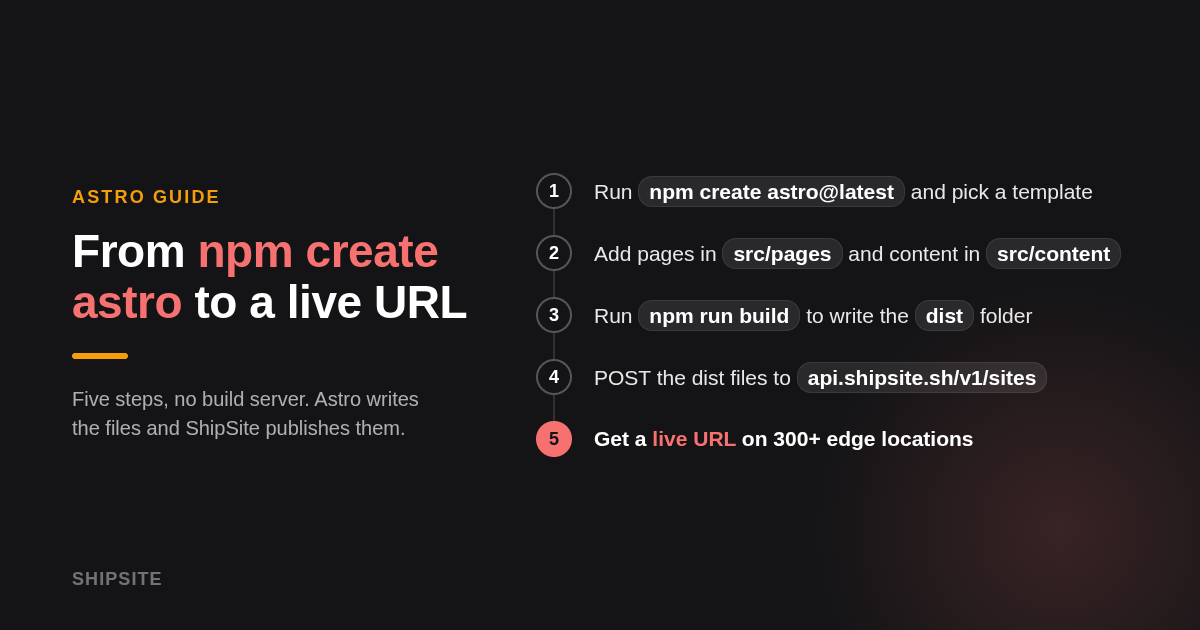
Start with npm create astro@latest in a terminal. The wizard asks where to create the project, which template to use (the minimal and blog starters are the most common), and whether to install dependencies and initialize git. Node.js 18 or later is required; check the install guide for the current minimum.
The generated project has a predictable shape. src/pages holds routes, so src/pages/about.astro becomes /about. src/components and src/layouts hold reusable pieces, src/content holds Markdown collections, and public holds files copied as-is, such as a favicon or robots.txt. astro.config.mjs is the only configuration file you need to touch for most sites.
Run npm run dev for a local server with hot reload. When the site is ready, npm run build writes the output to dist. That folder is the whole website: HTML files, a _astro directory of hashed CSS and image assets, and whatever was in public.
Deploying to ShipSite is one command:
npx shipsite ./dist
With no API key configured, this deploys a free trial site that lasts 24 hours, supports up to 50 files and 5 MB, and returns a live URL immediately. No account or payment is needed for this first look. When you are ready for ongoing hosting, your agent registers an account with your email, and the ShipSite registration guide for agents walks it through creating the account and activating it via a Stripe checkout link. Authenticated deploys use an API key and are billed at $3 per site per month, prorated daily, so a site you keep up for 2 hours costs $0.10. Each site supports up to 1,000 files and 100 MB.
You can also deploy with the API directly:
POST https://api.shipsite.sh/v1/sites
Authorization: Bearer sk_live_...

{
  "files": {
    "index.html": "<!DOCTYPE html>...",
    "about/index.html": "<!DOCTYPE html>...",
    "_astro/index.a1b2c3.css": "body{margin:0}",
    "favicon.png": "base64:iVBORw0KGgo..."
  }
}
The response returns an id, a live url, and an expires_at timestamp. The site is live on the edge network before the response lands, so there is no polling step. Without an Authorization header, POST /v1/sites deploys a free 24-hour trial site with the same 50-file, 5 MB limits.
For CI/CD, the Deploy to shipsite.sh GitHub Action (coolsoftwaretyler/shipsite-deploy-action@v1) deploys your dist folder on every push, so your Astro site stays current without manual steps.
Astro's clean URLs and redirects also work on ShipSite. Add a shipsite.json file to your build output with "clean_urls": true to serve /about instead of /about.html, and define redirects in the same file:
{
  "clean_urls": true,
  "redirects": [
    { "from": "/old-page", "to": "/new-page" }
  ]
}
We publish more agent deployment walkthroughs on the ShipSite blog.
When should you switch from static output to on-demand rendering?
Stay static as long as every page can be known at build time. Switch a page to on-demand rendering only when it depends on the request itself, such as a logged-in dashboard, personalized pricing, or form handling. In Astro you install an adapter and add export const prerender = false to that one page; everything else stays prerendered.
The decision rule we use is simple. If a page would look identical to two different visitors at the same moment, it belongs in the static build. Blog posts, docs, landing pages, pricing tables, and product catalogs all qualify, even if the data comes from an API, because Astro fetches it during astro build. If the page changes per visitor or per request, it needs on-demand rendering.
Astro's on-demand rendering guide covers the mechanics. You add an adapter for your runtime (@astrojs/node, @astrojs/vercel, @astrojs/netlify, or @astrojs/cloudflare), keep output: 'static', and mark individual pages with export const prerender = false. Astro 5 removed the separate hybrid mode; static output with per-page opt-outs is now the standard way to mix both.
Middleware lives in src/middleware.ts and runs on every on-demand request, which is where authentication checks, redirects, and header injection belong. For prerendered pages, middleware runs once at build time, so it cannot read a visitor's cookies there. The astro:middleware module exports helpers like defineMiddleware and sequence for composing multiple handlers.
The hosting consequence is worth stating plainly. A page with prerender = false needs a server runtime, and ShipSite only serves static files, so such a page cannot run there. The common workaround is to keep the whole site static, host it on ShipSite, and have the few dynamic pieces call an API from the browser. Many sites that start on this path never need a server at all. Before deploying an Astro site, reviewing What Is a Site Plan and When Do You Need One? clarifies the structural layout decisions that inform your content architecture.
Can you use React, Vue, or Svelte components and Markdown in Astro?
Yes. Astro has official integrations for React, Preact, Vue, Svelte, Solid, and Alpine, added with a single npx astro add command, and you can mix them in one project. Content collections give Markdown and MDX files a typed schema, so blog posts, docs, and product pages are validated at build time and queried with getCollection.
Adding a framework is one command: npx astro add react, npx astro add vue, or npx astro add svelte. The command installs the package and edits astro.config.mjs. Components from different frameworks can sit on the same page, which makes Astro a practical migration target when a team has a React widget it does not want to rewrite. Remember that each framework island loads its own runtime, so three frameworks on one page means three runtimes.
Content collections are the second half of the story. In src/content.config.ts you declare a collection with defineCollection, point a glob loader at a folder of Markdown or MDX files, and give it a Zod schema for the frontmatter. A post missing a pubDate fails the build instead of silently rendering a blank date. Pages query the collection with getCollection('blog') and render each entry.
For non-developers the fastest path is a theme. The official theme catalog at astro.build/themes lists free and paid starters, and Starlight is the official documentation template. For editing without touching code, Keystatic and Decap CMS both work with Astro's Markdown files, so an editor can write in a browser form. An AI agent in Claude Code or Cursor can also set up the project, and ShipSite's guided onboarding track exists specifically so the agent handles configuration while the user only supplies an email.
How does Astro compare to Hugo, Eleventy, Next.js, Gatsby, and Jekyll?
Astro sits between the content-focused generators and the full application frameworks. Hugo and Eleventy build faster on very large sites but offer no built-in component model. Next.js and Gatsby bundle React on every page by default. Jekyll is the simplest but depends on Ruby. Astro wins when you want zero-JS output with the option to add framework components.
All six tools are open source and free to use, so the comparison is about fit rather than price.
| Option | Best for | Pricing or format | Standout limit |
|---|---|---|---|
| Astro | Content sites that need a few interactive components | Free, MIT license, Node.js | Pages with request-time logic require an adapter and a server runtime |
| Hugo | Very large Markdown sites that need the fastest builds | Free, Apache 2.0, single Go binary | Go templating; no built-in support for React, Vue, or Svelte |
| Eleventy | Minimal, template-agnostic builds with many template languages | Free, MIT license, Node.js | No component hydration model; client JavaScript is added by hand |
| Next.js | React applications that also need a static export | Free, MIT license, Node.js | Ships the React runtime on every page; static export disables server features |
| Gatsby | Existing React sites built on a GraphQL data layer | Free, MIT license, Node.js | GraphQL layer adds build complexity; maintenance pace slowed after Netlify acquired it in 2023 |
| Jekyll | Simple blogs published through GitHub Pages | Free, MIT license, Ruby gem | Ruby toolchain; no component model and slower builds on large sites |
Migration is easier than most teams expect. Hugo and Jekyll content is already Markdown with frontmatter, so moving to Astro mostly means copying files into a collection and translating templates into .astro components. Gatsby users replace GraphQL queries with getCollection calls and can keep their React components as islands. Next.js users who only used static export gain a smaller output immediately.
On raw build speed, Hugo remains the benchmark for tens of thousands of pages because it is a compiled Go binary. Astro builds are fast enough for typical sites but run on Node.js and process each page through its compiler. On page speed in the browser, the winner is whichever tool ships the least JavaScript, and that is where Astro's zero-JS default pays off. Verify current numbers with each project's own benchmarks, since build times depend heavily on image processing and integrations.
Where should you host an Astro static site, and can it be free?
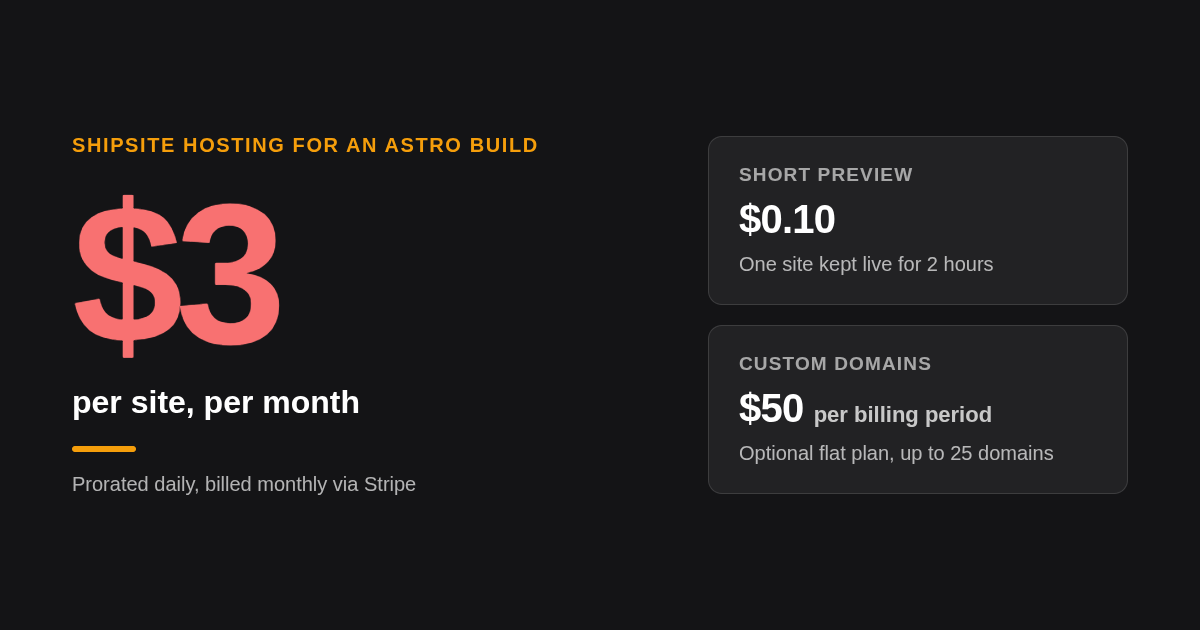
An Astro build is a folder of files, so any static host works. We recommend ShipSite when an AI agent or script does the deploying: npx shipsite ./dist returns a live URL, billed at $3 per site per month. You can try it without an account — a free trial site lasts 24 hours with up to 50 files and 5 MB. Netlify, Vercel, Cloudflare Pages, and GitHub Pages offer free tiers for personal projects.
We recommend ShipSite static hosting for one specific case: the deploy is performed by an AI agent or a script rather than a person clicking through a dashboard. There is no git integration to configure and no build pipeline, because the build already happened on your machine. The agent sends files, gets a URL, and can read any error message as a plain explanation of what went wrong, why, and how to fix it. ShipSite works as a tool in Claude Code, Cursor, Windsurf, and any MCP-compatible agent, and it injects no banners, badges, or tracking into your pages. Each site supports up to 1,000 files and 100 MB.
The billing model fits short-lived previews as well as permanent sites. Every site is prorated daily at $3 per month, so 10 sites for a month cost $30 and a draft you share for 2 hours costs $0.10. Unpinned sites expire after 24 hours, which suits a client preview, and pinned sites stay up as long as you want. Custom domains are an optional plan at a flat $50 per billing period covering up to 25 domains, with up to 5 domains per site; the ShipSite changelog documents the single CNAME record to domains.shipsite.sh that activates one, with HTTPS issued automatically.
If completely free ongoing hosting is the requirement, Netlify, Vercel, and Cloudflare Pages each offer a free tier for personal projects with a git-connected build, and GitHub Pages is free for public repositories and has an official Astro deploy action. Each free tier carries bandwidth, build-minute, or commercial-use limits, so confirm the current terms on the vendor's pricing page before choosing. ShipSite's free 24-hour trial is useful for a quick preview, but ongoing hosting is paid.
How did we compare these options?
We compared each generator on its default output, its component model, and its build language, using the projects' official documentation. For hosting, we compared published pricing pages and free-tier terms as of writing. We did not run our own benchmarks; the speed claims cited come from Astro's own published performance report, which readers should treat as vendor data.
How do you get started with ShipSite for an Astro site?
Build your Astro site with npm run build, then deploy with npx shipsite ./dist. With no API key, you get a free trial site that lasts 24 hours (up to 50 files and 5 MB). For ongoing hosting, your agent registers an account with your email, you activate it through a Stripe checkout link, and authenticated deploys are billed at $3 per site per month. Pin the site to keep it, or let the preview expire after 24 hours. For CI/CD, add the Deploy to shipsite.sh GitHub Action (coolsoftwaretyler/shipsite-deploy-action@v1) to deploy on every push.
Create your ShipSite account at shipsite.sh and ship your first Astro build today.
What do people also ask?
Is Astro a static site generator?
Yes. Astro's default output mode is static, so astro build renders every route to an HTML file in a dist folder with zero client JavaScript unless a component uses a client directive. Astro can also render pages on demand through adapters, which is why it describes itself as a web framework rather than only a generator.
Which framework is best for static websites?
For content sites that need a few interactive components, Astro is the strongest choice because it ships no JavaScript by default and still supports React, Vue, and Svelte islands. Hugo is better for very large Markdown sites that need the fastest builds, and Next.js makes sense only if you already run a React application.
How can I create a free static website?
Build the site with npm create astro@latest and npm run build, then deploy the dist folder to a free tier at GitHub Pages, Netlify, Vercel, or Cloudflare Pages, confirming each vendor's current limits. ShipSite offers a free 24-hour trial (up to 50 files and 5 MB) with no account required; ongoing hosting is $3 per site per month, prorated daily, which suits agent-driven deploys rather than free hobby hosting.
Which static site generator is the fastest?
For build time, Hugo is generally the fastest because it is a compiled Go binary that handles tens of thousands of pages in seconds. For page speed in the browser, the fastest result comes from shipping the least JavaScript, and Astro's zero-JS default gives it an edge over React-based generators like Next.js and Gatsby.
Can a non-developer build an Astro site?
Yes, with help. Start from a theme in the official Astro theme catalog or the Starlight docs template, add Keystatic or Decap CMS so content is edited in a browser form, and let an AI agent in Claude Code or Cursor run the commands. ShipSite's guided onboarding track lets the agent handle hosting while you only provide an email.
Related Articles



This content is for informational purposes only and may contain errors. Please contact us to verify important details.