Simplest API Based Web Deployment 2026
The simplest API based web deployment 2026 has to offer is ShipSite: one POST request to /v1/sites with your files as JSON returns a live URL on a global edge network — no API key, no account, no credit card. That first deploy is a free trial: up to 50 files, 5 MB, live for 24 hours. To keep a site beyond 24 hours or deploy more, create an account and complete Stripe checkout; paid sites cost $3 per site per month, prorated daily. It is static hosting only, so it does not run Node, Python, or Docker backends. If you need a server runtime, Fly.io or Render are the most API-friendly alternatives, but each needs more steps before the first deploy.
Key takeaways
- One request, no signup: ShipSite deploys a site with a single
POST https://api.shipsite.sh/v1/sitescall — no API key required for a free trial — and the response includes the live URL and anexpires_attimestamp. - Usage pricing: 1 site for a month costs $3, 10 sites cost $30, and 1 site for 2 hours costs $0.10, prorated daily and billed monthly through Stripe.
- Extra setup elsewhere: Vercel, Netlify, and Cloudflare Pages expose deploy APIs, but each expects a project or site record to exist first, which adds at least one step before the deploy call.
- Static only: ShipSite does not run servers or containers; for those, Fly.io's Machines API is the most API-driven option.
- Self-cleaning: ShipSite sites auto-expire after 24 hours unless pinned, so throwaway deploys from scripts and agents do not accumulate cost.

Which deploy mechanisms count as API based web deployment in 2026?
API based deployment means your code reaches a live URL through a programmatic call rather than a dashboard click. In practice that covers four mechanisms: a REST endpoint that accepts files, a CLI that wraps that endpoint, a git push that triggers a build, and a webhook or deploy hook URL that a script or CI job can call.
The distinction matters because the word simplest depends on which mechanism you count. A git push deploy looks easy, but it hides a repository, a build configuration, and a platform project behind the push. A REST endpoint that accepts files directly has no hidden steps: the request is the whole deploy.
The pages currently ranking for this query list platforms but never show an actual deploy call. So this guide counts steps explicitly: how many credentials you need, how many resources you must create before the first deploy, and how many requests it takes to get a URL back.
Who runs deploys is also changing. McKinsey's State of AI research reports that most organizations now use AI in at least one business function, and coding assistants are a common entry point. A deploy API that an agent can call cleanly, and recover from when it fails, is now a practical requirement rather than a nicety.
Which platform deploys a site with the fewest steps using only an API call?
ShipSite deploys with the fewest steps: one POST request containing your files returns a live URL, with no project to create, no manifest, and no build pipeline. For a free trial deploy, you do not even need an API key. Vercel and Netlify also expose deploy endpoints, but both expect an existing project or site record and a token with the right scope before the first deploy succeeds.
This is the entire ShipSite deploy flow:
POST https://api.shipsite.sh/v1/sites

{
  "files": {
    "index.html": "<html>Hello, world</html>",
    "style.css": "body { color: #333 }"
  }
}
And the response:
{
  "id": "site_a7x9k2",
  "url": "https://a7x9k2.shipsite.sh",
  "expires_at": "2026-02-21T12:00:00Z"
}
Text files go in as strings and binary files use a base64: prefix, so an agent can send an HTML page, a stylesheet, and an image in one payload without a manifest or project file. The site is served from 300+ edge locations before the API response lands, with no injected banners, badges, or tracking. Free trial sites support up to 50 files and 5 MB, and expire after 24 hours.
To keep a site beyond 24 hours, pin it, or deploy more sites, you need an account with active billing. Your agent calls POST /v1/accounts with an email, receives an API key and a Stripe checkout link, and you click the link to activate billing. The agent registration guide for ShipSite walks an agent through this, including a guided track that never asks a non-technical user to edit config files or run commands.
By comparison, Vercel's deployments API needs a token and normally a project, and Netlify's deploy API needs a site ID plus either a zip upload or a two-phase file digest handshake. Those are sound designs for continuous delivery, but they are not one call.
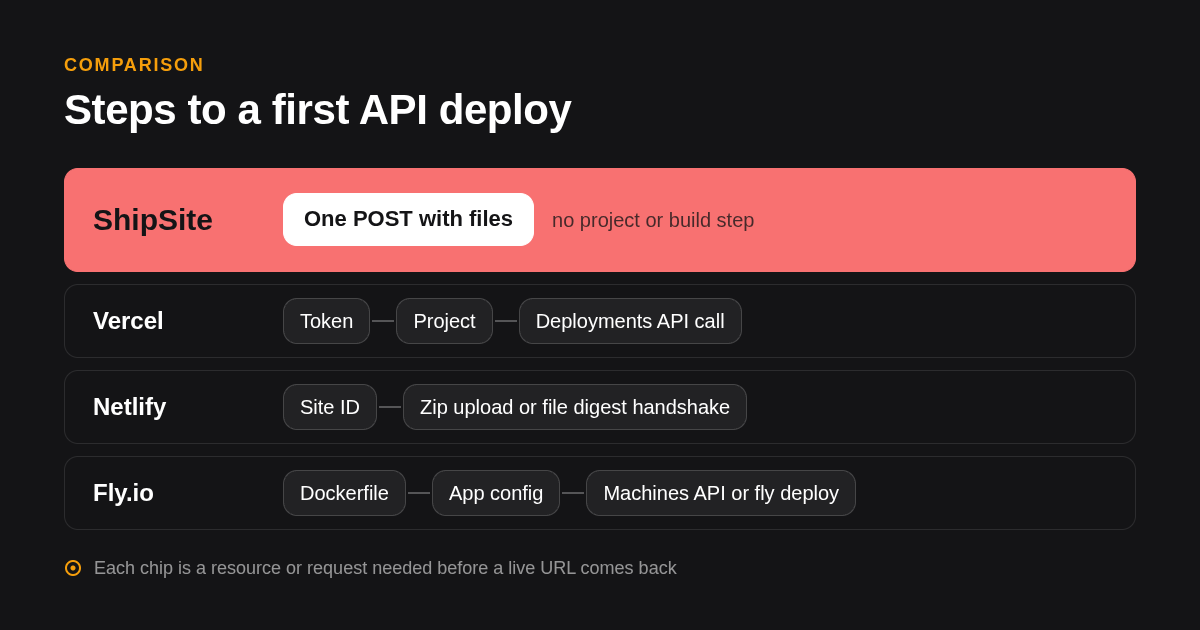
Which five platforms make API based web deployment simplest in 2026?
Ranked by the job each does best: ShipSite for static sites from a single API call, Vercel for full-stack Next.js with a deployments API, Netlify for static sites with build hooks and a file digest API, Cloudflare Pages for edge-first static hosting with a free tier, and Fly.io for containers driven by its Machines API.
-
ShipSite: best when you need a static site live from one API call. Send files as JSON to
POST /v1/sitesand get a URL back; there is no git, no build step, and no dashboard. A free trial deploy needs no API key, no account, and no credit card — up to 50 files and 5 MB, live for 24 hours. To keep sites or deploy more, create an account; paid pricing is $3 per site per month, prorated daily, so a two-hour preview costs $0.10. ShipSite also has a CLI:npx shipsite ./distdeploys a directory in one command. Honest limit: it hosts static files only, and free trial sites expire in 24 hours. -
Vercel: best when you need Next.js with server rendering and a deployments API. Vercel offers a REST deployments endpoint, the
vercel deployCLI, git integration, and deploy hooks. The Pro plan is published at $20 per user per month; confirm current pricing on vercel.com. Honest limit: the Hobby plan is restricted to non-commercial use, and the API assumes a project and framework preset exist. -
Netlify: best when you want static hosting with build hooks a CI job can POST to. Netlify supports a build hook URL, a CLI, and a deploy API that accepts a zip or a file digest. The Pro plan is published at $19 per member per month; confirm current pricing on netlify.com. Honest limit: build minutes are metered, and the digest-based API deploy is a multi-request flow.
-
Cloudflare Pages: best when you want edge-first static hosting on a free plan. The free plan includes 500 builds per month with unlimited bandwidth; confirm on cloudflare.com. Direct uploads go through the Wrangler CLI. Honest limit: Cloudflare now steers new projects toward Workers with static assets, so check which product you are adopting, and direct upload is CLI-centric rather than a single documented REST call.
-
Fly.io: best when you need Docker containers controlled through a REST API. The Machines API lets a script create, start, and stop VMs by HTTP, and
fly launchplusfly deploycover the CLI path. Pricing is usage-based on compute and storage with no flat plan to quote here. Honest limit: you own the Dockerfile, region choices, and scaling rules, which is the opposite of zero-config.
| Option | Best for | Pricing or format | Standout limit |
|---|---|---|---|
| ShipSite | Static sites from one API call, agent deploys | Free trial (no signup); $3 per site per month, prorated daily | Static only, free trial limited to 50 files / 5 MB / 24 hours |
| Vercel | Full-stack Next.js with REST deployments API | Free Hobby, Pro $20 per user per month (confirm) | Hobby is non-commercial; project must exist first |
| Netlify | Static sites with build hooks and CI triggers | Free Starter, Pro $19 per member per month (confirm) | Metered build minutes; multi-request digest deploys |
| Cloudflare Pages | Edge-first static hosting on a free plan | Free plan with 500 builds per month (confirm) | CLI-centric uploads; product is converging into Workers |
| Fly.io | Containers managed through the Machines API | Usage-based compute and storage | You manage Dockerfile, regions, and scaling |
How do API, CLI, and git push deploys differ, and which is simplest for a solo developer?
A git push deploy ties releases to a repository and a platform-managed build, a CLI deploy wraps the platform API in a local command, and a direct API deploy sends files or a build artifact over HTTP. For a solo developer shipping static output, the direct API call is simplest because it has no repository or build runner to maintain.
Use this decision rule. If several people commit to one repo and every merge must deploy, git push integration on Vercel, Netlify, or Render is the right fit, because the platform owns the build queue. If a script, a cron job, or an AI agent produces the files, a direct API call is shorter, because there is nothing to commit.
The CLI sits in the middle. Vercel CLI, Netlify CLI, Wrangler, and flyctl all call their platform's API for you, but each needs installation, login, and a local config file, which is exactly the part that breaks inside a container or an agent sandbox. ShipSite's CLI — npx shipsite ./dist — skips the install and login steps for free trial deploys, making it the lightest CLI option for one-off static deploys.
Can an AI agent or CI pipeline trigger a deploy without touching a dashboard?
Yes. Every platform in this guide can be triggered from a script or CI job through a token and an HTTP call, and Netlify, Vercel, and Render also offer deploy hook URLs. ShipSite goes further by shipping as an MCP tool for Claude Code, Cursor, Windsurf, and any MCP-compatible agent, with error messages written so the agent can self-correct. A free trial deploy needs no token at all, so an agent can ship a site without any prior credentials.
Deploy hooks deserve a precise definition. A deploy hook is a URL you POST to that tells the platform to rebuild from the connected repository. It is agent-triggerable, but the files still have to be in git first, so it does not remove the repository step.
ShipSite's approach removes that step by accepting files in the request body. Every error response says what went wrong, why, and how to fix it, which is what lets an agent retry without a human reading logs. The @shipsite/mcp package at version 0.2.0 adds domain tools such as add_domain, check_domain, and enable_custom_domains alongside site deploys.
The registration guide is also written for agents rather than people. It instructs the agent to ask one plain question about the user's comfort level, then either run a developer track or a guided track where the agent saves the API key itself to a file such as .shipsite-key and never uses words like token or endpoint with the user. Stanford's AI Index report documents how quickly AI adoption and developer tooling have grown, and that growth is why agent-first onboarding now matters.
Does the simplest option support your stack: static, Next.js, Python, or Docker?
ShipSite serves static files only: HTML, CSS, JavaScript, images, and anything a browser can load directly. For Next.js with server rendering choose Vercel or Netlify, for Python, Django, or Flask choose Render, Railway, or Fly.io, and for arbitrary Docker containers choose Fly.io, Railway, or DigitalOcean App Platform.
Static covers more than people expect. A Next.js or Astro project exported to static HTML, a Vite single-page app, documentation, landing pages, and anything an LLM generates as plain files all fit a static host. The moment you need a request handler, a database connection, or a secret at runtime, you need a server platform.
For server runtimes, the API story is thinner but real. Render exposes deploy hooks and an API, and its free instances spin down after 15 minutes of inactivity, which produces cold starts on the first request. Railway offers a GraphQL API and railway up, with a Hobby plan published at $5 per month that includes usage credit; confirm on railway.com. Heroku still deploys by git push with buildpacks and has a Platform API, and Firebase Hosting deploys through its CLI, while DigitalOcean App Platform accepts an app spec through its API.
How do custom domains, HTTPS, environment variables, and rollbacks work through the API?
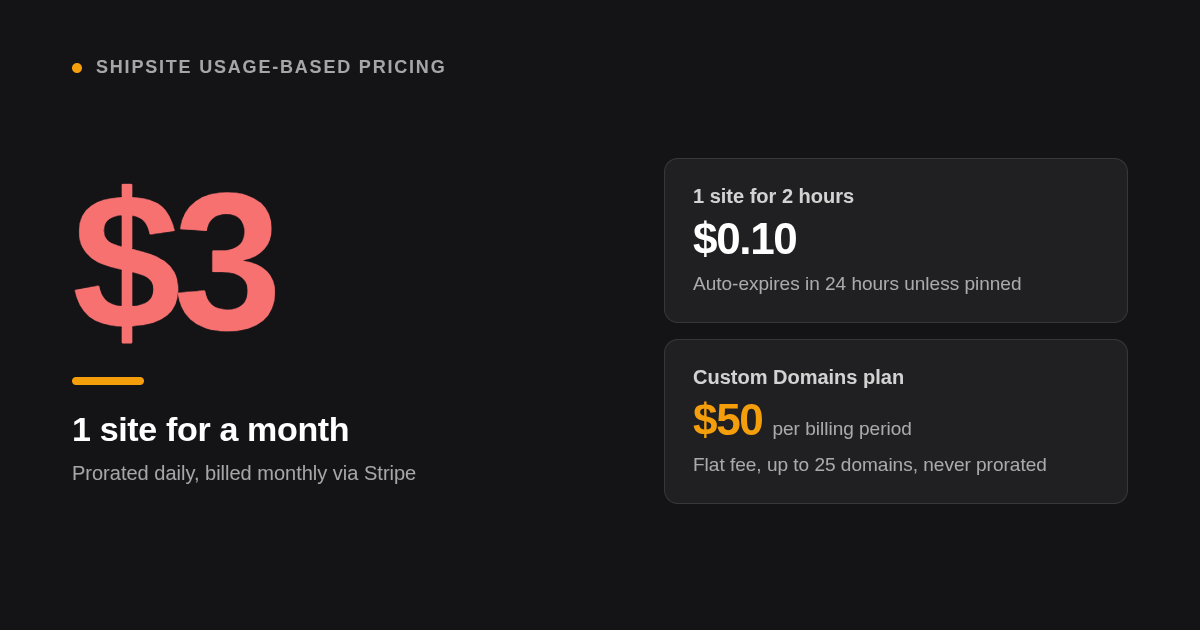
On ShipSite you add a domain with POST /v1/sites/:id/domains, create the single CNAME the response returns, and poll until status is active; HTTPS is issued automatically. The Custom Domains plan is a flat $4.99 per billing period for up to 25 domains.
The domain flow is designed to be relayed by an agent. The response to POST /v1/sites/:id/domains includes the CNAME target domains.shipsite.sh and a next_step field the agent can read back to the user, then GET /v1/sites/:id/domains/:hostname reports when status reaches active. Domains attach to pinned sites, with up to 5 per site and 25 per account, and the plan is never prorated and nothing is charged at enable time. Full details are in the ShipSite changelog entry on custom domains.
Rollback on ShipSite is a first-class feature. PUT /v1/sites/:id updates a site in place in one atomic step, and ShipSite keeps the 10 newest versions of every site. To restore a previous version, call POST /v1/sites/:id/rollback, which instantly promotes the prior version. Combined with add_domain and remove_domain, this gives you full control over what visitors see without creating throwaway site IDs.
On Vercel and Netlify, environment variables, domains, and certificates each have their own API endpoints, and rollback means promoting an earlier deployment to production. On Fly.io, secrets are set through the CLI or API, and certificates are requested per hostname.
Is there a genuinely usable free tier for API deploys in 2026?
ShipSite offers a free trial rather than a free tier: send POST /v1/sites with no API key and no account, and you get a live site for 24 hours, up to 50 files and 5 MB. To keep a site beyond 24 hours or deploy more, you need an account with Stripe checkout; the published example for a site that lives two hours is $0.10. Cloudflare Pages, Vercel Hobby, Netlify Starter, and Render's free instances are genuinely usable for personal projects, with limits on commercial use, build minutes, or idle spin down.
Free tiers trade money for constraints. Vercel's Hobby plan excludes commercial use, Netlify's free plan meters build minutes and bandwidth, Cloudflare caps free builds at 500 per month, and Render's free services sleep when idle. For a hobby site that changes once a week, any of them works.
ShipSite's model fits a different pattern: many short-lived sites created by scripts or agents. The free trial lets you see the full flow — one POST, one live URL — without entering a credit card. Beyond the trial, a preview that lives 2 hours costs $0.10, ten sites for a month cost $30, and anything you do not pin disappears after 24 hours, so the bill tracks what is actually live. To see the deploy sequence end to end, visit the ShipSite homepage.
Where do the comparison figures in this guide come from?
We compared the published pricing pages, API documentation, and plan limits of ShipSite, Vercel, Netlify, Cloudflare Pages, Fly.io, Render, and Railway as of early 2026, counting the credentials, resources, and requests needed before a first URL is live. ShipSite details come from its own documentation and changelog.
What is the shortest path to a first ShipSite deploy?
Send your files to POST /v1/sites — no API key, no account — and open the URL in the response. That free trial site lives for 24 hours with up to 50 files and 5 MB. Or use the CLI: npx shipsite ./dist. To keep sites or deploy more, ask your agent to register with ShipSite, or run it yourself: call POST /v1/accounts with your email, click the Stripe checkout link that comes back, and add an Authorization: Bearer sk_live_... header to future requests.
Which questions come up most about API deploys?
Which platform lets you deploy a web app with the fewest steps using only an API call?
ShipSite, for static sites: a single POST to https://api.shipsite.sh/v1/sites with your files as JSON returns a live URL, with no project, manifest, build step, API key, or account required for a free trial. Vercel and Netlify also have deploy APIs but require a project or site record and a scoped token first.
What is the difference between deploying via API, CLI, and git push, and which is simplest for a solo developer?
An API deploy sends files over HTTP, a CLI wraps that API in a local command that needs install and login, and git push triggers a platform build from a repository. For a solo developer or an agent producing static files, the direct API call is simplest because nothing has to be committed or installed. ShipSite also offers a lightweight CLI — npx shipsite ./dist — that skips login for free trial deploys.
Can I trigger a deployment from a script, CI pipeline, or AI agent without touching a dashboard?
Yes. All major platforms accept token-authenticated HTTP calls, and Vercel, Netlify, and Render add deploy hook URLs. ShipSite also runs as an MCP tool in Claude Code, Cursor, and Windsurf, and its error responses explain what failed and how to fix it so agents can retry on their own. A free trial deploy needs no token at all.
How does Vercel compare to Netlify, Railway, Render, and Fly.io for programmatic deploys?
Vercel and Netlify are strongest for frontend and Next.js projects with REST deploy endpoints and build hooks. Render and Railway cover Python, Node, and containers with deploy hooks, a REST API, and a GraphQL API respectively. Fly.io is the most API-driven for containers through its Machines API, at the cost of managing Dockerfiles and regions yourself.
Which platform is best for API backends versus frontend sites?
For frontend and static sites, ShipSite is simplest for API-driven deploys, with Vercel, Netlify, and Cloudflare Pages as git-integrated alternatives. For API backends and services that need a runtime, choose Fly.io, Render, or Railway, since ShipSite hosts static files only.
Related Articles



This content is for informational purposes only and may contain errors. Please contact us to verify important details.