Where to Deploy Sites Built in Cursor or Windsurf: 7 Hosts Compared
On this page
- Why does the host matter when a Cursor or Windsurf agent ships the site?
- Which seven hosts fit sites built in Cursor or Windsurf?
- What is the shortest path from the editor to a live URL?
- Can you deploy a Cursor or Windsurf site for free, and what are the limits?
- Which host should you choose for a static page versus a full-stack app?
- When does self-hosting on a VPS beat Vercel for cost or control?
- Why do AI-generated builds break in production, and how do you fix them?
- What have we observed running ShipSite with coding agents?
- What facts did we check for each host?
- How do you get started with ShipSite?
- What do people also ask?
The best website deployment for Cursor and Windsurf users depends on what the editor produced. For a static site, we recommend ShipSite: the agent sends the files in one POST request and the response contains a public URL that already works, priced at $0.10 per site per day with no free tier. ShipSite is not an application host. It serves static files only, so a Next.js app with server rendering, auth, or a database belongs on Vercel, Netlify, or a self-hosted PaaS, which are the next picks below.

Key takeaways
- One request to live: ShipSite deploys a static site from Cursor or Windsurf with a single
POST /v1/sitesrequest and returns a live HTTPS URL in the response, with no build step and nothing to poll. - Pricing: ShipSite costs $0.10 per site per day, has no free tier, and unpinned sites expire after 24 hours, which suits agents that generate many short-lived previews.
- Free options: Vercel's Hobby plan and Netlify's free plan cost nothing for personal projects as of November 2026, but a Vercel API deployment is a preview by default and preview URLs ask visitors to log in under Standard Protection.
- MCP is the shortcut: Cursor and Windsurf both load MCP servers, so a host with an MCP endpoint turns deployment into a tool call; ShipSite's hosted server is at mcp.shipsite.sh/mcp.
- Full-stack needs more: an app with a database built in either editor needs an application host plus a backend such as Supabase or Firebase; no static host on this list runs a database.
Why does the host matter when a Cursor or Windsurf agent ships the site?
Website deployment for Cursor and Windsurf users is the step that turns files generated inside an AI editor into a public URL. ShipSite is our top pick for static sites because the agent sends the files in one request and gets a working link back, at $0.10 per site per day, with no build step and no dashboard.
Cursor and Windsurf are AI code editors with agent modes that write files, run terminal commands, and call tools. The part they do not do on their own, as of November 2026, is host the result. Cursor relies on terminal commands and MCP servers for deployment, as described in Cursor's documentation, while Windsurf's Cascade agent adds a deploy action backed by Netlify, documented at docs.windsurf.com.
That difference matters because the agent, not the developer, is often the one deploying. A host that needs a dashboard click, a browser-created token, or a project settings form stops an agent mid-task. Reddit threads about Cursor deployments usually land on Vercel for Next.js, which is a fair default for apps, but the agent still has to get project settings right and work around a login wall on preview URLs.
Which seven hosts fit sites built in Cursor or Windsurf?
The seven best website deployment options for Cursor and Windsurf users are ShipSite, Vercel, Netlify, Cloudflare Pages, GitHub Pages, Render, and Coolify. ShipSite ranks first for agent-driven static sites because one API call returns a live public URL. Vercel and Netlify rank next for Git-connected apps, and Coolify covers teams that want their own server.
ShipSite: best when an agent ships many small static sites. The agent sends
POST /v1/siteswith a JSON map of files and the response contains a public URL that is already serving; there is no build and nothing to poll. Cursor loads the hosted MCP server athttps://mcp.shipsite.sh/mcp, or a local one withnpx @shipsite/mcp, so a deploy becomes a tool call. Pricing is $0.10 per site per day with no free tier, and unpinned sites clean themselves up after 24 hours. The honest limit: ShipSite serves static files only, so it cannot run server code, a build, or a database, and it handles smaller sites than Netlify does.Vercel: best when the editor produced a Next.js app. Vercel builds the framework, runs serverless functions, and creates a preview deployment for every Git push, and its Hobby plan is free for personal, non-commercial use as of November 2026, per Vercel's pricing page; confirm current limits there. Through the API,
POST /v13/deploymentsneeds a project name,projectSettingson a project's first deployment, and"target": "production", otherwise the deployment is a preview that asks for a Vercel login under Standard Protection, as explained in Vercel's deployment protection docs. The agent also pollsreadyStateuntil it readsREADY. We compare the two flows request by request in ShipSite vs Vercel. The honest limit: more fields to get right before a stranger can open the link.Netlify: best when a Windsurf user wants one-click deploys from Cascade. Netlify's API creates and deploys a site from one
POST /api/v1/sitesrequest with a ZIP file as the body, as documented in Netlify's API guide, and its free plan covers a personal project. Windsurf's built-in deploy action targets Netlify, so Windsurf users get the shortest click path here. The honest limits, as of November 2026: the API is capped at 100 deploys a day, a person has to create the personal access token in the dashboard, and the agent still polls until the deploy state isready. Our ShipSite vs Netlify page lists the request formats side by side.Cloudflare Pages: best when you want a free global CDN for a frontend. The free plan allows 500 builds per month, 20,000 files per site, and a 25 MiB maximum file size, per Cloudflare's Pages limits page as of November 2026. Git-connected deploys and the
wrangler pages deploycommand both work from a terminal inside Cursor or Windsurf. The honest limit: server rendering needs Pages Functions or Workers, and Cloudflare now points new projects toward Workers with static assets, so confirm which product to start on.GitHub Pages: best when the public repo is already the source of truth. GitHub Pages is free for public repositories, with a published source repository limit of 1 GB, a soft bandwidth limit of 100 GB per month, and a soft limit of 10 builds per hour, per GitHub's Pages limits documentation as of November 2026. A GitHub Actions workflow written by the agent handles the build. The honest limit: static files only, no server code, and Pages on a private repository requires a paid GitHub plan.
Render: best when a Cursor-built frontend needs a backend service next door. Render hosts static sites at no charge and runs web services, background workers, and Postgres on the same account, as described in Render's static site docs. That makes it a simple pairing when the agent generated both a React frontend and an Express API. The honest limit: free web services spin down after a period of inactivity, so the first request after a pause is slow; confirm current free-tier bandwidth and spin-down rules on Render's site.
Coolify: best when you want your own VPS with a Vercel-like workflow. Coolify is open source and free to self-host on any Linux server, with a paid Coolify Cloud option for the control plane, per coolify.io. You get Git-connected deploys, Docker-based services, and no per-seat pricing, and the agent can write the Dockerfile. The honest limit: you pay the VPS bill separately and you handle updates, backups, and monitoring yourself.
| Option | Best for | Pricing or format | Standout limit |
|---|---|---|---|
| ShipSite | Agents publishing many small static sites | $0.10 per site per day, no free tier, one POST request | Static files only, no builds or server code |
| Vercel | Next.js apps with server rendering | Free Hobby plan for non-commercial use; paid plans above | API deploys are previews behind a login unless target is production |
| Netlify | Windsurf one-click deploys and ZIP API deploys | Free plan; ZIP upload in one request | API capped at 100 deploys a day |
| Cloudflare Pages | Free global CDN for a frontend | Free plan with 500 builds per month | Server rendering needs Workers or Functions |
| GitHub Pages | Static sites in public repos | Free for public repos, 1 GB site limit | No server code, private repos need a paid plan |
| Render | Frontend plus a backend service on one account | Free static sites; paid services | Free web services spin down when idle |
| Coolify | Self-hosted PaaS on a VPS | Open source, free to self-host; VPS billed separately | You maintain the server |
What is the shortest path from the editor to a live URL?
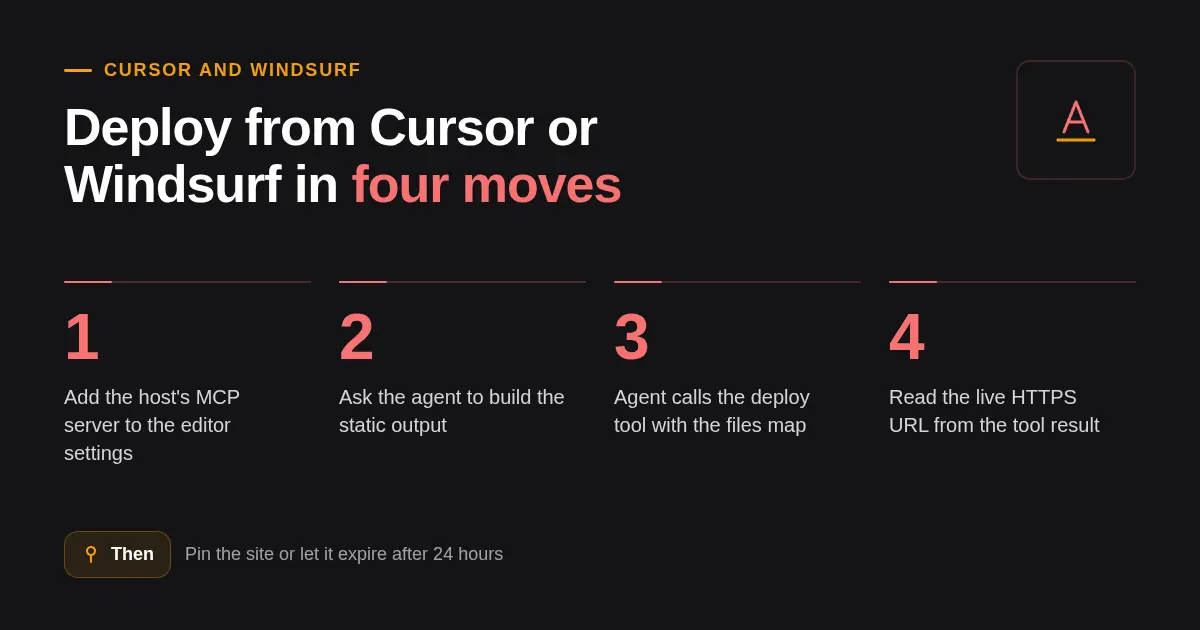
Cursor and Windsurf both load MCP servers, so the shortest path is a host with an MCP endpoint the agent can call as a tool. ShipSite exposes one at mcp.shipsite.sh, so a Cursor agent can deploy without writing an HTTP request. Windsurf's Cascade also ships a built-in deploy action backed by Netlify that publishes without a Git push.
For Cursor, add the host's MCP server to the editor's MCP settings. Cursor supports remote servers over HTTP and local servers started by a command, so a hosted endpoint such as https://mcp.shipsite.sh/mcp or a local npx @shipsite/mcp both work; the Model Context Protocol itself is an open standard documented at modelcontextprotocol.io. Once connected, the agent calls the deploy tool with the files and reads the URL from the result. We walk through the setup in our guide to hosting that works with Claude Code and Cursor agents.
For Windsurf, Cascade's deploy action publishes the current project to Netlify without leaving the editor, which is the fastest path for a Windsurf user who is happy on Netlify. Windsurf also loads MCP servers, so the ShipSite route works there as well.
The Git path works in both editors and is the one most tutorials describe: scaffold the project, run git init and push to GitHub, connect the repository in Vercel or Netlify, let the host build it, then add environment variables in the host's settings. It takes more steps than an API or MCP deploy, but it gives you a preview deployment on every pull request. It is the right path for a project that will live for months.
A decision rule we use: if the output is a folder of HTML, CSS, and JS and the agent is doing the deploying, use an API or MCP host. If the output is a framework app with a build step and a human will maintain it, connect the repo.
Can you deploy a Cursor or Windsurf site for free, and what are the limits?
Yes, a site built in Cursor or Windsurf can be deployed for free on Vercel's Hobby plan, Netlify's free plan, Cloudflare Pages, GitHub Pages, or Render static sites, as of November 2026. The limits are bandwidth, build minutes, and non-commercial terms on some plans. ShipSite has no free tier; it charges $0.10 per site per day.
Vercel's Hobby plan is free and intended for personal, non-commercial projects, and its current bandwidth and function allowances are published on Vercel's pricing page, which is the place to confirm them because they change. Netlify's free plan includes build minutes and bandwidth allowances listed on Netlify's own pricing page, and its API is capped at 100 deploys a day. Cloudflare Pages allows 500 builds a month on the free plan, GitHub Pages is free for public repositories with a 1 GB site limit, and Render hosts static sites at no charge.
Free tiers are the right default for one site you keep. They are the wrong fit when an agent produces dozens of throwaway previews, because every forgotten deploy counts against builds or bandwidth, and on Vercel each preview URL sits behind a login unless the project's protection settings are changed. ShipSite handles that case differently: each site costs $0.10 per day, there is no per-deploy charge, and a site that nobody pins disappears after 24 hours, so a forgotten preview stops costing anything on its own. We list more free and paid options in our roundup of alternatives to Netlify for API deploys.
Which host should you choose for a static page versus a full-stack app?
Static landing pages built in Cursor or Windsurf fit ShipSite, GitHub Pages, or Cloudflare Pages. Next.js apps with server rendering fit Vercel first and Netlify second. Full-stack apps with a database and auth pair a host like Vercel or Render with Supabase or Firebase. ShipSite serves static files only and cannot run a server or database.
| Project type | Best host | Why |
|---|---|---|
| Static landing page or prototype generated by an agent | ShipSite | One request returns a public URL; $0.10 per site per day |
| Static site in a public GitHub repo | GitHub Pages or Cloudflare Pages | Free, Git-connected, served from a CDN |
| Next.js with server rendering or API routes | Vercel, then Netlify | Framework builds, serverless functions, preview deployments |
| Full-stack app with database and auth | Vercel or Render plus Supabase or Firebase | The host runs the app; the backend service runs the database, auth, and storage |
| Backend for an Android or iOS app | Supabase, Firebase, or Back4App | Mobile SDKs, auth, hosted database |
| Several services on one server | Coolify or Dokploy on a VPS | Fixed monthly cost, full control |
For full-stack apps, the editor usually generates a frontend plus a Postgres schema or Firebase config. Supabase's free plan gives a hosted Postgres database with auth and storage, with limits and project pausing rules published on Supabase's pricing page as of November 2026. Firebase's free Spark plan and Back4App's free plan fill the same role, and each ships mobile SDKs, which is why an Android app built in Cursor needs one of them rather than a static host.
Managed AI builders such as Bolt.new, Lovable, Replit, and Hostinger Horizons bundle hosting with the generator. The trade-off is portability: a code-first editor plus a separate host leaves you with a plain repository you can move anywhere, while a bundled builder ties the deploy to its own platform.
When does self-hosting on a VPS beat Vercel for cost or control?
Self-hosting with Coolify or Dokploy on a VPS makes more sense than Vercel when a team runs several always-on services, needs long-running processes, or wants a fixed monthly bill instead of usage charges. Managed hosts like Vercel win when a solo developer wants zero server maintenance. Running a VPS means you patch, back up, and monitor it yourself.
Coolify and Dokploy both install on a single Linux server and give you Git-connected deploys, Docker-based services, and a dashboard, with no per-seat fee. The agent in Cursor or Windsurf can write the Dockerfile and compose file, which removes most of the setup that used to make self-hosting slow. Railway sits in the middle: a managed PaaS with usage-based pricing that runs containers and databases without a VPS, with current rates on Railway's own pricing page.
Our rule of thumb: count services and uptime. One static site or one Next.js app with light traffic belongs on a managed free tier. Three or more always-on services, a background worker, or a websocket server justify a VPS, because Vercel's serverless model charges per invocation and does not run long-lived processes.
Why do AI-generated builds break in production, and how do you fix them?
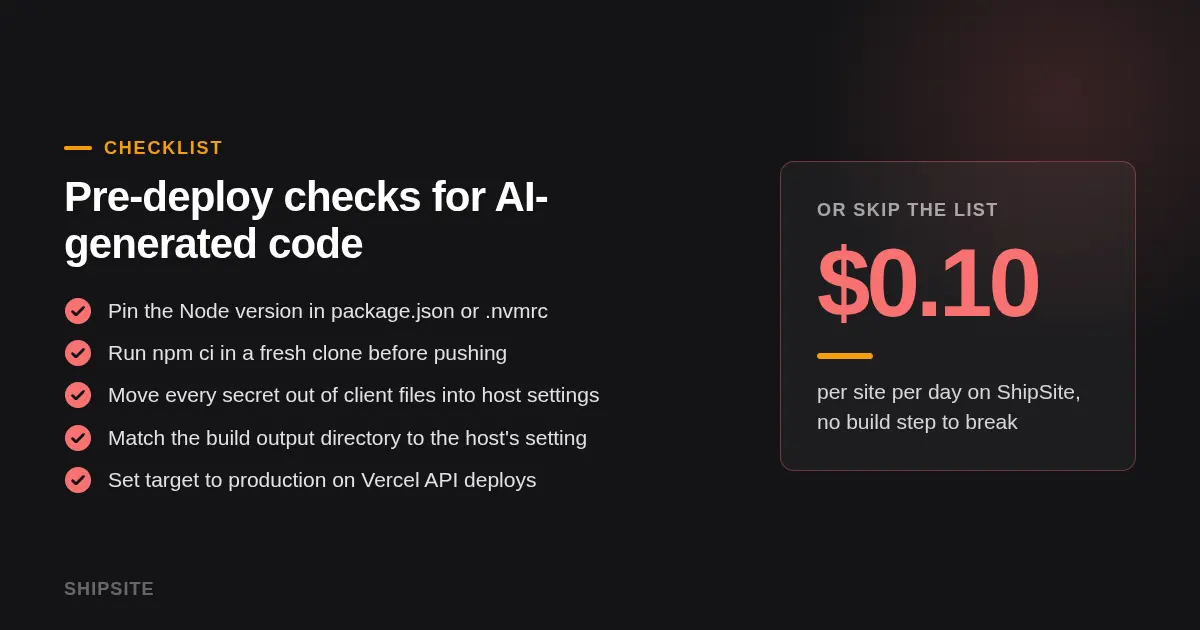
AI-generated code from Cursor or Windsurf most often breaks in production because of Node version mismatches, dependencies installed locally but missing from package.json, environment variables hardcoded into client files, and build commands that differ from the host's defaults. The fix is to reproduce the host's build locally, pin the Node version, and move secrets into the host's settings.
The most common failures we see, and the fix for each:
- Node version mismatch. The agent writes syntax that needs a newer Node than the host's default. Add an
enginesfield to package.json or a.nvmrcfile, and set the same version in the host's build settings. - Missing dependency. A package was imported after being installed with
npxor never saved. Runnpm ciin a fresh clone; if it fails locally, it will fail on the host. - Leaked secret. The agent pasted an API key into a component, or used a
NEXT_PUBLIC_prefix that ships the value to the browser. Move the key to.env.local, add that file to.gitignore, set the value in the host's environment settings, and rotate any key that was ever committed. - Wrong output directory. The host expects
distand the project writesbuild, or the reverse. Set the output directory in the host, or, with ShipSite, skip the question by sending the built folder's files directly, since there is no build step. - A preview that looks broken. On Vercel, an API deployment without
targetset toproductionis a preview, and visitors see a login page. That is Standard Protection, not a failed build.
When a build fails, paste the host's log into the agent. Both Cursor and Windsurf read logs well and will usually name the missing package or version pin on the first try.
What have we observed running ShipSite with coding agents?
ShipSite is built around one observation from our own work with coding agents: an agent stalls at the exact point a host asks for a browser. So ShipSite lets the agent create its own account with POST /v1/accounts, deploy with POST /v1/sites, and read errors that say what to send next, with no dashboard step in between.
The flow we settled on has three stages. First, POST /v1/sites with no API key creates a trial site that lasts 24 hours, so the agent can show a result before anyone signs up. Second, POST /v1/accounts returns an API key and a Stripe checkout link; a person opens the link once to activate the key, as described in our agent registration and credential guide. Third, a deploy-scoped key can manage sites but cannot buy domains, change plans, or manage keys, which limits what a misbehaving agent can do.
We also checked the competing flows against each vendor's own docs: Vercel on November 16, 2026 and Netlify on November 19, 2026. That is where the details in this post about projectSettings, Standard Protection, ZIP uploads, and the 100 deploys a day cap come from.
What facts did we check for each host?
We compared each host on four facts as of November 2026: the request or click path from a Cursor or Windsurf session to a live URL, whether that URL is public by default, the free-tier or per-site price, and what the host runs. Vercel and Netlify details come from their own docs, checked on November 16 and 19, 2026.
How do you get started with ShipSite?
You get started with ShipSite by letting your agent send a POST to /v1/sites with a files map and no API key, which creates a trial site that lasts 24 hours. To keep sites running, the agent calls POST /v1/accounts, you open the Stripe checkout link once, and billing runs at $0.10 per site per day.
Point your Cursor or Windsurf agent at ShipSite's static site hosting for LLMs and ask it to deploy your next build.
What do people also ask?
Which deployment platform works best out of the box with a Next.js project built in Cursor or Windsurf?
Vercel. It builds Next.js without extra configuration, creates a preview for every Git push, and its Hobby plan is free for non-commercial projects as of November 2026. Netlify is the closest alternative. For a purely static export, ShipSite publishes the output folder in one API request without a build.
Do Cursor and Windsurf have built-in deploy features, or do I need an external platform?
Windsurf's Cascade agent has a built-in deploy action backed by Netlify. Cursor has no built-in host and deploys through terminal commands or MCP servers. Both editors load MCP servers, so a host with an MCP endpoint, such as ShipSite at mcp.shipsite.sh/mcp, lets the agent deploy as a tool call.
How do I handle environment variables and secrets when the AI generated my config files?
Search the generated code for hardcoded keys first, since agents often paste them into components. Move every secret into a .env.local file that is listed in .gitignore, set the same values in the host's environment settings, avoid NEXT_PUBLIC_ or VITE_ prefixes on server secrets, and rotate any key that was committed to Git.
Which host should I pick for a static landing page versus a full-stack app with a database and auth?
A static landing page fits ShipSite, which returns a public URL from one request at $0.10 per site per day, or a free option like GitHub Pages or Cloudflare Pages. A full-stack app needs an application host such as Vercel or Render paired with a backend service like Supabase or Firebase, because static hosts cannot run a database.
How do I deploy from Cursor or Windsurf to Vercel or Netlify via GitHub with the least setup?
Ask the agent to run git init, commit, and push to a new GitHub repository, then import that repository in Vercel or Netlify and accept the detected framework settings. Add environment variables in the host dashboard before the first build. After that, every push to the main branch deploys to production and every pull request gets a preview URL.